

Mobile Comfy Creator
Gallahadd Software LLC Utilities iPhoneiPadiPod touch
Mobile Comfy Creator is a free Utilities app for iPhone and iPad by Gallahadd Software LLC. Rated 3.7/5 from 3 ratings. Requires iOS 26.1.
- Rating
- 3.7
- 3 ratings
- Price
- Free
- on the App Store
- Size
- 25 MB
- Age 17+
- Updated
- Oct 1
- 2026 · v1.8
Screenshots


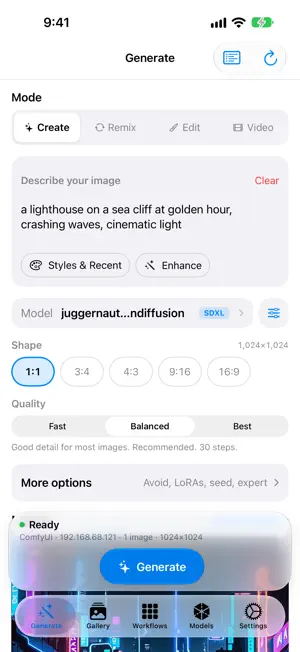
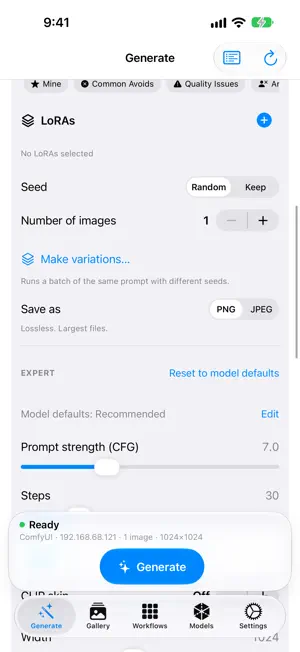
About Mobile Comfy Creator
Mobile Comfy Creator is a remote control for the AI image and video tools running on your own computer. Connect your iPhone or iPad to ComfyUI or SwarmUI on your network, or to a rented cloud GPU, and create from anywhere in your home. SET UP IN A MINUTE • Scan your Wi-Fi for ComfyUI and SwarmUI, or type an address: the app detects the server, tests the connection and shows your GPU and installed models • A built-in checklist helps when a server can't be reached • Rent a GPU on Vast.ai if you don't have one SIMPLE BY DEFAULT • Pick a mode: Create, Remix, Edit or Video • Choose a shape (1:1, 3:4, 4:3, 9:16, 16:9) sized for your model • Choose Fast, Balanced or Best quality, tuned for each model family (SDXL, FLUX, Lightning, Turbo and more) • Style, prompt history and prompt enhancement help you write better prompts • Describe an image: a vision model turns any photo into a prompt POWERFUL WHEN YOU WANT IT • More options: negative prompt, LoRAs, seed, number of images, PNG or JPEG • Expert controls: CFG, steps, sampler, scheduler and custom sizes • Your saved ComfyUI workflows, a visual node editor and batch generation, including one-tap seed variations • Browse and download models from Civitai and Hugging Face SEE EVERY RESULT • Live progress and Cancel for ComfyUI and SwarmUI, even from other tabs • Results appear right away with Share, Save to Photos, Remix and New seed • A gallery with folders, favorites and search • Optional notification when a generation finishes • Widgets, Control Center controls and a Live Activity for your latest image and generation progress • On iPad: sidebar navigation and options in an inspector YOUR DATA STAYS YOURS • Images travel directly between your device and your server • Optional iCloud sync of your images, videos, workflows, settings, servers, folders, favorites and prompts, stored in your own iCloud account Requires your own ComfyUI or SwarmUI server (on your network, over Tailscale or on a cloud GPU). The app does not generate images by itself. Terms of Use: https://gallahadd.com/legal/mobile-comfy-creator/terms Privacy Policy: https://gallahadd.com/legal/mobile-comfy-creator/privacy
What’s new
Version 1.8 · Updated October 1, 2026
More models, each with the settings it was made for — and edit photos by describing the change. New models on ComfyUI • Edit with instruction: pick a FLUX.1 Kontext model, choose a photo and type what to change ("make the sky purple, keep everything else"). No mask needed. • FLUX.2 (dev, klein 4B / 9B and klein Base) and Chroma1-HD now create, remix and edit. • Split-file models: the picker lists diffusion models next to your checkpoints, grouped by family, and sets up FLUX.1 (dev, Krea, schnell), Z-Image Turbo and Base, SD 3.5 and Qwen-Image for you. Text encoders and VAEs are found on your server automatically. • Wan 2.2 5B video: text to video and image to video on the Video screen, with the right sizes and defaults. • Each model shows whether it's ready, or exactly which file it still needs — and whether your server's GPU can run it. Per-model settings • Give any model its own steps, prompt strength, sampler, size, Avoid text, LoRAs, prompt tags and more. • They sync to your other devices through iCloud (turn off under Cloud Sync), and you can export and import them. • Better starting settings for FLUX, Z-Image, SD 3.5, SDXL Lightning / Turbo / Hyper and SD 1.5. Pony and Illustrious now use CLIP skip 2, as they were trained. A prompt assistant that knows your model • Enhance and Describe an image write tags for Illustrious, Pony and SD 1.5, plain sentences for FLUX, SD 3.5, Qwen-Image and Z-Image, and short instructions when you edit with Kontext. • Tips under the prompt and one-tap fixes in Expert when a setting doesn't suit the model. Fixes • A missing model file, text encoder or node gets one clear message before anything is sent. • LoRAs now apply to Remix and Edit on ComfyUI. • The Sampler and Scheduler lists match what your ComfyUI server offers. • The Video screen no longer asks for VideoHelperSuite when your server doesn't need it, and its Wan 2.2 pickers only offer text-to-video models. • Many smaller fixes.
App privacy
The developer, Gallahadd Software LLC, reported these privacy practices to Apple.
Data Not Collected
The developer does not collect any data from this app.
Alternatives to Mobile Comfy Creator
Looking for apps like Mobile Comfy Creator? Here are 6 similar apps on the App Store. The highest rated is Tina - Private Local AI (5.0/5), and all 6 are free to download.
-
 ComfyLink
-
 Comfy Portal
3.6
Comfy Portal
3.6
-
 Tina - Private Local AI
5.0
Tina - Private Local AI
5.0
-
 LocalMind: Ollama & LM Studio
4.7
LocalMind: Ollama & LM Studio
4.7
-
 LLM Local Client
4.4
LLM Local Client
4.4
-
 Nexus LLM
| App | Rating | Price | Last updated | Compare |
|---|---|---|---|---|
| Mobile Comfy Creator | 3.7 / 5 (3 ratings) | Free | October 1, 2026 | |
| ComfyLink | – | Free | Oct 17, 2026 | Compare |
| Comfy Portal | 3.7 / 5 (20) | Free | Aug 26, 2026 | Compare |
| Tina - Private Local AI | 5.0 / 5 (3) | Free | Oct 16, 2026 | Compare |
| LocalMind: Ollama & LM Studio | 4.7 / 5 (13) | Free | Oct 15, 2026 | Compare |
| LLM Local Client | 4.4 / 5 (9) | Free | Jul 14, 2025 | Compare |
| Nexus LLM | – | Free | Nov 3, 2024 | Compare |