

Audio Tools - Vocal Remover
泓 段 Utilities iPhoneiPadiPod touch
Audio Tools - Vocal Remover is a free Utilities app for iPhone and iPad by 泓 段. Rated 5.0/5 from 2 ratings. Requires iOS 15.0. Updated January 12, 2026.
- Rating
- 5.0
- 2 ratings
- Price
- Free
- on the App Store
- Size
- 33 MB
- Age 4+
- Updated
- Jan 12
- 2026 · v1.2.2
Screenshots
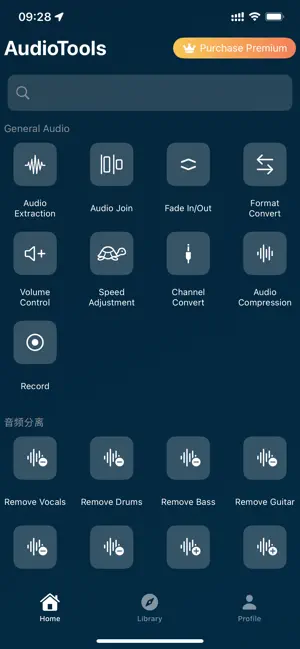
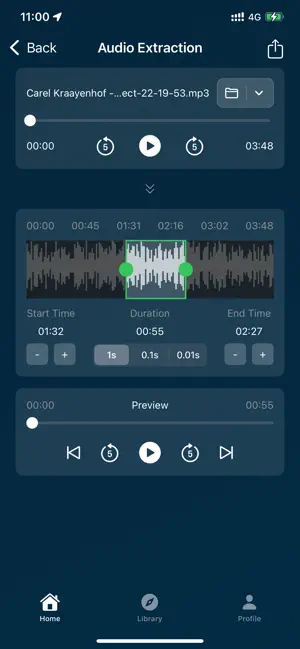
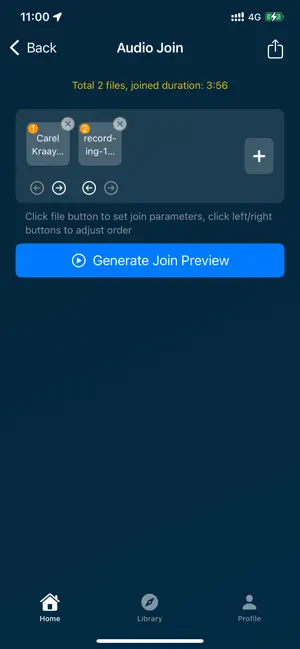
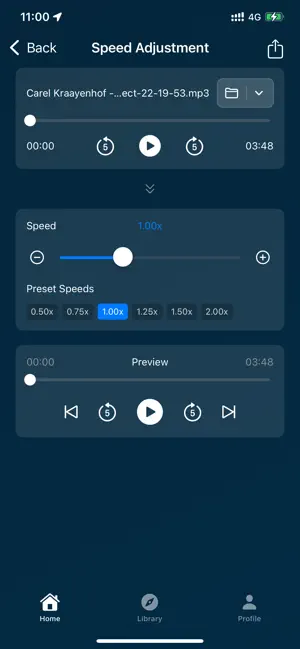
About Audio Tools - Vocal Remover
Audio Tools is a powerful, user-friendly audio editing application that integrates over 20 professional audio processing tools to meet all your needs, from basic trimming to advanced effects processing. Whether you are a podcaster, music producer, video creator, or audio enthusiast, Audio Tools provides a one-stop solution. Core Features: - Audio Trimming & Merging: Precisely trim, merge, and insert audio clips, with support for audio reversal. - Volume & Effects: Adjust volume, apply fade-in/fade-out, and add professional effects like reverb, delay, and chorus. - Format & Channel Conversion: Easily convert between audio formats (MP3, WAV, M4A, FLAC, etc.) and switch between mono and stereo channels. - Speed & Pitch Shifting: Adjust playback speed and apply fun voice-changing effects. - Audio Restoration: Automatically trim silent segments, with future support for noise reduction and vocal separation. - Specialty Tools: Extract audio from videos, apply radio effects, and generate white/pink noise. - Recording: Built-in high-quality recorder to capture inspiration on the go. Use Cases: - Podcast production and editing - Music creation and mixing - Video voice-overs and sound effects - Audiobook recording and editing - Daily audio memos and sharing Technical Advantages: - Supports a wide range of popular audio formats for import and export. - Powered by the robust FFmpeg engine for professional-quality results. - Intuitive user interface with all tools clearly accessible. - All processing is done locally on your device to protect your privacy. 【Auto-Renewable Subscription Instructions】 1. Subscription Services: Weekly subscription (1 week) and Monthly subscription (1 month). 2. Subscription Price: Subject to the information submitted in the IAP application. 3. Payment: Subscriptions are managed by the user. After confirmation of purchase, the payment will be charged to the user’s iTunes account. 4. Renewal: The Apple iTunes account will be charged within 24 hours before the end of the subscription period. Upon successful payment, the subscription will automatically renew for the next period. 5. Cancel Renewal: To cancel the subscription, open “Settings” → “iTunes & App Store” → tap “Apple ID” → “View Apple ID” → enter “Account Settings” → tap “Subscriptions”, then select the subscription and cancel it. If you do not turn off auto-renewal at least 24 hours before the end of the subscription period, the subscription will be automatically renewed. Privacy Policy: https://tapaudio.github.io//privacy/audiotools/en/ End User License Agreement (EULA): https://www.apple.com/legal/internet-services/itunes/dev/stdeula/ Feedback: For any questions, please contact us at: [email protected]
What’s new
Version 1.2.2 · Updated January 12, 2026
- 已知问题修复解决;
App privacy
The developer, 泓 段, reported these privacy practices to Apple.
Data Not Collected
The developer does not collect any data from this app.
Alternatives to Audio Tools - Vocal Remover
Looking for apps like Audio Tools - Vocal Remover? Here are 6 similar apps on the App Store. The highest rated is Vocal Remover : AI Separator (5.0/5), and all 6 are free to download.
-
 Vocal Remover : AI Separator
5.0
Vocal Remover : AI Separator
5.0
-
 Sound Enhancer - Audio Editor
4.6
Sound Enhancer - Audio Editor
4.6
-
 Audio Master - Music Editor
-
 AI Noise Reducer - Clear Sound
5.0
AI Noise Reducer - Clear Sound
5.0
-
 Audio Noise Reducer 2025
-
 Noise Reducer - Audio Cleaner
| App | Rating | Price | Last updated | Compare |
|---|---|---|---|---|
| Audio Tools - Vocal Remover | 5.0 / 5 (2 ratings) | Free | January 12, 2026 | |
| Vocal Remover : AI Separator | 5.0 / 5 (4) | Free | Sep 27, 2026 | Compare |
| Sound Enhancer - Audio Editor | 4.6 / 5 (13) | Free | Dec 8, 2025 | Compare |
| Audio Master - Music Editor | – | Free | Sep 13, 2026 | Compare |
| AI Noise Reducer - Clear Sound | 5.0 / 5 (5) | Free | Nov 6, 2025 | Compare |
| Audio Noise Reducer 2025 | – | Free | May 25, 2025 | Compare |
| Noise Reducer - Audio Cleaner | – | Free | Aug 1, 2026 | Compare |