

Zero-Friction Task Manager
Markus Hoefinger Productivity iPhoneiPadiPod touch
Zero-Friction Task Manager is a free Productivity app for iPhone and iPad by Markus Hoefinger. Requires iOS 15.1. Updated September 17, 2026.
- Price
- Free
- on the App Store
- Size
- 46 MB
- Age 4+
- Updated
- Sep 17
- 2026 · v1.9.8
Screenshots

About Zero-Friction Task Manager
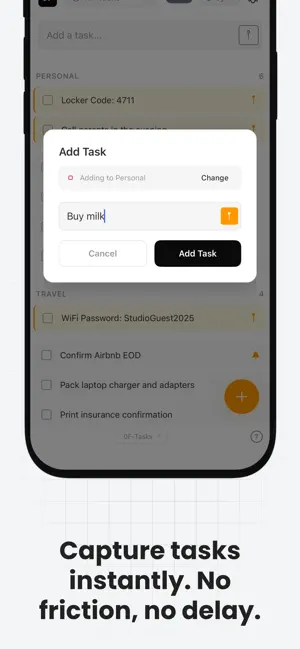
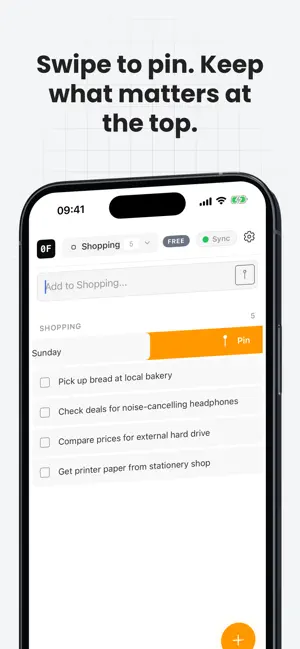
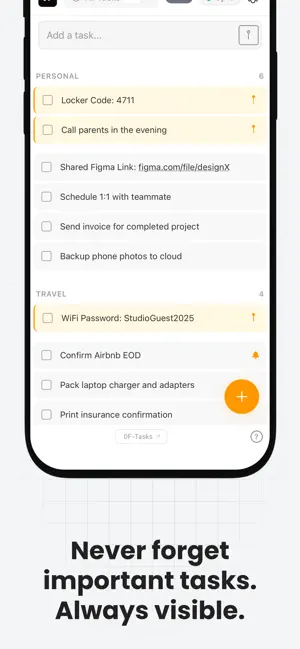
Zero-Friction Tasks is the personal task manager for busy individuals who simply want to get things done – without signing up, without a mandatory subscription, and without complexity. New: just speak your task. NEW: VOICE TASKS. SAY IT – IT BECOMES A TASK. Hands full, in the car, on the go, or cooking? Speak a short note and it lands directly in your list. There are three ways to start: • Tap the microphone in the “Add Task” bar • Press and hold the large + button • Assign the iPhone Action Button: Settings > Action Button > Shortcut > “0F Voice Task” Speak your task and tap “Done.” Recording starts immediately and stops automatically after no more than 20 seconds. Only the recognized text is saved – never the audio recording. When iOS supports on-device speech recognition, it runs directly on your iPhone, so your voice never leaves the device. NO ACCOUNT. NO EMAIL. NO PASSWORD. Download and get started in 10 seconds. No registration. No confirmation email. No password to forget. Zero-Friction Tasks respects your time from the very first second. WHY ZERO-FRICTION TASKS? Most task apps demand an account before you can even begin. Many hide essential features behind complicated plans or store your data unencrypted. Zero-Friction Tasks takes a different approach: • No account required – start in seconds with a simple sync code • Free to start – no trial and no credit card required • End-to-end encrypted (AES-256) – the server never sees your tasks in plain text • Offline mode – core functionality remains available without a connection • Real-time sync – iPhone, Android, Windows, web, and macOS FOR INDIVIDUALS, NOT TEAMS. No Kanban boards. No Gantt charts. No collaboration features. Just your tasks – fast, private, and always available. KEY FEATURES: • Voice Tasks on iPhone – speak tasks instead of typing them • Global hotkey on Windows (Alt+Space) – capture tasks without switching apps • iOS widgets for the Home Screen, Lock Screen, and Today View • Lists for work, home, shopping, and anything else • Pinned tasks – keep what matters at the top • One-time and recurring reminders • Dark Mode and offline mode • Drag-and-drop sorting Start for free. No sign-up. Your tasks, your way. Terms of Use (EULA): https://zerofriction.app/terms Privacy Policy: https://zerofriction.app/privacy
What’s new
Version 1.9.8 · Updated September 17, 2026
NEW: RECEIPT BY E-MAIL After upgrading to Pro in the app, you can now enter an e-mail address to receive your purchase confirmation together with your sync code. With it you can unlock Pro on Windows and on the web as well. You can add the address any time later under Settings > Email Receipt. Also includes voice tasks and small stability improvements.
App privacy
The developer, Markus Hoefinger, reported these privacy practices to Apple.
Data Not Linked to You
The following data, which may be collected but is not linked to your identity, may be used for the following purposes:
- Identifiers: Device ID
- Usage Data: Product Interaction, Other Usage Data
- Diagnostics: Crash Data, Performance Data, Other Diagnostic Data
- Contact Info: Email Address
- User Content: Other User Content
Used for: Analytics, Product Personalization, App Functionality
Alternatives to Zero-Friction Task Manager
Looking for apps like Zero-Friction Task Manager? Here are 6 similar apps on the App Store. The highest rated is Ember: Markdown Notes (5.0/5), and all 6 are free to download.
-
 Orgazized3 - daily planner
-
 SealTask
-
 Clarity: AI Daily Planner
-
 FlowPods: Auto Focus Tracker
-
 Ariv - Notes, PKM Second Brain
-
 Ember: Markdown Notes
5.0
Ember: Markdown Notes
5.0
| App | Rating | Price | Last updated | Compare |
|---|---|---|---|---|
| Zero-Friction Task Manager | – | Free | September 17, 2026 | |
| Orgazized3 - daily planner | – | Free | Jan 23, 2026 | Compare |
| SealTask | – | Free | Jul 10, 2026 | Compare |
| Clarity: AI Daily Planner | – | Free | Jul 8, 2026 | Compare |
| FlowPods: Auto Focus Tracker | – | Free | Mar 31, 2026 | Compare |
| Ariv - Notes, PKM Second Brain | – | Free | Jun 14, 2026 | Compare |
| Ember: Markdown Notes | 5.0 / 5 (3) | Free | Sep 15, 2026 | Compare |