
BalanceMeal
Pavel Gnatyuk Health & Fitness iPhoneiPadiPod touch
BalanceMeal is a free Health & Fitness app for iPhone and iPad by Pavel Gnatyuk. Requires iOS 26.0. Updated April 29, 2026.
- Price
- Free
- on the App Store
- Size
- 28 MB
- Age 4+
- Updated
- Apr 29
- 2026 · v1.9
Screenshots


About BalanceMeal
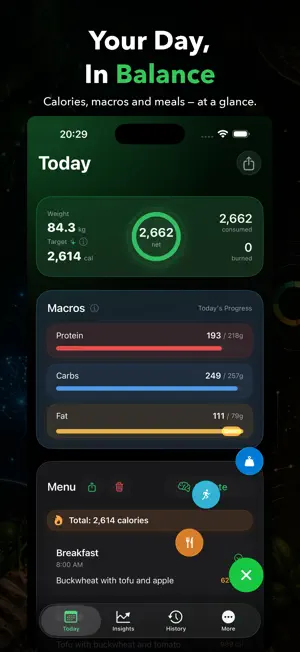
Most nutrition apps feel like a chore. You open them, tap through five screens, and still wonder if you logged that chicken breast correctly. BalanceMeal works differently. Take a photo of your meal or describe it in plain words. The AI figures out the calories, protein, carbs, and fat. No barcode scanning. No endless food database scrolling. Just eat, snap, done. The same goes for activity tracking. Screenshot from workout app - BalanceMeal identifies what you did and logs the calorie burn. Your 30-day nutrition plan is built around you specifically. A short questionnaire covers your goals, body stats, and food preferences. From that, the app generates a strategic diet plan, then breaks it into daily menus with actual recipes. Not generic advice. A concrete plan for today. Everything runs on Apple Intelligence, the on-device AI that ships with iOS 26. Your meal photos, your weight history, your body measurements - none of it ever leaves your iPhone. No backend servers. No cloud sync. No analytics. Nothing is transmitted anywhere. If you want more AI power, you can connect your own OpenAI API key. Five GPT models are available, from GPT-4o Mini to GPT-5. Your key, your account, your data. BalanceMeal is fully functional without it. What you can track: Meals - log with text, photos, or both. Get instant AI breakdown of calories and all macros. Activities - log manually or let AI read screenshots from your workout app and fill in the details. Weight - record daily weigh-ins with optional progress photos. Watch the trend over weeks. Insights - weekly charts and AI-generated recommendations based on your actual numbers. Body Fat - calculate using Navy, YMCA, or US Army methods. Pick the formula you trust. Diet Plans - personalized 30-day plans generated from your questionnaire answers. Daily Menus - specific meals for today, with recipes and AI-generated dish photos. PDF Export - share your daily report or weekly menu as a polished PDF. Photo Gallery - every meal and progress photo in one place, browsable by date. The app is built for iPhone and iPad. The design follows iOS 26 Liquid Glass guidelines throughout - smooth, native, and fast at 60fps. No third-party UI frameworks. No ads. No subscription. BalanceMeal works the moment you download it. No account required. No onboarding walls. Open the app and start logging your first meal in under a minute. Your health data is yours. It always will be.
What’s new
Version 1.9 · Updated April 29, 2026
This update is about feel. Every screen in the app has been redesigned from scratch - cleaner layouts, better spacing, sharper visual hierarchy. If something felt slightly off before, it's been fixed. Workout screenhots recognition is now significantly more accurate. We've pushed the AI harder so you log less manually. The overall experience is smoother and more consistent across iPhone and iPad.
App privacy
The developer, Pavel Gnatyuk, reported these privacy practices to Apple.
Data Not Linked to You
The following data, which may be collected but is not linked to your identity, may be used for the following purposes:
- User Content: Photos or Videos, Other User Content
Used for: App Functionality
Alternatives to BalanceMeal
Looking for apps like BalanceMeal? Here are 6 similar apps on the App Store. The highest rated is Noxa: AI Calorie Tracker (5.0/5), and all 6 are free to download.
-
 Mealens: GLP-1 Tracker
-
 Ironpad
-
 Точка Баланса - фитнес
-
 Pic 2 Calories
-
 Noxa: AI Calorie Tracker
5.0
Noxa: AI Calorie Tracker
5.0
-
 Mealgrade AI PCOS Meal Tracker
5.0
Mealgrade AI PCOS Meal Tracker
5.0
| App | Rating | Price | Last updated | Compare |
|---|---|---|---|---|
| BalanceMeal | – | Free | April 29, 2026 | |
| Mealens: GLP-1 Tracker | – | Free | Oct 6, 2026 | Compare |
| Ironpad | – | Free | Aug 25, 2026 | Compare |
| Точка Баланса - фитнес | – | Free | Aug 21, 2026 | Compare |
| Pic 2 Calories | – | Free | Oct 16, 2025 | Compare |
| Noxa: AI Calorie Tracker | 5.0 / 5 (3) | Free | Jun 30, 2026 | Compare |
| Mealgrade AI PCOS Meal Tracker | 5.0 / 5 (1) | Free | Aug 18, 2026 | Compare |
Compare BalanceMeal with the top alternatives: ratings, updates, ASO score and keyword gaps →