

ZENOVA PIZZA
Emerging Coders Food & Drink iPhoneiPadiPod touch
ZENOVA PIZZA is a free Food & Drink app for iPhone and iPad by Emerging Coders. Rated 5.0/5 from 1 ratings. Requires iOS 15.6. Updated July 30, 2026.
- Rating
- 5.0
- 1 ratings
- Price
- Free
- on the App Store
- Size
- 63 MB
- Age 4+
- Updated
- Jul 30
- 2026 · v6.1.27
Screenshots

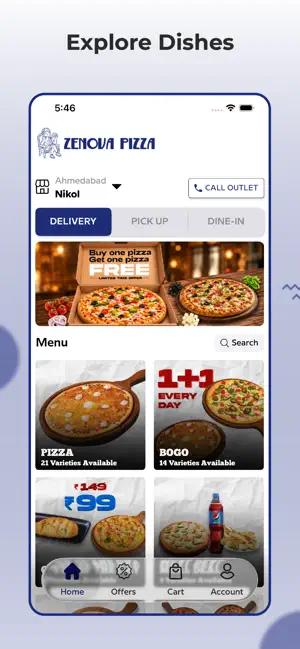
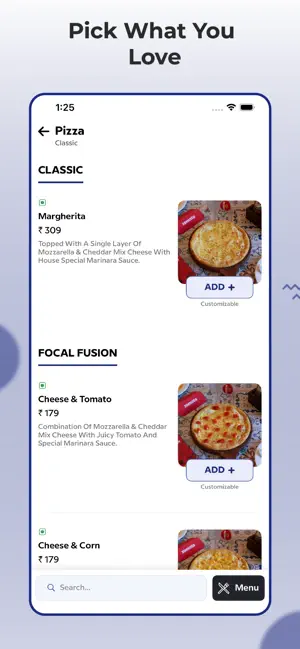

About ZENOVA PIZZA
The ZENOVA PIZZA app offers a simple and seamless ordering process: • Open the app and select your preferred order type: Delivery or Pickup or dine-in. • Browse the menu and choose from a variety of items. • Customize your items by selecting options for add-ons to make your meal exactly how you like it. • Use the search bar to find your favorite item by name and select it. • Once you've added your items, tap on View Cart to review your order. • Add any special notes or requests, and apply any coupon codes. • Proceed to checkout. • For delivery orders, enter your delivery address. • Choose your preferred payment method. • Finally, click Place Order, and your order will be confirmed and processed.
What’s new
Version 6.1.27 · Updated July 30, 2026
Bugfix and performance improvement.
App privacy
The developer, Emerging Coders, reported these privacy practices to Apple.
Data Not Collected
The developer does not collect any data from this app.
Alternatives to ZENOVA PIZZA
Looking for apps like ZENOVA PIZZA? Here are 6 similar apps on the App Store. The highest rated is Martinoz Pizza - Order Online (5.0/5), and all 6 are free to download.


| App | Rating | Price | Last updated | Compare |
|---|---|---|---|---|
| ZENOVA PIZZA | 5.0 / 5 (1 rating) | Free | July 30, 2026 | |
| Initty | – | Free | Feb 7, 2024 | Compare |
| Taranovas Pizza | – | Free | Jun 9, 2026 | Compare |
| Uboat | – | Free | Jun 15, 2026 | Compare |
| Martinoz Pizza - Order Online | 5.0 / 5 (16) | Free | Jun 26, 2026 | Compare |
| London Yard Pizza | 1.0 / 5 (1) | Free | Jun 9, 2026 | Compare |
| Poptos | – | Free | Jun 18, 2026 | Compare |
Compare ZENOVA PIZZA with the top alternatives: ratings, updates, ASO score and keyword gaps →