

Draw to Life: AI Art for Kids
NOMAD LINK Photo & Video iPhoneiPadiPod touch
Draw to Life: AI Art for Kids is a free Photo & Video app for iPhone and iPad by NOMAD LINK. Rated 5.0/5 from 3 ratings. Requires iOS 13.0.
- Rating
- 5.0
- 3 ratings
- Price
- Free
- on the App Store
- Size
- 232 MB
- Age 4+
- Updated
- Oct 11
- 2026 · v3.7.0
Screenshots



About Draw to Life: AI Art for Kids
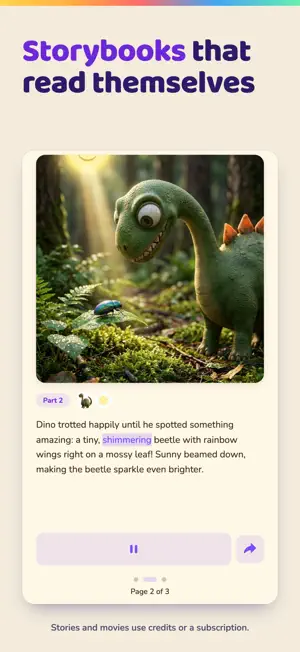
Your child draws a wobbly dragon. Seconds later it's a glossy masterpiece. Then it stars in a storybook — and Sparky reads it aloud. That's the wow moment kids ask for again and again. HOW THE MAGIC WORKS • Draw on the in-app canvas or snap a photo of a paper drawing • Pick from 6 art styles — including Exactly As Drawn, which keeps every wobbly line and simply brings it to life • Turn favorite creations into illustrated storybooks and short animated movies • Slide the before/after view to compare the original with the transformation KIDS MODE WITH SPARKY Sparky — the purple mascot with rainbow paintbrush bristles — guides little artists with spoken instructions, so even pre-readers can play independently. Kids Mode hides grown-up screens, and a quick-math parent gate protects purchases and settings. The app is available in 9 languages, with Sparky's voice guidance in 8. LEARN & PLAY: 8 GAMES IN ONE HUB • Learn to Draw — 15 step-by-step tutorials, from cats to robots • Drawing Puzzles — 28 jigsaw puzzles with three difficulty levels • Trace It! — letters, numbers, Hiragana, Katakana and basic Chinese characters, each spoken aloud • Sort It! — drag-and-drop sorting through animals, everyday things and the outdoors • What's Next? — 150 pattern puzzles across 5 themed packs • I Spy — 10 hidden-object scenes • Pop the Bubbles — fast, giggly tap-to-pop rounds • Sparky's Splash Dash — an ocean runner with power-ups and an unlockable underwater Deep Dive level Seasonal events bring themed challenges and collectible badges to the hub. STORIES THAT READ THEMSELVES Characters from your child's art star in multi-part storybooks. Choose a story idea by listening, then watch the words light up karaoke-style as Sparky narrates — and tap any word to hear it again, a sneaky little reading boost. Stories continue part after part, and creations generate in the background with progress shown in a notification, so kids never have to stare at a spinner. BUILT FOR PARENTS TOO The Parent Dashboard shows each child's week at a glance: creations, screen time and a recent-activity feed with thumbnails. Add up to 10 child profiles, each with its own gallery, streaks, achievements and sticker collection — plus a My Rewards screen kids can visit in Kids Mode. SAFE BY DESIGN • No ads, no chat, no social features • Creations stay private to your family account • Parent gate protects purchases and settings in Kids Mode • Gentle, age-appropriate experience for ages 3–10 FREE TO START Try one creation instantly, no account needed. One guest image creation per device. Enjoy free play across the games hub: starter puzzles, daily bubble rounds, I Spy scenes, tutorials and game packs. Trace It! and Splash Dash are included at no cost, with no limits. PREMIUM Go further with a subscription: Monthly $9.99 (40 credits per month) or Yearly $79.99 (500 credits per year). 1 credit = 1 artwork or story part; movies use 5 credits. Unused monthly credits roll over, and credit packs start at $3.99. Eligible new subscribers can start a 3-day free trial on the monthly plan; it auto-renews at $9.99/month unless cancelled at least 24 hours before the trial ends. Manage or cancel anytime in your App Store account settings. Privacy Policy: https://draw-to-life.com/privacy Terms of Use (EULA): https://www.apple.com/legal/internet-services/itunes/dev/stdeula/ Grab the crayons — Sparky can't wait to see what your family draws today.
What’s new
Version 3.7.0 · Updated October 11, 2026
A new home for parents The parent side is rebuilt around five tabs: Today, Album, your child's face, Rules and Account. Today shows your child's latest picture and how their week of play went. Album keeps every creation and filters by child. Open any picture to save, share or print it, or to turn it into a movie. Kids Mode rules for each child In Rules, choose each child's play time each day, a rest after bedtime, a reading level, the places they can open and whether Sparky talks to them. When play time runs out, a goodnight screen ends the session gently. To hand over the phone, tap your child's face in the middle of the bar. A new Kids Mode Your child moves along Sparky's path between four places by tapping or swiping: Studio to draw or photograph a picture, My Wall for everything they've made, Playground for games and drawing lessons, and Story Tree for their storybooks. They draw on a canvas made for small hands, pick a style by its picture, and rub the screen to reveal what their drawing became. Grown-ups stay in charge To leave Kids Mode, press and hold the lock, then type the number shown in words. That opens the Grown-up zone, and play pauses while you're there. In Kids Mode, a grown-up now approves every movie before it's made. Plans & credits on Today Your credits and your plan now sit on one row on Today. Tap it to compare plans and credit packs, or buy a pack right there. On Starter? You can switch to Plus from the same place. Night mode on every screen Night mode (Account → This phone) now darkens the whole app, and text everywhere is easier to read, by day and by night. Also in this update • Every new drawing keeps your child's streak going, whether it was drawn in the app, photographed from paper or saved from a drawing lesson • Sparky has a fresh look and waves when you tap him on the home screen • Every style example now shows the same baby dragon, and three styles have clearer names: 3D movie, Anime and Just like mine • Stories are read aloud in Sparky's voice at the speed you chose, in Night mode too • My Wall has a "Make a Movie!" tile for the next movie • After you buy a credit pack, your new balance shows within seconds • Clearer messages when a purchase doesn't go through, and a purchase waiting for a parent's approval no longer shows as failed • Add as many children as you like
App privacy
The developer, NOMAD LINK, reported these privacy practices to Apple.
Data Not Collected
The developer does not collect any data from this app.
Alternatives to Draw to Life: AI Art for Kids
Looking for apps like Draw to Life: AI Art for Kids? Here are 6 similar apps on the App Store. The highest rated is Fridge2Frame (5.0/5), and 5 of the 6 are free to download.
-
 Kids Sketch AI: Drawing to Art
4.3
-
 DrawToLife : AI animate
-
 Chanimate - Kids Drawing Magic
-
 Gimba: Animate Your Drawings
-
 Fridge2Frame
5.0
-
 Levende: Drawings That Dance
| App | Rating | Price | Last updated | Compare |
|---|---|---|---|---|
| Draw to Life: AI Art for Kids | 5.0 / 5 (3 ratings) | Free | October 11, 2026 | |
| Kids Sketch AI: Drawing to Art | 4.3 / 5 (15) | Free | Jul 15, 2025 | Compare |
| DrawToLife : AI animate | – | Free | Mar 19, 2026 | Compare |
| Chanimate - Kids Drawing Magic | – | Free | Jan 20, 2026 | Compare |
| Gimba: Animate Your Drawings | – | Free | Jul 4, 2026 | Compare |
| Fridge2Frame | 5.0 / 5 (1) | Free | Aug 21, 2026 | Compare |
| Levende: Drawings That Dance | – | 1.99 USD | Oct 22, 2026 | Compare |