

Vidion: AI Video Editor
Mobile Ocean Graphics & Design iPhoneiPadiPod touch
Vidion: AI Video Editor is a free Graphics & Design app for iPhone and iPad by Mobile Ocean. Requires iOS 13.0. Updated October 28, 2025.
- Price
- Free
- on the App Store
- Size
- 120 MB
- Age 4+
- Updated
- Oct 28
- 2025 · v1.1
Screenshots

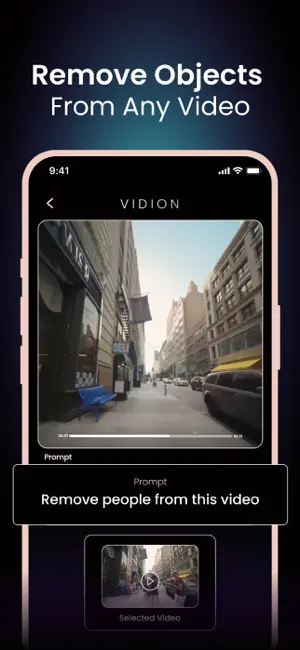

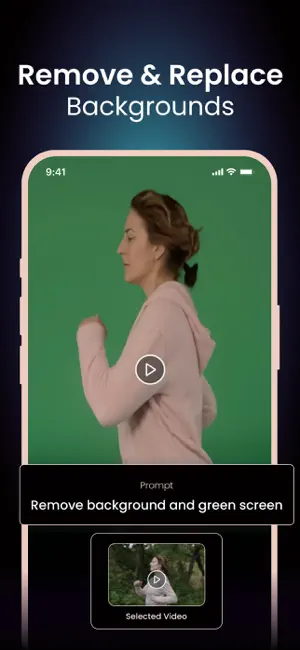
About Vidion: AI Video Editor
Transform your videos with AI. Vidion makes editing as simple as typing a text prompt. Change backgrounds, restyle in anime or cinematic looks, remove text or watermarks, resize, and more. No complex tools, no learning curve – just instant edits with Runway Aleph. Whether for social media, creative projects, or professional use, Vidion gives you the power to create in seconds. Key Features - AI Edit Video – Edit videos using smart AI prompts. - Background Changer – Remove, replace, or green screen video backgrounds. - Restyle with AI – Transform your videos into anime style, cinematic effects, or unique looks. - Remove Objects & Text – Clean up your videos by erasing unwanted parts. - Resize & Format – Change video ratio, resolution, and format for any platform. - Video Speed Control – Adjust speed for slow motion or fast cuts. - Video Watermark Remover – Instantly remove watermarks with AI precision. - Video Inpainting – Recreate missing or damaged parts of your footage. How to Use 1- Upload your video or image. 2- Enter a text prompt or choose from editing options. 3- Generate and share your video instantly. Why Vidion? Vidion combines cutting-edge AI editing with Runway Aleph technology, giving you professional-level ai video editing tools without complexity. Create Reels, Stories, or polished edits in seconds. Support: [email protected] About Subscriptions and Terms of Use: - For Unlimited Features of Vidion AI Video Generator, some Premium subscriptions are needed. - Payment will be made from your iTunes account after you confirm the purchase. - Subscriptions will auto-renew at the end of each term if it is not canceled 24 hours before the end of the purchasing term. - The user can manage subscriptions. Auto-renew can be turned off from iTunes account settings. - You can cancel your subscriptions by entering: http://support.apple.com/en-us/HT202039 - Privacy Policy: https://sites.google.com/view/vidionai/privacy-policy - Terms of Use: https://sites.google.com/view/vidionai/terms-of-use
What’s new
Version 1.1 · Updated October 28, 2025
-> Minor bug fixes and performance improvements.
App privacy
The developer, Mobile Ocean, reported these privacy practices to Apple.
Data Used to Track You
The following data may be used to track you across apps and websites owned by other companies:
- Identifiers: User ID, Device ID
Data Linked to You
The following data, which may be collected and linked to your identity, may be used for the following purposes:
- Identifiers: User ID, Device ID
Used for: Product Personalization, App Functionality
Data Not Linked to You
The following data, which may be collected but is not linked to your identity, may be used for the following purposes:
- Location: Coarse Location
- Usage Data: Product Interaction, Other Usage Data
- Diagnostics: Crash Data, Performance Data
- Other Data: Other Data Types
Used for: Analytics
Alternatives to Vidion: AI Video Editor
Looking for apps like Vidion: AI Video Editor? Here are 6 similar apps on the App Store. The highest rated is Sofina AI - Video Generator (5.0/5), and all 6 are free to download.
-
 Videl - AI Video Generator
3.7
-
 AI Video Generator: Funderated
4.2
-
 Sofina AI - Video Generator
5.0
-
 Vynora: Video & Photo
4.2
-
 PixelMint – AI Photo Magic
4.0
-
 PixMove: AI Video Generator
4.6
| App | Rating | Price | Last updated | Compare |
|---|---|---|---|---|
| Vidion: AI Video Editor | – | Free | October 28, 2025 | |
| Videl - AI Video Generator | 3.7 / 5 (48) | Free | Jun 13, 2025 | Compare |
| AI Video Generator: Funderated | 4.2 / 5 (34) | Free | May 2, 2026 | Compare |
| Sofina AI - Video Generator | 5.0 / 5 (4) | Free | Jul 20, 2026 | Compare |
| Vynora: Video & Photo | 4.3 / 5 (8) | Free | Oct 8, 2026 | Compare |
| PixelMint – AI Photo Magic | 4.0 / 5 (43) | Free | Oct 30, 2026 | Compare |
| PixMove: AI Video Generator | 4.6 / 5 (347) | Free | Oct 21, 2026 | Compare |