

FlyCharts - Sim Flight Planner
Appeed Navigation iPhoneiPadiPod touchMac
FlyCharts - Sim Flight Planner is a free Navigation app for iPhone and iPad by Appeed. Rated 4.9/5 from 7 ratings. Requires iOS 15.0.
- Rating
- 4.9
- 7 ratings
- Price
- Free
- on the App Store
- Size
- 19 MB
- Age 4+
- Updated
- Oct 7
- 2026 · v26.4.1
Screenshots

About FlyCharts - Sim Flight Planner
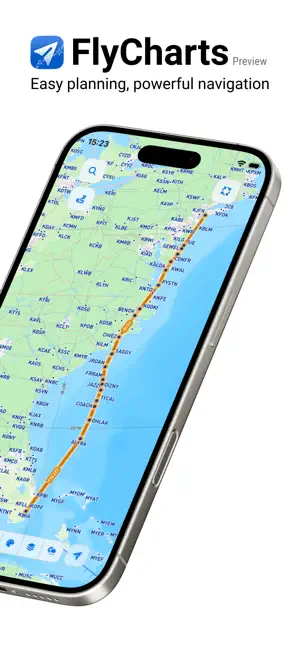
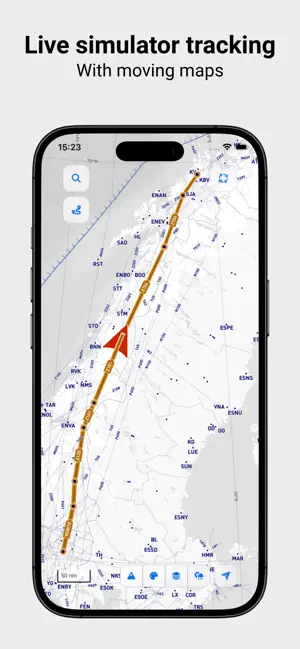
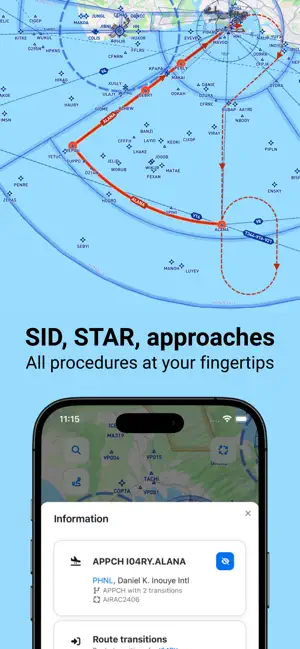
FlyCharts is a powerful yet easy-to-use flight planner and navigation app built for flight simulation. Compatible with Flight Simulator (MSFS), Prepare 3D, Aerofly FS and X-Plane, it gives sim pilots realistic flight planning tools, global aviation charts, accurate aircraft performance data, and live simulator tracking with moving map. From VFR to IFR flight planning, FlyCharts helps you to plan and flight with accuracy and confidence. Advanced Flight Planning - Flight plan generator with advanced route finder - Manually add or remove waypoints and procedures from the flight plan - 80+ aircraft available, from general aviation to airliners - Flight profile with aircraft performance-based navigation - Accurate fuel planning with realistic consumption models - Oceanic tracks (NAT & PACOTS) for long-haul - Seamless flight plan export to supported simulators Live Navigation - Global navigation maps and enroute charts - SID, STAR and approaches procedures - Detailed airport charts worldwide - Live simulator tracking with moving map - Real-time weather map overlays Coming Soon - Integrated flight logbook - More aircraft, charts, and advanced planning tool Whether you fly short VFR hops or long-haul IFR routes, FlyCharts is your all-in-one flight planning companion for flight simulation.
Ratings & reviews
4.9
7 ratings
What’s new
Version 26.4.1 · Updated October 7, 2026
FlyCharts 26.4.1 improves route editing with highlighted waypoints, quick access to map actions (right-click) and easier route modifications on mobile devices (touch and hold). Improved colors in dark mode make the map easier to read, while smoother panel animations make navigation more comfortable. Flight plans can now be exported in GeoFS JSON format. Features: - Selected waypoints are now highlighted on the map - Touch and hold (or right-click) on a map item opens its menu for available actions and for route editing - On mobile devices, information panel opens while keeping the corresponding item visible on the map - Map in dark mode has more readable colors and improved contrast for better visibility - Smoother animations when opening and closing panels - Flight plans can now be exported in GeoFS JSON format Bugfixes: - Button for inserting waypoint in the flight plan now insert at the best position - Faster and smoother live simulator tracking on mobile devices with reduced computational load
App privacy
The developer, Appeed, reported these privacy practices to Apple.
Data Not Linked to You
The following data, which may be collected but is not linked to your identity, may be used for the following purposes:
- Usage Data: Product Interaction
Used for: Analytics
Alternatives to FlyCharts - Sim Flight Planner
Looking for apps like FlyCharts - Sim Flight Planner? Here are 6 similar apps on the App Store. The highest rated is Waypoint — Live Flight Map (5.0/5), and all 6 are free to download.
-
 Loxim: Sim Tracker & Flights
3.9
-
 Waypoint — Live Flight Map
5.0
-
 AeroPointer: Aviation Weather
4.6
-
 Navigraph Charts
4.9
-
 Approach Charts
2.0
-
 EYEVIONICS
3.0
| App | Rating | Price | Last updated | Compare |
|---|---|---|---|---|
| FlyCharts - Sim Flight Planner | 4.9 / 5 (7 ratings) | Free | October 7, 2026 | |
| Loxim: Sim Tracker & Flights | 3.9 / 5 (36) | Free | Oct 28, 2026 | Compare |
| Waypoint — Live Flight Map | 5.0 / 5 (10) | Free | Oct 15, 2026 | Compare |
| AeroPointer: Aviation Weather | 4.6 / 5 (98) | Free | Oct 25, 2026 | Compare |
| Navigraph Charts | 4.9 / 5 (2,814) | Free | Oct 19, 2026 | Compare |
| Approach Charts | 2.0 / 5 (5) | Free | Aug 19, 2026 | Compare |
| EYEVIONICS | 3.0 / 5 (4) | Free | Jan 11, 2025 | Compare |