

Sign PDF - Scan & Fill
Adrian Amor Utilities iPhoneiPadiPod touch
Sign PDF - Scan & Fill is a free Utilities app for iPhone and iPad by Adrian Amor. Rated 5.0/5 from 51 ratings. Requires iOS 16.0. Updated May 26, 2026.
- Rating
- 5.0
- 51 ratings
- Price
- Free
- on the App Store
- Size
- 7 MB
- Age 4+
- Updated
- May 26
- 2026 · v1.0.2
Screenshots


About Sign PDF - Scan & Fill
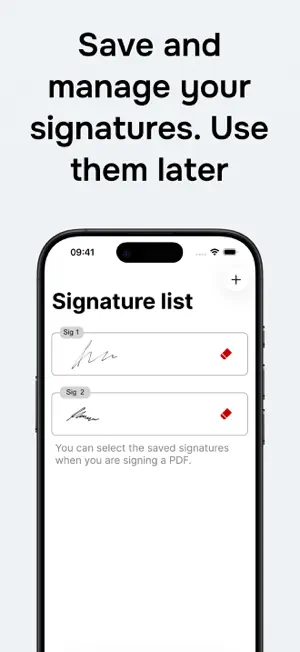
Sign PDF helps you scan, sign and complete PDF documents on your iPhone quickly and easily. Scan a paper document with your iPhone camera or open a PDF, add your handwritten signature, type text into blank spaces, place dates, then save or share the final document in just a few steps. Main features: - Scan paper documents and turn them into PDFs. - Sign PDF documents from your iPhone. - Add text over a PDF to complete simple forms. - Add today's date to a document. - Choose fonts and colours for text and dates. - Move and adjust each signature, text item or date before confirming it. - Create handwritten signatures with your finger. - Save signatures and reuse them in future documents. - Save the completed PDF or share it with other apps. - Access recent documents from a local history. - Search, rename, open and share recent PDFs. - Work without creating an account. Useful for contracts, authorisations, forms, work documents, school documents, receipts and paperwork you need to scan, complete or sign from your phone. The app is focused on one job: scanning, signing and completing PDFs fast. No complicated PDF editor to learn. Scan or choose the document, add what you need, sign it and save it.
Ratings & reviews
5.0
51 ratings
What’s new
Version 1.0.2 · Updated May 26, 2026
New document scanner to create PDFs with your iPhone camera. We also added recent documents with local history, search, renaming and quick access to open or share saved PDFs. The editor improves text and date placement with fonts, colours and more precise controls.
App privacy
The developer, Adrian Amor, reported these privacy practices to Apple.
Data Not Linked to You
The following data, which may be collected but is not linked to your identity, may be used for the following purposes:
- Usage Data: Product Interaction
- Diagnostics: Crash Data, Performance Data
Used for: Analytics, App Functionality
Alternatives to Sign PDF - Scan & Fill
Looking for apps like Sign PDF - Scan & Fill? Here are 6 similar apps on the App Store. The highest rated is Sign PDF: Editor & Certificate (4.9/5), and all 6 are free to download.
-
 Sign PDF: Editor & Certificate
4.9
Sign PDF: Editor & Certificate
4.9
-
 PDF Editor - Read & Edit PDF
4.3
PDF Editor - Read & Edit PDF
4.3
-
 Signature Creator - SigPDF
4.5
Signature Creator - SigPDF
4.5
-
 Signature Maker & Docs Signer
-
 PDF editor, sign, fill
-
 eSign — PDF Documents Filler.
4.0
eSign — PDF Documents Filler.
4.0
| App | Rating | Price | Last updated | Compare |
|---|---|---|---|---|
| Sign PDF - Scan & Fill | 5.0 / 5 (51 ratings) | Free | May 26, 2026 | |
| Sign PDF: Editor & Certificate | 4.9 / 5 (18) | Free | Oct 7, 2026 | Compare |
| PDF Editor - Read & Edit PDF | 4.3 / 5 (189) | Free | Sep 11, 2026 | Compare |
| Signature Creator - SigPDF | 4.5 / 5 (22) | Free | Aug 11, 2026 | Compare |
| Signature Maker & Docs Signer | – | Free | Mar 16, 2026 | Compare |
| PDF editor, sign, fill | – | Free | Jul 26, 2025 | Compare |
| eSign — PDF Documents Filler. | 4.0 / 5 (30) | Free | Jul 22, 2026 | Compare |