

Custom Unit Converter - MyUnit
Tsuyoshi Ninomiya Education iPhoneiPadiPod touch
Custom Unit Converter - MyUnit is a free Education app for iPhone and iPad by Tsuyoshi Ninomiya. Requires iOS 16.2. Updated October 16, 2026.
- Price
- Free
- on the App Store
- Size
- 12 MB
- Age 4+
- Updated
- Oct 16
- 2026 · v4.4
Screenshots


About Custom Unit Converter - MyUnit
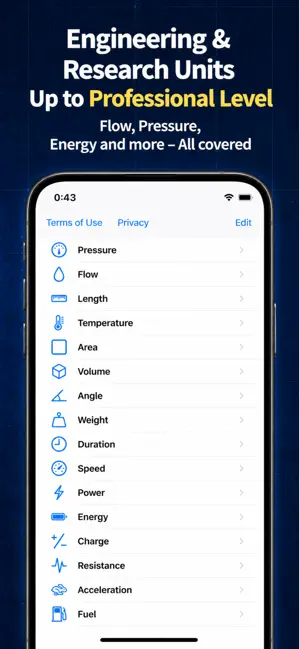
MyUnit is a flexible unit conversion app that lets you freely add your own categories and units. In addition to standard conversions such as length, area, volume, temperature, weight, and speed, MyUnit also supports specialized units used in engineering, science, research, and business, including flow rate, pressure, vacuum, energy, power, force, resistance, frequency, and more. Many unit conversion apps only support pre-installed units. This can be inconvenient when the unit you need is missing or when the app does not fit your workflow. MyUnit solves this by allowing you to create your own categories and add the units you need. For example, you can create categories such as Pressure, Flow Rate, Temperature, or Vacuum, and register units such as Pa, psi, sccm, slpm, Torr, and more. MyUnit also supports multi-step calculations. In addition to simple multiplication-based conversion, you can create flexible conversion rules using ×, ÷, +, −, and ^. This makes it easier to handle conversions that cannot be expressed with only one simple factor. If you often calculate special formulas manually, MyUnit can help you save time. With this update, MyUnit now supports CSV export. You can export registered categories, units, and conversion data in CSV format. This makes it easier to check, organize, record, and share the data you created in the app. CSV export is useful for reviewing unit lists in spreadsheet software, organizing conversion rules, keeping research or work records, sharing data, and creating documents. Main Features 1. Add categories and units freely Create your own categories and register the units you need. 2. Multi-step calculations Create custom conversion rules using ×, ÷, +, −, and ^. 3. CSV export Export registered categories, units, and conversion data as CSV files. 4. Automatic conversion Enter one value and other units in the same category are automatically calculated. 5. Easy copy operation Copy conversion results quickly for reports, notes, emails, documents, and spreadsheets. 6. Rearrange categories and units Place frequently used categories and units at the top for faster access. 7. Useful for technical fields Suitable for engineering, science, research, experiments, design, development, evaluation, maintenance, and on-site checks. 8. Useful for everyday conversion Also convenient for daily conversions such as length, temperature, weight, volume, area, and speed. Recommended For ・People who want to add their own categories and units ・People who handle engineering, scientific, or technical units ・Researchers, students, engineers, technicians, and developers ・People who check overseas specifications or technical documents ・People who want to manage conversion data with CSV files Use Cases Students and researchers Useful for assignments, reports, experiments, research data, and unit conversion records. Engineers and technicians Useful for checking flow rate, pressure, vacuum, power, energy, equipment specifications, sensor specifications, and design values. Data management and sharing Export categories, units, and conversion data as CSV files and use them in spreadsheet software for review, records, and sharing. Supported Category Examples Temperature, length, area, volume, angle, weight, time, speed, power, energy, electric charge, frequency, data transfer rate, electric current, resistance, acceleration, force, flow rate, pressure, and more. Why Choose MyUnit ・Create your own categories ・Use ×, ÷, +, −, and ^ ・Export data in CSV format ・Automatically convert multiple units at once ・Rearrange categories and units ・Useful for work, research, study, and daily life MyUnit is not just a unit conversion app. It lets you customize categories, units, and conversion rules to match your needs. Premium Features ・Ad-free experience Terms of Use:https://www.apple.com/legal/internet-services/itunes/dev/stdeula/ Privacy Policy:http://244div.com/privacy-policy/
What’s new
Version 4.4 · Updated October 16, 2026
Version 4.4 improves conversion accuracy and usability. • Reviewed built-in unit conversion formulas to improve accuracy. • Watch one video ad to unlock advanced operations until you save the unit or finish editing. • Improved Premium subscription status and expiration checks. • Added Spanish (Mexico) support and improved localization.
App privacy
The developer, Tsuyoshi Ninomiya, reported these privacy practices to Apple.
Data Used to Track You
The following data may be used to track you across apps and websites owned by other companies:
- Purchases: Purchase History
Data Not Linked to You
The following data, which may be collected but is not linked to your identity, may be used for the following purposes:
- Purchases: Purchase History
- Usage Data: Advertising Data
Used for: Third-Party Advertising, Analytics
Alternatives to Custom Unit Converter - MyUnit
Looking for apps like Custom Unit Converter - MyUnit? Here are 6 similar apps on the App Store. The highest rated is PhysicsCalc - 126 Formulas (5.0/5), and 5 of the 6 are free to download.
-
 Unit Conveyor
-
 AR Japanese Tracing
-
 ビール知識検定対策 3級向け(非公式)
-
 サクッと第一種電気工事士1問1答【サクトレ】
-
 PhysicsCalc - 126 Formulas
5.0
PhysicsCalc - 126 Formulas
5.0
-
 KujiraTimer
5.0
KujiraTimer
5.0
| App | Rating | Price | Last updated | Compare |
|---|---|---|---|---|
| Custom Unit Converter - MyUnit | – | Free | October 16, 2026 | |
| Unit Conveyor | – | Free | Oct 15, 2026 | Compare |
| AR Japanese Tracing | – | Free | Oct 18, 2026 | Compare |
| ビール知識検定対策 3級向け(非公式) | – | Free | Oct 21, 2026 | Compare |
| サクッと第一種電気工事士1問1答【サクトレ】 | – | Free | May 15, 2026 | Compare |
| PhysicsCalc - 126 Formulas | 5.0 / 5 (1) | 19.99 USD | Jul 29, 2026 | Compare |
| KujiraTimer | 5.0 / 5 (1) | Free | Jan 7, 2026 | Compare |