

Document scan&scanner app
皓博 杨 Productivity iPhoneiPadiPod touch
Document scan&scanner app is a free Productivity app for iPhone and iPad by 皓博 杨. Requires iOS 18.6. Updated August 28, 2026.
- Price
- Free
- on the App Store
- Size
- 70 MB
- Age 4+
- Updated
- Aug 28
- 2026 · v1.4.1
Screenshots


About Document scan&scanner app
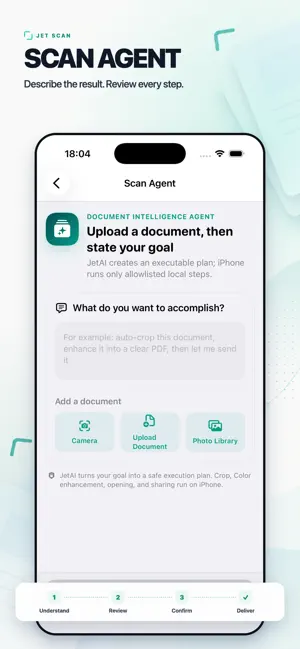
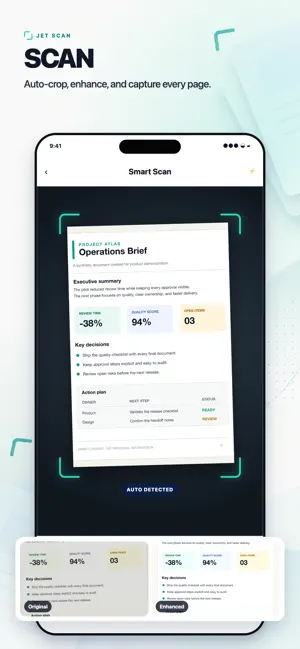
The all-in-one Document Scanner & PDF Maker that turns your iPhone into a fast, clear, and reliable portable scanner. Scan documents, photos, receipts, invoices, IDs, books, whiteboards, and more — then convert them into high-quality PDF or JPG files within seconds. Whether you’re a student, professional, remote worker, or simply need to scan something on the go, this app gives you clean results, accurate text, and powerful PDF editing tools, all in one lightweight and easy-to-use app. Powerful Scanning Features • Auto edge detection for clean, accurate scans • Smart enhancement filters for crystal-clear documents • Multi-page scanning for books, contracts, or large files • Convert any photo to PDF instantly • Save in PDF or JPG with adjustable quality Advanced PDF Tools • Merge, split, reorder, or delete PDF pages • Add signatures, notes, or markup • Fill in forms or sign documents • Add watermarks or text • Create professional-looking PDFs with ease OCR Text Recognition Extract text from documents and copy or edit it. Perfect for notes, business cards, forms, and printed materials. Organize & Share • Batch scan multiple pages • Create folders or secure private documents • Sync to cloud storage • Share via email, messaging apps, or exported PDFs This scanner app is built for speed, clarity, and convenience — turning your everyday documents into high-quality digital files you can use anywhere. Terms of Use (EULA): https://www.apple.com/legal/internet-services/itunes/dev/stdeula/
What’s new
Version 1.4.1 · Updated August 28, 2026
Version 1.4.1 Thanks for scanning with us! This release brings a sharper, faster, and lighter experience: • Ask your scans anything — chat with any PDF or image to pull answers in seconds. • Search across every scanned document and find text instantly, no more scrolling page by page. • Faster auto edge detection and smarter enhancement filters for crystal-clear results in one tap. • On-device storage by default, so your scans stay private until you choose to share. • Smoother multi-page scanning, batch capture, and more reliable PDF merges and reorders. • Smaller, lighter app footprint — scan, search, and ask without the bloat. Have feedback or feature requests? We'd love to hear from you inside the app. Happy scanning!
App privacy
The developer, 皓博 杨, reported these privacy practices to Apple.
Data Not Collected
The developer does not collect any data from this app.
Alternatives to Document scan&scanner app
Looking for apps like Document scan&scanner app? Here are 6 similar apps on the App Store.
-
 Scan to PDF: Sign & Redact
-
 PDF Scanner and Editor +
-
 Scanner PDF: Doc Scan & OCR
-
 PDF Scanner and Editor ..
-
 PDF Scanner and Editor +.
-
 FilePro - Image to PDF Tool
| App | Rating | Price | Last updated | Compare |
|---|---|---|---|---|
| Document scan&scanner app | – | Free | August 28, 2026 | |
| Scan to PDF: Sign & Redact | – | Free | Jul 7, 2026 | Compare |
| PDF Scanner and Editor + | – | Free | Oct 15, 2026 | Compare |
| Scanner PDF: Doc Scan & OCR | – | Free | Sep 14, 2026 | Compare |
| PDF Scanner and Editor .. | – | Free | Aug 17, 2026 | Compare |
| PDF Scanner and Editor +. | – | Free | Aug 24, 2026 | Compare |
| FilePro - Image to PDF Tool | – | Free | Jan 19, 2026 | Compare |