

HB Code: Remote Coding Agent
helpful bits GmbH Developer Tools iPhoneiPadiPod touch
HB Code: Remote Coding Agent is a free Developer Tools app for iPhone and iPad by helpful bits GmbH. Requires iOS 18.0. Updated October 12, 2026.
- Price
- Free
- on the App Store
- Size
- 77 MB
- Age 4+
- Updated
- Oct 12
- 2026 · v1.8
Screenshots

About HB Code: Remote Coding Agent
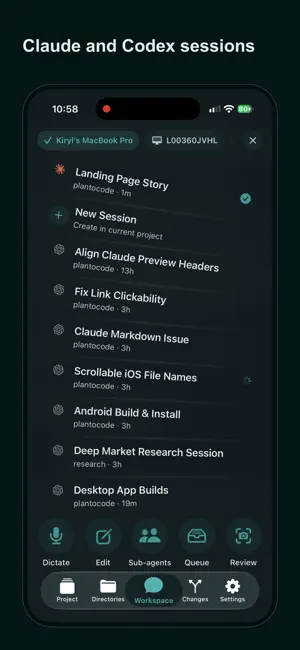
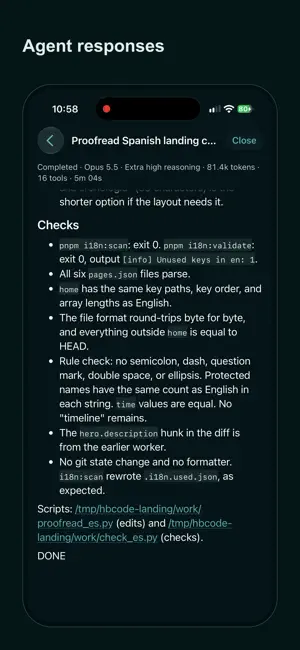
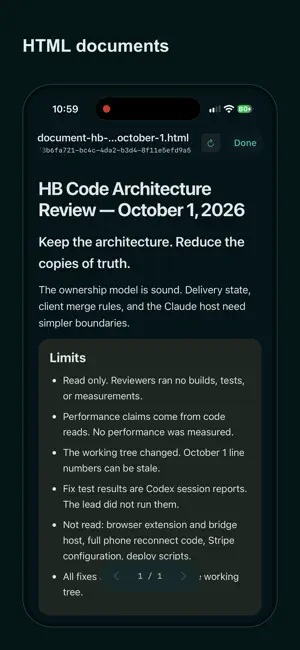
Follow and steer Claude Code and Codex from your iPhone. HB Code connects to HB Code Desktop on your computer. Your desktop runs the coding agent and does the work. Your iPhone shows the same session, live, and sends your next message. What sets HB Code apart: - Two agents, one app. Pick Claude Code or Codex when you create a session. - Every step opens. Tap a command, command output, file read, file change, diff, or tool call and see exactly what the agent ran, read, or changed. Sub-agent threads are included. - Your own desktop does the work. HB Code Desktop runs on Mac and Windows. Claude Code and Codex sessions run on both. Open HB Code Desktop and enable Mobile access. Then add a project, create a session, and send instructions from your iPhone. Continue the same work in either app. What you can do on iPhone: - Pick a project and session on your desktop - Add a project from a folder on the connected desktop - Create a Claude Code or Codex session, or open an existing one - Follow the session live while the agent works - Send a message, or queue a follow-up while the agent is busy - Dictate a message instead of typing it - Pick the model and reasoning settings for supported sessions - Browse project files on your desktop - Open write-ups with diagrams, Markdown, media, and file previews - Play spoken walkthroughs as audio - Review git changes and diffs - Get an alert when the agent finishes, and open the matching session from it - See the reconnect state when your desktop or network changes How it works: 1. Install and open HB Code Desktop from https://www.hbcode.ai/downloads on your Mac or Windows PC. 2. Sign in on desktop and iPhone with the same account and region. On desktop, enable Mobile access. 3. Pick your desktop in the iPhone app. Add or select a project, then create or open a session. 4. Work in either app and continue the same project and session on the other. Your desktop runs the agent and every command. Your files stay on your desktop. Your iPhone sends your requests through the authenticated HB Code relay. It doesn't run a second agent or stream your screen. Codex sessions use your own ChatGPT subscription, through OpenAI's Codex App Server. Claude Code sessions use your own Claude account. HB Code doesn't sell or include Codex or Claude access. Spoken walkthroughs use your own Gemini API key. Requirements: - HB Code Desktop on your Mac or Windows PC - An internet connection for your account and the relay Review generated changes and AI output before you use them. HB Code is an independent app and is not affiliated with Anthropic or OpenAI. Claude Code is a trademark of Anthropic. Codex is a trademark of OpenAI. Terms of Service: https://www.hbcode.ai/terms Privacy Policy: https://www.hbcode.ai/privacy
What’s new
Version 1.8 · Updated October 12, 2026
This version adds Claude Code: pick Claude Code or Codex when you create a session, then follow every step and steer it from your iPhone. Claude Code sessions run in HB Code Desktop for Mac and Windows.
App privacy
The developer, helpful bits GmbH, reported these privacy practices to Apple.
Data Used to Track You
The following data may be used to track you across apps and websites owned by other companies:
- Purchases: Purchase History
- Identifiers: User ID
Data Linked to You
The following data, which may be collected and linked to your identity, may be used for the following purposes:
- Purchases: Purchase History
- Identifiers: User ID, Device ID
- Location: Coarse Location
- Contact Info: Email Address, Name
- User Content: Photos or Videos, Audio Data, Other User Content
- Other Data: Other Data Types
Used for: Developer’s Advertising or Marketing, Analytics, App Functionality
Data Not Linked to You
The following data, which may be collected but is not linked to your identity, may be used for the following purposes:
- Usage Data: Product Interaction
- Diagnostics: Performance Data
Used for: Analytics, App Functionality
Alternatives to HB Code: Remote Coding Agent
Looking for apps like HB Code: Remote Coding Agent? Here are 6 similar apps on the App Store. The highest rated is MiniVibe (5.0/5), and all 6 are free to download.


| App | Rating | Price | Last updated | Compare |
|---|---|---|---|---|
| HB Code: Remote Coding Agent | – | Free | October 12, 2026 | |
| Yaver IO | – | Free | Sep 24, 2026 | Compare |
| afk — AI Coding Agent Remote | – | Free | Oct 30, 2026 | Compare |
| MiniVibe | 5.0 / 5 (1) | Free | Jan 13, 2026 | Compare |
| Shellton | – | Free | Sep 7, 2026 | Compare |
| Veelops | – | Free | Jun 10, 2026 | Compare |
| Codecast | – | Free | Oct 19, 2026 | Compare |