

PDF Editor & Scanner:PDF Tools
Mohamed Lotfi Productivity iPhoneiPadiPod touch
PDF Editor & Scanner:PDF Tools is a free Productivity app for iPhone and iPad by Mohamed Lotfi. Rated 4.7/5 from 94 ratings. Requires iOS 18.5.
- Rating
- 4.7
- 94 ratings
- Price
- Free
- on the App Store
- Size
- 40 MB
- Age 4+
- Updated
- Dec 10
- 2025 · v1.1
Screenshots

About PDF Editor & Scanner:PDF Tools
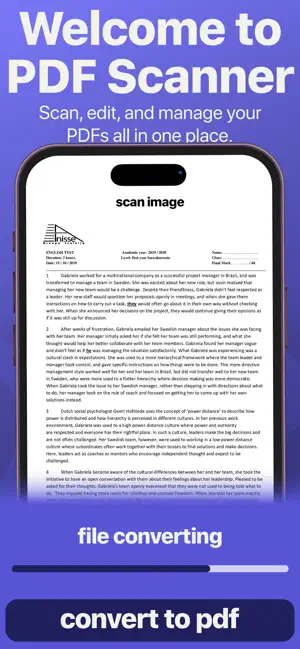
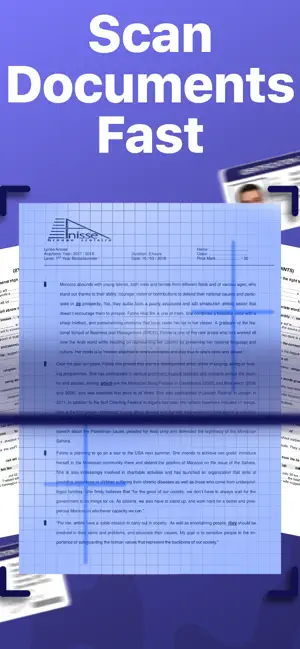
Professional PDF Editor and Document Management Solution PDF Editing | PDF Scanner is the ultimate all-in-one PDF application for iOS, designed to help you scan, edit, annotate, convert, and manage PDF documents with complete ease. Whether you are digitizing paper documents, editing existing PDFs, or extracting text with OCR, this app provides professional-grade functionality in a clean, intuitive interface. Advanced PDF Scanning and Conversion • High-quality PDF scanning with automatic edge detection • Multi-page scanning with instant PDF creation • Import existing PDFs from Files, iCloud, Google Drive, Dropbox, and other cloud services • Organize pages efficiently with smart document management tools • Batch scanning and processing for multiple documents at once • Convert images or photos into PDF format for easy archiving Comprehensive PDF Editing Tools • Add, delete, rotate, reorder, or duplicate PDF pages effortlessly • Merge multiple PDFs into a single document • Professional page management controls for precise editing • Real-time preview of all edits before saving • Support for multiple file formats including PDF, JPG, and PNG Powerful Annotation and Markup • Highlight, underline, or strikethrough text with custom colors • Insert text, shapes, and digital signatures for professional documents • Resize, reposition, or format annotations with complete flexibility • Ideal for contracts, reports, assignments, and other professional documents OCR Text Extraction and Search • Convert scanned PDFs into searchable and editable text • Quickly search through extracted content within your PDFs • Export text for use in other applications or workflows • Essential for students, educators, and professionals managing documents Professional Features for Every User • High-resolution PDF output for crisp, clear documents • Advanced PDF editing, annotation, and text extraction tools • Merge, compress, and convert PDFs with professional efficiency • Secure and private handling of sensitive files • Designed for business professionals, students, and anyone needing robust PDF tools Why Choose PDF Editing | PDF Scanner? • All-in-one PDF solution: scan, edit, annotate, and manage documents • Professional-grade PDF editor and OCR text extraction • Intuitive interface that is easy to navigate • Comprehensive annotation and markup capabilities • Seamless cloud backup and multi-device synchronization • Streamline your document workflow with a single, reliable app Download PDF Editing | PDF Scanner today and transform your document workflow. Whether you need a PDF editor, PDF scanner, OCR tool, document organizer, or annotation app, this solution provides everything you need to manage, edit, and optimize your PDF documents efficiently and professionally. you need a paid subscription. Prices may vary by country and are subject to change without notice. Prices are clearly displayed in the app. * Payment will be charged to your iTunes account at confirmation of purchase. * Your subscription will automatically renew unless auto-renew is turned off at least 24 hours before the end of the current period. * Your account will be charged for renewal within 24 hours before the end of the current period. * You can manage your subscriptions and turn off auto-renewal by going to your Account Settings in the iTunes Store. * If offered, if you choose to use our free trial, any unused portion of the free trial period will be forfeited when you purchase a subscription to that publication, where applicable. Privacy Policy : https://sites.google.com/view/mohamed-lotfi-pp/home Terms of Use: https://sites.google.com/view/mohamedlotfi-terms/home
Ratings & reviews
4.7
94 ratings
What’s new
Version 1.1 · Updated December 10, 2025
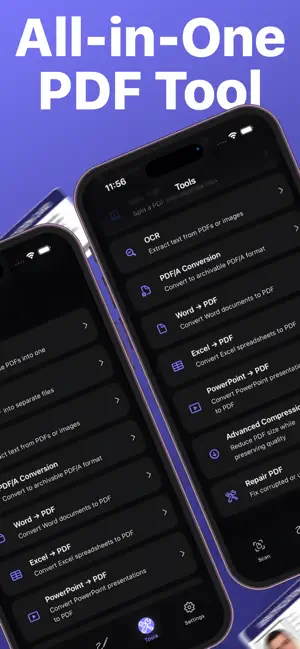
This update brings major improvements to your PDF productivity: -Merge PDFs — combine multiple documents into a single file -Split PDFs — extract pages into new separate files -Advanced OCR — more accurate text recognition -Word to PDF conversion -Excel to PDF conversion -PowerPoint to PDF conversion -PDF Repair — fix unreadable or corrupted files -Advanced Compression — reduce file size while keeping quality -PDF/A export for long-term archiving -Improved PDF editing tools — smoother and more precise -Performance enhancements throughout the app -Various bug fixes for a more stable experience Thank you for using our app. We’re continuously improving to provide the best PDF tools for you.
App privacy
The developer, Mohamed Lotfi, reported these privacy practices to Apple.
Data Used to Track You
The following data may be used to track you across apps and websites owned by other companies:
- Diagnostics: Crash Data, Performance Data
Data Not Linked to You
The following data, which may be collected but is not linked to your identity, may be used for the following purposes:
- Diagnostics: Crash Data, Performance Data
Used for: Analytics, App Functionality
Alternatives to PDF Editor & Scanner:PDF Tools
Looking for apps like PDF Editor & Scanner:PDF Tools? Here are 6 similar apps on the App Store. The highest rated is Mangonote: AI Note Taker (4.7/5), and all 6 are free to download.
-
 OCR Image AI - Photo to Text
4.5
-
 Fexo All File Converter
4.3
-
 All Document Reader Pro
4.5
-
 Mangonote: AI Note Taker
4.7
-
 Voice ToDo List AAKA AI
4.6
-
 Chat Pen: AI Chatbot & Search
2.5
| App | Rating | Price | Last updated | Compare |
|---|---|---|---|---|
| PDF Editor & Scanner:PDF Tools | 4.7 / 5 (94 ratings) | Free | December 10, 2025 | |
| OCR Image AI - Photo to Text | 4.5 / 5 (61) | Free | Aug 31, 2025 | Compare |
| Fexo All File Converter | 4.3 / 5 (6) | Free | Apr 27, 2026 | Compare |
| All Document Reader Pro | 4.5 / 5 (13) | Free | Nov 22, 2025 | Compare |
| Mangonote: AI Note Taker | 4.7 / 5 (41) | Free | Oct 5, 2026 | Compare |
| Voice ToDo List AAKA AI | 4.6 / 5 (77) | Free | Dec 16, 2025 | Compare |
| Chat Pen: AI Chatbot & Search | 2.5 / 5 (122) | Free | Oct 6, 2026 | Compare |