

Elevate Gradebook
Zachary Wilson Education iPhoneiPadiPod touch
Elevate Gradebook is a free Education app for iPhone and iPad by Zachary Wilson. Rated 5.0/5 from 3 ratings. Requires iOS 17.0. Updated October 9, 2026.
- Rating
- 5.0
- 3 ratings
- Price
- Free
- on the App Store
- Size
- 15 MB
- Age 4+
- Updated
- Oct 9
- 2026 · v2.1.3
Screenshots


About Elevate Gradebook
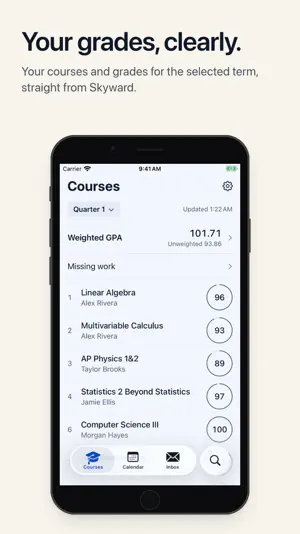
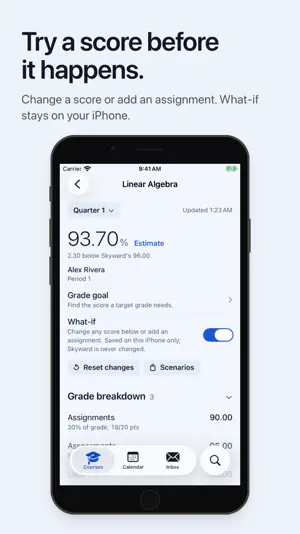
Elevate is a clear, calm gradebook for students who use Skyward. Sign in with your school account to see your courses, assignments, and category weights for the selected term. Then plan ahead with tools that stay on your iPhone. Grades, clearly • Courses and assignments for the selected term, with category weights • Search assignments in the selected quarter • Past courses, documents, student info, and fees in Settings > School records Try a what-if • Edit a score, add a hypothetical assignment, or mark work as not counting • Save scenarios and return to them later • What-if changes stay on your iPhone and never change your grades in Skyward Goals and GPA • Set a course grade goal and see what it would take, using score assumptions you can see and change • Weighted and unweighted GPA history • Convert completed semesters to a general 4.0 or 5.0 scale, with clear notes on how AP and Honors courses are handled • Explore sourced college profiles with published admissions guidance and GPA data where available. If a college's method can't be verified, Elevate shows no estimate instead of guessing. • Estimate credits from posted semesters, current courses if passed, and semesters you plan These tools are for planning. They are not an official GPA, class rank, admissions prediction, or graduation clearance. Your week • Calendar for the selected quarter with school dates, attendance, and assignments due • This Week: a checklist of the next seven days. Marking something Done is just for you and doesn't change a teacher's Missing mark. • Read your Skyward Inbox Widgets and alerts • Widgets for GPA, GPA Trend, Grades, Recent Grades, Missing Work, Inbox, and School Pulse, a grade-free overview • Optional reminders and grade alerts. Alerts show course and assignment names, never numeric grades. iOS can delay or skip background grade checks. Reminder delivery depends on notification permission and system settings. Private by design • Your iPhone connects directly to Skyward over HTTPS. Elevate runs no academic server of its own. • Sign-in and session details are stored in the iOS Keychain. Grades, plans, and scenarios are kept on your device for your account. • No advertising or analytics SDKs. • Optional Face ID, Touch ID, or passcode lock for the app. App lock does not hide information shown in widgets or notification previews. Made to fit Theme colors, light, dark, or system appearance, plus Dynamic Type and Reduce Motion support. Elevate is an independent app and is not affiliated with or endorsed by Eanes ISD or Skyward. An Eanes ISD Skyward student account is required.
What’s new
Version 2.1.3 · Updated October 9, 2026
- Fixed a Skyward course-information parsing error that prevented grades from refreshing. - Corrected AP weighting for eligible Independent Study in English courses so their contribution to weighted GPA calculates correctly.
App privacy
The developer, Zachary Wilson, reported these privacy practices to Apple.
Data Not Collected
The developer does not collect any data from this app.
Alternatives to Elevate Gradebook
Looking for apps like Elevate Gradebook? Here are 6 similar apps on the App Store. The highest rated is VHS Grades (5.0/5), and all 6 are free to download.
-
 VHS Grades
5.0
VHS Grades
5.0
-
 VibeNodes - AI Mindmaps
-
 Math Brained
-
 Calvary Chapel Northern KY
-
 My Grade Book 2
-
 Hearth: Homeschool Planner
| App | Rating | Price | Last updated | Compare |
|---|---|---|---|---|
| Elevate Gradebook | 5.0 / 5 (3 ratings) | Free | October 9, 2026 | |
| VHS Grades | 5.0 / 5 (7) | Free | Oct 15, 2026 | Compare |
| VibeNodes - AI Mindmaps | – | Free | Mar 18, 2026 | Compare |
| Math Brained | – | Free | Sep 27, 2025 | Compare |
| Calvary Chapel Northern KY | – | Free | Oct 15, 2026 | Compare |
| My Grade Book 2 | – | Free | Oct 12, 2026 | Compare |
| Hearth: Homeschool Planner | – | Free | Jul 30, 2026 | Compare |
Compare Elevate Gradebook with the top alternatives: ratings, updates, ASO score and keyword gaps →