

Construction Trades Ordering
Kenneth Riendeau Business iPhoneiPadiPod touch
Construction Trades Ordering is a free Business app for iPhone and iPad by Kenneth Riendeau. Requires iOS 18.5. Updated January 1, 2026.
- Price
- Free
- on the App Store
- Size
- 5 MB
- Age 4+
- Updated
- Jan 1
- 2026 · v3.0
Screenshots


About Construction Trades Ordering
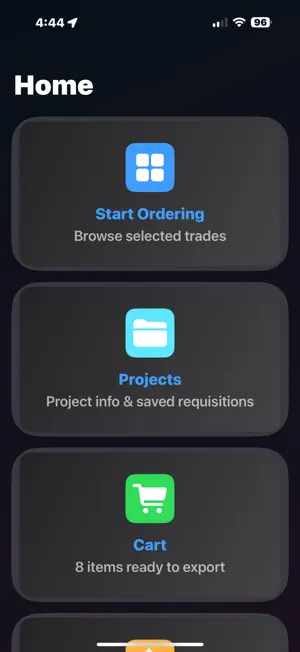
The fastest way to create material requisitions. Trades Ordering lets contractors, estimators, and crews build supply lists in minutes, stay organized by project, and export professional PDFs — all on iPhone or iPad. Built-in Trades Get started instantly with five preloaded trades: • Electrical • Plumbing • HVAC • Carpentry • Painting Browse categories, search items, and add them to your requisition cart with ease. Organize Projects & Files • Save requisitions as PDF files into Projects • Organize files into folders with custom names • Move, rename, or delete files and folders • Open saved files anytime to view, share, or print Cart & PDF Export • Cart groups all items by category for easy review • Export a clean, professional PDF requisition with project details • Add your company logo or use the default Trades logo • Share PDFs instantly by email, text, or print Branding & Customization • Upload your company logo for branded exports • Add subcategories and custom items to catalogs • All catalogs are stored locally as JSON files — your data stays private and safe Typical Workflow 1. Select a trade (Electrical, Plumbing, HVAC, Carpentry, or Painting) 2. Browse categories and add items to your cart 3. Use Favorites for frequently used parts or materials 4. Review your cart and finalize your requisition 5. Export as PDF — ready to send or archive Subscription Tiers Demo Mode • Full access to all 5 trades for 7 days • Exported PDFs include a DEMO watermark • Upgrade required after 7 days Paid Tier • Unlock one trade of your choice • Add subcategories and custom items within that trade • Includes Favorites, categories, and cart features Pro Tier • Unlock unlimited trades — add or switch anytime • Create completely custom trades with categories and items • Best for contractors, estimators, and multi-trade users Terms of Use (EULA): https://www.apple.com/legal/internet-services/itunes/dev/stdeula Privacy Policy: https://longing-cobbler-23e.notion.site/Construction-Trades-Ordering-Support-Privacy-26f4bcf85bb680878cfcc1bd835984d8?source=copy_link
What’s new
Version 3.0 · Updated January 1, 2026
Updated Support links to new website
App privacy
The developer, Kenneth Riendeau, reported these privacy practices to Apple.
Data Not Collected
The developer does not collect any data from this app.
Alternatives to Construction Trades Ordering
Looking for apps like Construction Trades Ordering? Here are 6 similar apps on the App Store. The highest rated is Infor LN Requisition (5.0/5), and all 6 are free to download.
-
 Deler – Parts Requests
-
 Perform 24.0 Material Request
-
 Myliis
4.0
-
 Control Alquiler Articulos
-
 Infor LN Requisition
5.0
-
 VirtuApp Online Business store
| App | Rating | Price | Last updated | Compare |
|---|---|---|---|---|
| Construction Trades Ordering | – | Free | January 1, 2026 | |
| Deler – Parts Requests | – | Free | Oct 23, 2026 | Compare |
| Perform 24.0 Material Request | – | Free | Apr 24, 2024 | Compare |
| Myliis | 4.0 / 5 (1) | Free | Feb 22, 2026 | Compare |
| Control Alquiler Articulos | – | Free | May 20, 2026 | Compare |
| Infor LN Requisition | 5.0 / 5 (1) | Free | May 19, 2026 | Compare |
| VirtuApp Online Business store | – | Free | Oct 16, 2026 | Compare |