

Berean Bible
Wyoming Software, Inc Reference iPhoneiPadiPod touch
Berean Bible is a free Reference app for iPhone and iPad by Wyoming Software, Inc. Rated 5.0/5 from 3 ratings. Requires iOS 16.4. Updated October 28, 2026.
- Rating
- 5.0
- 3 ratings
- Price
- Free
- on the App Store
- Size
- 81 MB
- Age 4+
- Updated
- Oct 28
- 2026 · v2.0.0
Screenshots


About Berean Bible
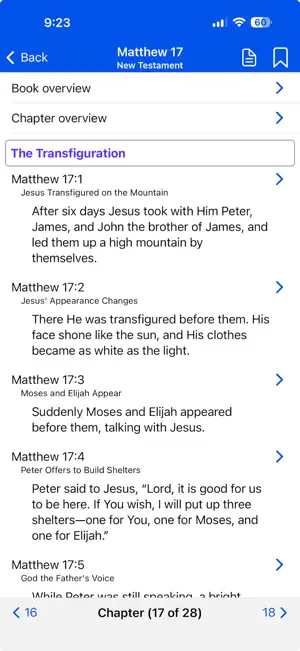
About: The Berean Bible app by Christian Coder is fast, nimble, and very easy to use. Reading a well formatted Bible app allows the mind to float back-and-forth between verses. This enhances the reader's understanding of the text. Controls, widgets and gadgets just seem to get in the way. Also integrated into the app are "Summaries and Narratives" which are simple study guides providing further understanding of each book, chapter, and verse. Internally funded: Author is committed to build and maintain the Berean Bible app without any external financial support. - Free app - No in-app purchases - No ads - No subscriptions - No donations Privacy: Since there is no login, nothing is known about you. App stores do not provide your identity. - No login - No tracking - No analytics The Berean Bible app is thankful to the Berean Bible Translation Committee for their contribution to the open source community via Creative Commons.
What’s new
Version 2.0.0 · Updated October 28, 2026
Berean Bible has been rebuilt from the ground up as a native app, so it looks and feels at home on your {device}. Everything you used before is still here, along with a few new features. - New Features - Search: Tap the magnifying glass on the Books page or in the Reader to search every verse of the Bible. Results are listed in Bible order with your words picked out. Tap one to open the Reader at that verse, highlighted for a moment so it’s easy to find. Favorite Verses: Keep as many verses as you like to come back to. Choose Favorite Verses from the menu to see them all, listed from Genesis to Revelation, and tap Go to Verse to open one in the Reader. Continue Reading: Once the bookmark is set, the Books page starts with a Continue Reading row that takes you straight back to the verse where you stopped. Chapter Picker: Each chapter is now listed with its heading as well as its opening words. Tap “Chapter” at the bottom of the Reader, or choose Chapters from the menu. - What’s Changed - Press and Hold a Verse: In the Reader, press and hold a verse to set or clear the bookmark, or to add it to or remove it from your favorite verses. This replaces sliding a verse to the left. A tap on a verse still opens its summary and narrative. The Menu: The bookmark and chapter buttons at the top of the Reader have moved into a menu behind the {menuButton} button, along with Favorite Verses. The Books page has the same menu, without Chapters. Info: The info button on the Books page now opens Info, where Getting Started, Omitted Verses and About each have a page of their own, alongside this one.
App privacy
The developer, Wyoming Software, Inc, reported these privacy practices to Apple.
Data Not Collected
The developer does not collect any data from this app.
Alternatives to Berean Bible
Looking for apps like Berean Bible? Here are 6 similar apps on the App Store. The highest rated is The Living Bible - offline (5.0/5), and all 6 are free to download.
-
 Berean Bible App
4.9
Berean Bible App
4.9
-
 Everence Events
-
 Berean Standard Bible (BSB)
4.6
Berean Standard Bible (BSB)
4.6
-
 Geometry AI: Math Helper
4.7
Geometry AI: Math Helper
4.7
-
 Bible: Know God and His Words
4.8
Bible: Know God and His Words
4.8
-
 The Living Bible - offline
5.0
The Living Bible - offline
5.0
| App | Rating | Price | Last updated | Compare |
|---|---|---|---|---|
| Berean Bible | 5.0 / 5 (3 ratings) | Free | October 28, 2026 | |
| Berean Bible App | 4.9 / 5 (10) | Free | Aug 25, 2026 | Compare |
| Everence Events | – | Free | Mar 20, 2026 | Compare |
| Berean Standard Bible (BSB) | 4.6 / 5 (11) | Free | Feb 17, 2026 | Compare |
| Geometry AI: Math Helper | 4.7 / 5 (21) | Free | Oct 4, 2025 | Compare |
| Bible: Know God and His Words | 4.8 / 5 (46) | Free | Oct 24, 2026 | Compare |
| The Living Bible - offline | 5.0 / 5 (1) | Free | Jun 10, 2026 | Compare |
Compare Berean Bible with the top alternatives: ratings, updates, ASO score and keyword gaps →