

Verbi Lecture Recorder & Notes
Mustafa Onur ILGAZ Productivity iPhoneiPadiPod touch
Verbi Lecture Recorder & Notes is a free Productivity app for iPhone and iPad by Mustafa Onur ILGAZ. Rated 5.0/5 from 2 ratings. Requires iOS 16.0.
- Rating
- 5.0
- 2 ratings
- Price
- Free
- on the App Store
- Size
- 29 MB
- Age 4+
- Updated
- Nov 20
- 2026 · v1.6.0
Screenshots
Save to Pinterest


About Verbi Lecture Recorder & Notes
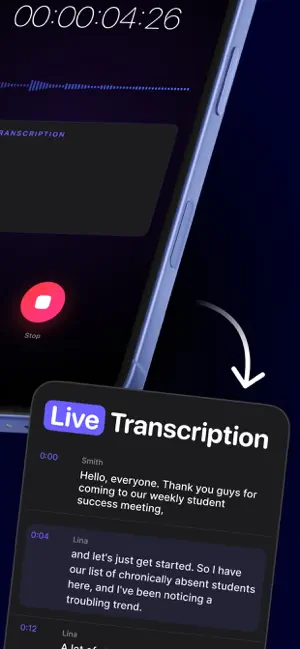
Verbi is a lecture recorder and AI note taker: it turns lectures, meetings and interviews into accurate text and a summary you can act on. Record in the app, import a file, or share audio in from another app. Verbi writes it down in 39 languages, tells the speakers apart, and summarizes it in the shape your lecture or meeting actually needs. WHAT YOU CAN DO • Long recordings — an hour-long meeting or a whole lecture, transcribed from start to finish. • Summaries that write themselves — with Pro, every transcript comes with a summary. The free plan includes 3 a month. • Told when it's ready — leave the app while a long recording transcribes; Verbi lets you know when your notes are ready. • Record and transcribe — hit record, get clean punctuated text back in seconds. • Live transcription — watch the words appear as you speak. • Bring your own audio — import from Files, share in from any app, or paste a video link. • 39 languages plus auto-detect — English, Spanish, French, German, Turkish, Italian, Portuguese, Arabic, Japanese, Chinese and more. • Speaker detection — see who said what, and give each voice a name. • Ask the transcript — chat with a recording and get answers drawn from what was actually said. • Translation — read any transcript in English, Turkish, German, French, Spanish, Portuguese, Italian, Russian, Arabic, Japanese, Korean, Indonesian, Dutch, Polish or Simplified Chinese. • Custom vocabulary — teach Verbi the names, companies and acronyms it keeps getting wrong. • Meeting reminders — Verbi reads your calendar and nudges you to record when a meeting starts. • Export — copy the text for free; with Pro, share or save as TXT or PDF. SUMMARIES THAT MATCH THE MOMENT Choose the template and the summary comes back structured for it: general meeting, 1:1, daily stand-up, weekly review, lesson notes, idea capture, action items, email draft, blog post. Every summary sticks to what was actually said: sections nobody talked about are left out, and to-do lists name owners and due dates only when someone stated them. NO SURPRISES • No account — open the app and record. No sign-up, no email. • Free every month — 60 minutes of transcription and 3 AI summaries, renewed on the 1st. No card needed, nothing to cancel. • Your recording is safe — audio is saved to your phone as you record. If the app is closed by a call, a crash or an empty battery, the recording is recovered the next time you open Verbi. • Plans you can leave — weekly, monthly or yearly, cancelled any time in your App Store settings. WHO IT IS FOR • Students — record the lecture or class, get study notes. • Professionals — capture the whole meeting, keep the decisions, stop writing notes. • Journalists and creators — transcribe an interview in minutes. • Everyone — voice notes you can search. FREE AND PRO Free: 60 minutes of transcription and 3 AI summaries a month, recordings kept for 15 days and basic live transcription. Verbi Pro: 20 hours of transcription a month (5 a week on the weekly plan), an AI summary for every transcript, speaker detection, chat with the transcript, translation, sharing and export to TXT and PDF, high-quality live transcription and history that is not deleted automatically. Verbi MAX: everything in Pro with twice the hours (40 a month, 10 a week on the weekly plan). Subscribers can add extra hours that never expire. PRIVACY Your recordings and transcripts are stored on your phone; Verbi has no account and no cloud sync. To transcribe, the audio is sent to our speech-to-text providers, usually through our server, and summaries, chat and translation send the transcript text to our AI provider. Usage analytics never include your recordings or transcripts, and you can turn them off in Settings. Privacy Policy: https://theverbi.com/privacy-policy/ Terms of Service: https://theverbi.com/terms-of-service/
What’s new
Version 1.6.0 · Updated November 20, 2026
New • Record in one tap: a widget for the Home Screen and the Lock Screen, a Control Center button (iOS 18), and a "Start Recording" action for Shortcuts and the Action button. While you record, the Lock Screen shows the timer and a Stop button. • A new default template, Plain Summary: just the summary, with no fixed sections. Choose your default in Settings > Summary. • Summaries appear as they are written, instead of after a wait. • Make a summary yours: Shorter, More detail, Change template, or edit it by hand. • A new template, Doctor's Visit: what was discussed and advised, medicines and doses as they were said, and next steps. • Study from a lesson (Pro): recordings summarized with Lesson Notes get a Study tab with flashcards and a quiz. Every card and question quotes the recording. • Speakers are numbered in the order they speak, and each has its own color. • Importing a video? Pick the summary template before it starts. • Export a transcript as a Word document (DOCX) or as subtitles (SRT). Improved • Summaries of short recordings are shorter and open with what matters most. • Summaries and automatic titles now work for recordings in Japanese, Chinese and Thai. • No connection when a recording ends? The summary is made as soon as you are back online. • The silence before the first word is trimmed from the audio you share.
App privacy
The developer, Mustafa Onur ILGAZ, reported these privacy practices to Apple.
Data Not Linked to You
The following data, which may be collected but is not linked to your identity, may be used for the following purposes:
- Purchases: Purchase History
- Identifiers: Device ID, User ID
- Usage Data: Product Interaction, Advertising Data
- Location: Coarse Location
- User Content: Audio Data, Other User Content
- Diagnostics: Crash Data, Performance Data, Other Diagnostic Data
Used for: Third-Party Advertising, Developer’s Advertising or Marketing, Analytics, App Functionality
Alternatives to Verbi Lecture Recorder & Notes
Looking for apps like Verbi Lecture Recorder & Notes? Here are 6 similar apps on the App Store. The highest rated is ScribeKit - Offline Transcribe (5.0/5), and all 6 are free to download.
-
 ScribeKit - Offline Transcribe
5.0
-
 Voice Memos Recorder - Recordd
4.0
-
 Just Transcribe. Offline
4.5
-
 Murble: AI Voice Notes
3.3
-
 Voice Recorder AI: ThinkScribe
5.0
-
 Transcribe: Audio to Text AI
| App | Rating | Price | Last updated | Compare |
|---|---|---|---|---|
| Verbi Lecture Recorder & Notes | 5.0 / 5 (2 ratings) | Free | November 20, 2026 | |
| ScribeKit - Offline Transcribe | 5.0 / 5 (1) | Free | Oct 27, 2026 | Compare |
| Voice Memos Recorder - Recordd | 4.0 / 5 (5) | Free | Nov 22, 2026 | Compare |
| Just Transcribe. Offline | 4.5 / 5 (2) | Free | Nov 23, 2026 | Compare |
| Murble: AI Voice Notes | 3.3 / 5 (6) | Free | Nov 19, 2026 | Compare |
| Voice Recorder AI: ThinkScribe | 5.0 / 5 (1) | Free | Nov 9, 2026 | Compare |
| Transcribe: Audio to Text AI | – | Free | Nov 23, 2026 | Compare |