

Max Volume Booster: Bass EQ
No Worries! Lifestyle, LLC Music iPhoneiPadiPod touch
Max Volume Booster: Bass EQ is a free Music app for iPhone and iPad by No Worries! Lifestyle, LLC. Requires iOS 17.0. Updated September 10, 2026.
- Price
- Free
- on the App Store
- Size
- 6 MB
- Age 4+
- Updated
- Sep 10
- 2026 · v1.3.0
Screenshots


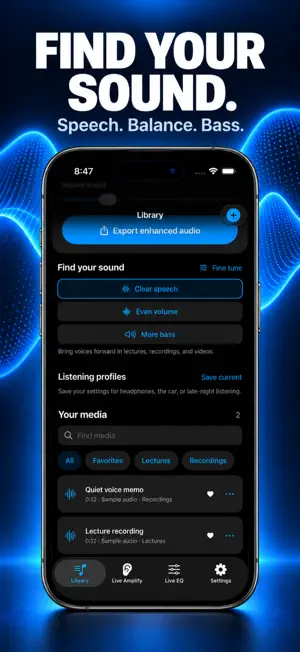

About Max Volume Booster: Bass EQ
Make quiet videos and recordings easier to hear. Import your own media, compare Original and Enhanced sound, and keep listening from where you left off. TRY IT FREE Hear a built-in sample before importing anything. Preview the audio from your videos and recordings, adjust boost up to 200%, and use Clear speech, Even volume, or More bass. Basic enhanced audio export is included. MAKE YOUR LIBRARY USEFUL EVERY DAY Pause, seek, and resume from a saved position. Find recent listening, mark favorites, organize folders, or search your library. Set a sleep timer, use Lock Screen playback controls, or open your last selection from the Home Screen widget. SAVE YOUR BETTER VERSION WITH PREMIUM Export videos with enhanced audio and the original picture. Fine-tune sound with the 10-band equalizer, save named listening profiles, and unlock boost up to 500% for supported audio. Choose weekly access or a one-time lifetime purchase. Video imports and soundtrack previews are free. FOR YOUR OWN AUDIO AND VIDEO Import compatible MP3, M4A, WAV, and AIFF audio, or MP4 and MOV videos with an audio track. Choose videos from Photos or Files. Open compatible files from other apps in Volume Booster. LIVE AMPLIFY Use the microphone to amplify nearby sound. Headphones are recommended. Microphone permission is requested only for live amplification. Audio processing happens on your device. Volume Booster does not change the sound of other apps, phone calls, or protected streaming tracks. Boost is an audio gain setting; results depend on the recording and output device. Start at a comfortable volume. Weekly subscriptions renew automatically unless cancelled in your Apple Account settings. Eligible accounts may receive the introductory offer shown by the App Store. Lifetime access is a one-time purchase. Support: [email protected] Terms of Use: https://www.noworrieslifestyle.com/eula Privacy Policy: https://www.noworrieslifestyle.com/privacy-policy
What’s new
Version 1.3.0 · Updated September 10, 2026
Make quiet videos and recordings easier to hear. - Try a free audio sample and compare original and enhanced sound. - Import videos from Photos or Files and preview their audio before upgrading. - Save videos with enhanced sound and the original picture with Premium. - Pause, seek, and continue listening from your saved position, including from a Home Screen widget. - Find your sound with Clear speech, Even volume, and More bass modes. - Keep media organized with favorites, folders, search, and recently played. - Save named listening profiles with Premium, and set a sleep timer for playback. - Choose an upgrade when you need it, with clear weekly and lifetime purchase options.
App privacy
The developer, No Worries! Lifestyle, LLC, reported these privacy practices to Apple.
Data Not Collected
The developer does not collect any data from this app.
Alternatives to Max Volume Booster: Bass EQ
Looking for apps like Max Volume Booster: Bass EQ? Here are 6 similar apps on the App Store. The highest rated is Volume Booster: Bass Boost (5.0/5), and all 6 are free to download.
-
 Volume Booster: Bass Booster
4.3
-
 Volume Booster: Bass Boost
5.0
-
 Bass Booster - Music Player
-
 Volume Booster ・ Bass Booster
4.2
-
 Bass & Volume Booster: Louder
-
 Audio Booster: Booster
4.6
| App | Rating | Price | Last updated | Compare |
|---|---|---|---|---|
| Max Volume Booster: Bass EQ | – | Free | September 10, 2026 | |
| Volume Booster: Bass Booster | 4.3 / 5 (6) | Free | Aug 13, 2025 | Compare |
| Volume Booster: Bass Boost | 5.0 / 5 (2) | Free | Jul 22, 2026 | Compare |
| Bass Booster - Music Player | – | Free | Oct 23, 2024 | Compare |
| Volume Booster ・ Bass Booster | 4.3 / 5 (4) | Free | Aug 7, 2025 | Compare |
| Bass & Volume Booster: Louder | – | Free | Feb 24, 2026 | Compare |
| Audio Booster: Booster | 4.6 / 5 (54) | Free | Jul 19, 2026 | Compare |