

Micapaint
SHOGO SEKI Graphics & Design iPad
Micapaint is a free Graphics & Design app for iPad by SHOGO SEKI. Rated 4.4/5 from 11 ratings. Requires iOS 17. Updated October 7, 2026.
- Rating
- 4.4
- 11 ratings
- Price
- Free
- on the App Store
- Size
- 13 MB
- Age 4+
- Updated
- Oct 7
- 2026 · v1.14.0
Screenshots


About Micapaint
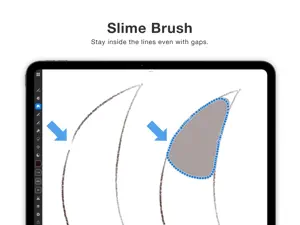
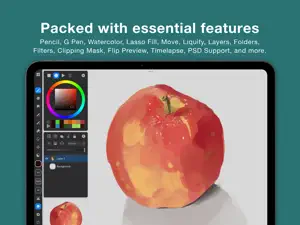
Made with a love of painting, Micapaint puts a delightful drawing experience above everything else. Key Features - Smooth brush performance at 120fps: even 1000×1000 blending brushes run fluidly. - "Slime Brush" that fills regions without spilling outside broken lines. - A simple, workspace-first UI that maximizes your canvas. - No ads. Use most tools without limits, for free. Free Features - Pencil, G-pen, watercolor blending, blur - Lasso fill - Unlimited layers (as long as memory allows) - Layer folders - Clipping masks (yes, even for folders!) - Canvas flip for preview - Alpha lock - Filters (Hue/Saturation/Lightness, Brightness & Contrast, Tone Curve, Noise, Dither, Gradient Map, Blur, Chromatic Aberration) - Filter Layers (Non-destructive adjustment layers) - Saturation adjustment that preserves perceived brightness - Selection & transform - Liquify (push, expand, pinch, rotate, reset) - Paint bucket fill - Image import - Standard blend modes - Mini canvas view - Reference images displayed over the canvas - PSD import / export - Undo / redo - Adjustable stabilizer strength - Barrel roll support - Customizable toolbar (button count & layout) - Color history and swatches - Timelapse recording - Crop / resize the canvas you're editing (free up to 5 times) Pro Features (available with in-app purchase) - Canvas reordering - Brush export and import - Unlimited canvas crop / resize
Ratings & reviews
4.4
11 ratings
What’s new
Version 1.14.0 · Updated October 7, 2026
[New Features] - Added support for resetting and restoring the canvas placement with a quick pinch gesture [Improvements] - Fixed an issue where canvas data could revert to a previous state - Fixed an issue where popups such as the layer menu appeared in unintended positions on iPadOS 17 - Improved stability
App privacy
The developer, SHOGO SEKI, reported these privacy practices to Apple.
Data Not Linked to You
The following data, which may be collected but is not linked to your identity, may be used for the following purposes:
- Usage Data: Product Interaction
- Diagnostics: Crash Data, Performance Data
Used for: Analytics, App Functionality
Alternatives to Micapaint
Looking for apps like Micapaint? Here are 6 similar apps on the App Store. The highest rated is 1BitPencil (5.0/5), and 5 of the 6 are free to download.
-
 SeePaint: Draw, Sketch & Paint
4.2
SeePaint: Draw, Sketch & Paint
4.2
-
 Paintrix: Digital Painting
4.6
Paintrix: Digital Painting
4.6
-
 Artbox - Real Oil Painting
4.0
Artbox - Real Oil Painting
4.0
-
 1BitPencil
5.0
1BitPencil
5.0
-
 Pofi Brush - Sketch · Paint
3.2
Pofi Brush - Sketch · Paint
3.2
-
 SuperPaint: Fluid Art
5.0
SuperPaint: Fluid Art
5.0
| App | Rating | Price | Last updated | Compare |
|---|---|---|---|---|
| Micapaint | 4.4 / 5 (11 ratings) | Free | October 7, 2026 | |
| SeePaint: Draw, Sketch & Paint | 4.3 / 5 (12) | Free | Oct 7, 2026 | Compare |
| Paintrix: Digital Painting | 4.6 / 5 (18) | Free | Oct 17, 2026 | Compare |
| Artbox - Real Oil Painting | 4.0 / 5 (7) | Free | Apr 28, 2026 | Compare |
| 1BitPencil | 5.0 / 5 (1) | 6.99 USD | Sep 2, 2026 | Compare |
| Pofi Brush - Sketch · Paint | 3.2 / 5 (13) | Free | Jul 16, 2026 | Compare |
| SuperPaint: Fluid Art | 5.0 / 5 (2) | Free | Sep 5, 2026 | Compare |
Compare Micapaint with the top alternatives: ratings, updates, ASO score and keyword gaps →