

4Q: 4 Quadrants Method
浩东 邱 Productivity iPhoneiPadiPod touch
4Q: 4 Quadrants Method is a free Productivity app for iPhone and iPad by 浩东 邱. Rated 5.0/5 from 2 ratings. Requires iOS 17.0. Updated September 7, 2026.
- Rating
- 5.0
- 2 ratings
- Price
- Free
- on the App Store
- Size
- 10 MB
- Age 4+
- Updated
- Sep 7
- 2026 · v1.0.2
Screenshots

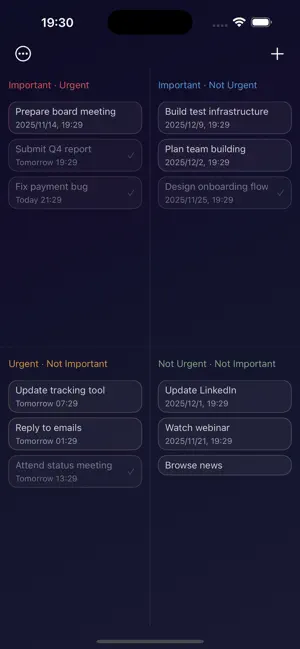
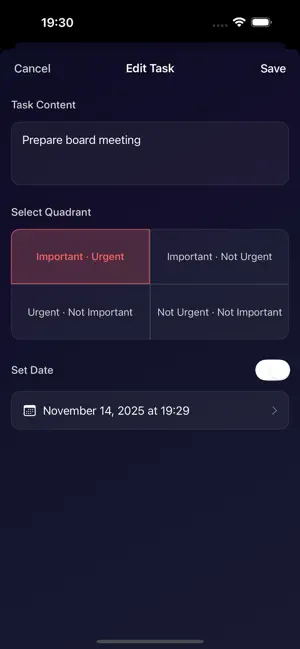

About 4Q: 4 Quadrants Method
Focus on What Matters, Master Your Life's Rhythm Always dragged along by "urgent" things, while "important" ones keep getting postponed? 4Q is a simple yet powerful four-quadrant task management app based on the classic Eisenhower Matrix. It helps you clearly distinguish priorities, break free from the chaos of "busy work", truly focus on high-value matters, and take control of your work and life's rhythm. Core Philosophy: Do Only What's Important We firmly believe that "doing more important things" is better than "doing more things". 4Q divides all your tasks into four quadrants based on two dimensions: "important" and "urgent": • P1 - Important and Urgent: Do it immediately • P2 - Important but Not Urgent: Plan to do it (this is the key to your growth!) • P3 - Urgent but Not Important: Delegate to others • P4 - Neither Important nor Urgent: Decisively abandon Through this structured thinking, you'll concentrate your precious time and energy on the truly valuable "second quadrant". Core Features • Intuitive Matrix Interface: All tasks are visible at a glance across four quadrants. Supports drag-and-drop operations, allowing you to quickly adjust when priorities change. • Flexible Task Management: Easily add tasks, notes, deadlines, tags, and priorities, keeping every matter well-organized. • Statistics and Review: Provides daily, weekly, and monthly task data overviews. Intuitively understand your time allocation, continuously optimizing your efficiency model. • Personalized Space: Switch between multiple visual themes and layout methods at will, creating your own exclusive efficiency tool. • Multi-Device Cloud Sync: Whether on your phone or tablet, your tasks and progress update in real-time, enabling seamless efficiency management. Who is 4Q For? • Professionals: Balance projects, meetings, and personal growth goals. • Students: Plan study, exam revision, and interest development. • Entrepreneurs/Managers: Clarify team task priorities, improve decision-making efficiency. • Freelancers: Efficiently manage client projects, task cycles, and life matters. Why Choose 4Q? Unlike traditional to-do lists, 4Q isn't just about recording—it's training in "priority thinking". It helps you develop the habit of rational judgment—before taking action, pause and reflect: "Is this thing truly important?" Stop mindless busyness, start structured thinking. From today, use 4Q to focus on what truly matters, experience an efficient and orderly journey of personal growth. Terms of Use: https://www.apple.com/legal/internet-services/itunes/dev/stdeula/
What’s new
Version 1.0.2 · Updated September 7, 2026
Fixed known issues
App privacy
The developer, 浩东 邱, reported these privacy practices to Apple.
Data Not Collected
The developer does not collect any data from this app.
Alternatives to 4Q: 4 Quadrants Method
Looking for apps like 4Q: 4 Quadrants Method? Here are 6 similar apps on the App Store. The highest rated is Eisenhower Matrix AI PrioritAI (4.0/5), and all 6 are free to download.
-
 TaskSteps: To Do List Planner
-
 Eisen - Eisenhower Task Man...
-
 Eisenhower Matrix Task Manager
-
 Task Quadrant
-
 Quadrant List
-
 Eisenhower Matrix AI PrioritAI
4.0
Eisenhower Matrix AI PrioritAI
4.0
| App | Rating | Price | Last updated | Compare |
|---|---|---|---|---|
| 4Q: 4 Quadrants Method | 5.0 / 5 (2 ratings) | Free | September 7, 2026 | |
| TaskSteps: To Do List Planner | – | Free | Oct 6, 2026 | Compare |
| Eisen - Eisenhower Task Man... | – | Free | Oct 10, 2026 | Compare |
| Eisenhower Matrix Task Manager | – | Free | Jan 8, 2026 | Compare |
| Task Quadrant | – | Free | Apr 14, 2026 | Compare |
| Quadrant List | – | Free | Feb 26, 2026 | Compare |
| Eisenhower Matrix AI PrioritAI | 4.0 / 5 (1) | Free | Apr 2, 2026 | Compare |