

Containd - Visual Lists Mapper
Next Level Order Engineering UG (haftungsbeschrankt) Productivity iPhoneiPadiPod touch
Containd - Visual Lists Mapper is a free Productivity app for iPhone and iPad by Next Level Order Engineering UG (haftungsbeschrankt). Requires iOS 15.5.
- Price
- Free
- on the App Store
- Size
- 113 MB
- Age 4+
- Updated
- Oct 5
- 2026 · v0.14.8
Screenshots


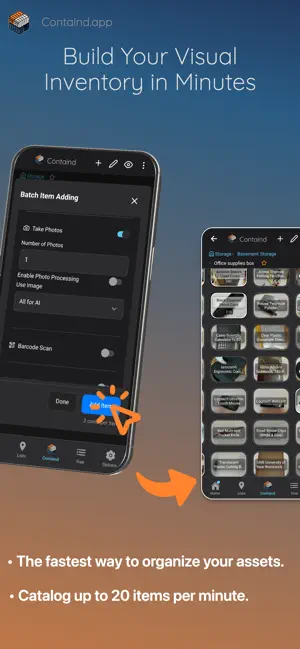
About Containd - Visual Lists Mapper
Stop relying on plain text lists to organize your tasks, ideas, or physical items. Containd is a visual database that lets you arrange your list items on top of a customizable canvas. By placing list items onto nested visual canvases with customized backgrounds, you create interactive maps out of any list. Map out your living space by placing your belongings where they are in real life, or visualize the interconnectedness and dependencies of your tasks, ideas, or plans. The main advantages of Containd are: • All your lists visualized and searchable, with you everywhere at any time. • Cataloging as fast as possible using a single photo per item, or by selecting multiple items in one photo, and more. • Intuitive, visual item management on a highly customizable 2D canvas map of containers and items, with drag and drop as the core management mechanism. • A high degree of privacy (fully dependent on your privacy settings) with an offline-first foundation. Your inventory is not mirrored in the cloud, and the app always works without an internet connection. Be sure to back up regularly. • A high degree of list item customization, featuring list-specific templates with dedicated functionality, item-specific categories for custom variables, custom tags, and full control over item appearance (from rotation and corner radius to drop shadows and custom colors for every item). Key features: • Simple text and advanced parameter item search. • QR and label generation directly in the app, including full container labels with content lists that can be sent straight to a compatible printer via the share function. • Local (offline) image search within your own image database. • Hierarchical categories for highly detailed, searchable inventory, making visually engaging statistics effortless. • Scan QR codes to find items in your catalog (label a container with a QR code, scan it, and see what is inside without opening it). • Scan generic QR codes in the app to store them directly as list items. • Full AI Assistant to help edit your database and guide app usage. • Full offline onboarding guide with all the information you need to get started. • Guided in-app tours to help you hit the ground running. • Privacy settings for individual items that stay hidden until you authenticate locally (and stay un-synced if cloud sync is active). • Share your inventory maps as images directly from the app. • Cross-device and cross-platform import/export, backup, and restore options. • Attach documents to your items to keep everything together. Connected services: • Image to inventory item: AI automatically fills in titles, descriptions, and estimated properties like value, weight, and dimensions. • Image to multiple inventory items: Take a photo of a shelf, analyze it semi-automatically, and select multiple items to add to your database at once. • Barcode lookup: Use standalone or combined with image analysis. • Document import and text extraction: Scan text from screenshots or document images and automatically convert them into inventory items. • Cross-device and cross-platform cloud syncing for your database. • Share cloud-synced lists or sublists with optional collaboration features. • Optional live syncing: Instantly apply changes across shared or personal devices in seconds. • Publish your lists to containd.space: Freeze your list in its current state to share it over the web without needing the app.
What’s new
Version 0.14.8 · Updated October 5, 2026
AI assistant functionality slightly improved
App privacy
The developer, Next Level Order Engineering UG (haftungsbeschrankt), reported these privacy practices to Apple.
Data Linked to You
The following data, which may be collected and linked to your identity, may be used for the following purposes:
- Identifiers: User ID
- Usage Data: Product Interaction
- User Content: Other User Content
Used for: Third-Party Advertising, Analytics, App Functionality
Data Not Linked to You
The following data, which may be collected but is not linked to your identity, may be used for the following purposes:
- Contact Info: Email Address
- Usage Data: Advertising Data, Other Usage Data
- Purchases: Purchase History
- Location: Coarse Location
- Diagnostics: Performance Data, Other Diagnostic Data
- Financial Info: Payment Info
- User Content: Photos or Videos, Customer Support
Used for: Third-Party Advertising, Analytics, App Functionality
Alternatives to Containd - Visual Lists Mapper
Looking for apps like Containd - Visual Lists Mapper? Here are 6 similar apps on the App Store. The highest rated is fewer: declutter and inventory (5.0/5), and all 6 are free to download.
-
 Placefolio
-
 FaceBox
-
 fewer: declutter and inventory
5.0
-
 Doneward
-
 Y-NO: Home Inventory
-
 NeoTodo - Task Manager
| App | Rating | Price | Last updated | Compare |
|---|---|---|---|---|
| Containd - Visual Lists Mapper | – | Free | October 5, 2026 | |
| Placefolio | – | Free | Sep 5, 2026 | Compare |
| FaceBox | – | Free | Mar 15, 2026 | Compare |
| fewer: declutter and inventory | 5.0 / 5 (1) | Free | Jun 7, 2026 | Compare |
| Doneward | – | Free | Oct 15, 2026 | Compare |
| Y-NO: Home Inventory | – | Free | Oct 12, 2026 | Compare |
| NeoTodo - Task Manager | – | Free | Dec 19, 2025 | Compare |