

Smart Dash: IoT Dashboards
GROSNET TECHNOLOGY COMPANY LIMITED Utilities iPhoneiPadiPod touch
Smart Dash: IoT Dashboards is a free Utilities app for iPhone and iPad by GROSNET TECHNOLOGY COMPANY LIMITED. Requires iOS 16.4. Updated October 25, 2026.
- Price
- Free
- on the App Store
- Size
- 69 MB
- Age 4+
- Updated
- Oct 25
- 2026 · v1.0.4
Screenshots

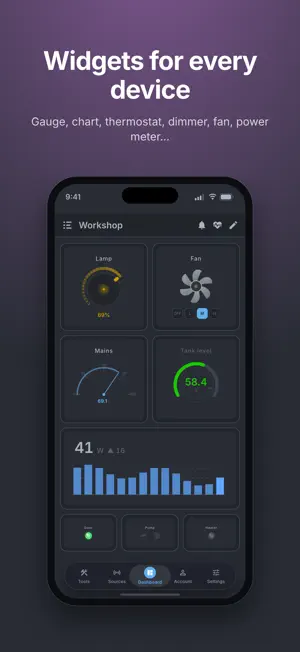


About Smart Dash: IoT Dashboards
Smart Dash is two things in one app: a no-code dashboard builder for real-time data, and a toolbox of IoT clients for the device on your bench. Connect a source, name the values you care about, drop widgets on a dashboard. From a raw endpoint to a live gauge in about five minutes, with no code. Six protocols, plus static values • MQTT — subscribe to topics with wildcards, publish to control • HTTP / REST — poll any endpoint with GET, POST, PUT, PATCH or DELETE • WebSocket — a persistent two-way stream, with per-tag message filters • Server-Sent Events (SSE) — one-way push that reconnects itself • Socket.IO — named events, namespaces and custom paths • Bluetooth Low Energy — connect over GATT, or read broadcast beacons • Static values — fixed labels and placeholders Every protocol works on every plan. Reads and writes work on all of them, with JSON, raw bytes, hex, ASCII key:value, regex or your own parser, and byte-level addressing for binary payloads. Works with ESP32 and Arduino projects, Raspberry Pi scripts, Home Assistant, Node-RED, Shelly and Tasmota devices, energy monitors, and any REST API you already have. 15 widgets, 20 styles Sensor readouts, arc gauges, power meters and charts for reading. Buttons, switches, relays, sliders (horizontal, vertical and circular), light dimmers, fans, thermostats, selectors (segments, list or dropdown) and numeric inputs for writing back. Colour zones, units, decimals, icons and value transforms where needed. An IoT toolbox, included Seven standalone tools that need no dashboard, no account and no sign-up: • BLE Scanner — find devices, read and write their characteristics • Wi-Fi Provision — put an ESP32 onto your Wi-Fi network • API Tester — fire an HTTP request with any method, headers and body • MQTT Client — subscribe and publish against a broker • WebSocket Client — open a socket, exchange text or hex • SSE Client — watch an event stream, named events included • Socket.IO Client — connect, listen, emit, and see acknowledgements Useful on their own, and the fastest way to check that a device responds, and what it sends, before building a dashboard. Alerts on your terms Set rules on any widget — above, below, outside a range, equals — and get a notification when a reading crosses the line. Alerts are evaluated on the device and delivered as local notifications, so they work with no account and no cloud round-trip. Your data stays yours Smart Dash opens straight into a guest session. No sign-up wall, no account, no upload — dashboards, sources and every credential you enter stay on your device. Sign in only if you want your dashboards backed up and waiting on your other devices, and room for more dashboards and sources. Signing in is free. API keys, tokens, passwords and the addresses they reach are encrypted on your device before upload, with a key that never leaves your devices. We store the result and cannot read it. No advertising. No analytics SDK. Your phone talks to your devices directly. Plans Every protocol and every tool is available on every plan. A guest gets 5 dashboards, 5 sources and 10 widgets per dashboard; a free account gets 10 dashboards, 10 sources and 10 widgets per dashboard, plus cloud sync. Both keep one MQTT, one Bluetooth and one Socket.IO connection at a time. HTTP, WebSocket, SSE and Static sources have no such cap. Smart Dash Pro is an optional monthly subscription that removes the caps above. Good to know Alerts and live values need the app open on the dashboard. Smart Dash is not a safety, alarm, medical or life-critical system — please do not rely on it where a missed reading or a delayed alert could cause harm. MQTT connections are made over WebSocket, so your broker needs a WebSocket listener enabled. Terms of Use (EULA): https://www.apple.com/legal/internet-services/itunes/dev/stdeula/ Smart Dash Terms: https://getsmartdash.com/terms Privacy Policy: https://getsmartdash.com/privacy
What’s new
Version 1.0.4 · Updated October 25, 2026
New in 1.0.4 • Tags can read their own URL. • Move your Recovery Code to a new phone by scanning a QR. • Pull to refresh on Sources. • Bug fixes and improvements.
App privacy
The developer, GROSNET TECHNOLOGY COMPANY LIMITED, reported these privacy practices to Apple.
Data Linked to You
The following data, which may be collected and linked to your identity, may be used for the following purposes:
- Location: Coarse Location
- Purchases: Purchase History
- Contact Info: Email Address, Name
- User Content: Other User Content
- Identifiers: User ID, Device ID
Used for: Analytics, App Functionality
Data Not Linked to You
The following data, which may be collected but is not linked to your identity, may be used for the following purposes:
- Diagnostics: Crash Data, Performance Data
Used for: App Functionality
Alternatives to Smart Dash: IoT Dashboards
Looking for apps like Smart Dash: IoT Dashboards? Here are 6 similar apps on the App Store. The highest rated is RLSAND Home for HomeKit (5.0/5), and 5 of the 6 are free to download.
-
 RLSAND Home for HomeKit
5.0
RLSAND Home for HomeKit
5.0
-
 Ventaurio: Solar & Smart Home
-
 BLE Scanner – Monitor
-
 Dark Pages: Dark Mode+
-
 CliniEquip
-
 EasyArduinoBleTerm
| App | Rating | Price | Last updated | Compare |
|---|---|---|---|---|
| Smart Dash: IoT Dashboards | – | Free | October 25, 2026 | |
| RLSAND Home for HomeKit | 5.0 / 5 (1) | Free | Sep 29, 2026 | Compare |
| Ventaurio: Solar & Smart Home | – | Free | Oct 14, 2026 | Compare |
| BLE Scanner – Monitor | – | Free | Jul 16, 2026 | Compare |
| Dark Pages: Dark Mode+ | – | 1.99 USD | Jul 23, 2025 | Compare |
| CliniEquip | – | Free | Feb 26, 2025 | Compare |
| EasyArduinoBleTerm | – | Free | Jun 29, 2026 | Compare |