

Handbrace - Compress Factory
Diep Huu Kha Utilities iPhoneiPadiPod touch
Handbrace - Compress Factory is a free Utilities app for iPhone and iPad by Diep Huu Kha. Requires iOS 13.0. Updated September 25, 2026.
- Price
- Free
- on the App Store
- Size
- 42 MB
- Age 4+
- Updated
- Sep 25
- 2026 · v5.0
Screenshots


About Handbrace - Compress Factory
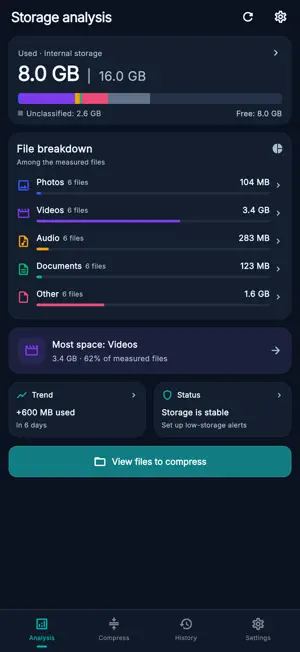
Large files taking up space or making sharing difficult? File Compressor: Smart Batch helps you reduce file size for photos, videos, audio and documents in one batch. Select your files, choose a compression level and review the results. See the original size, compressed size and percentage reduced, then save or share the files you need. • Compress multiple files Select several files from a thumbnail grid and process them together. Filter by file type, search by name, and sort by largest, newest or name to find where to start. • Photo and video compression Make supported photos and videos smaller with quality and size controls. Choose a preset or adjust the available image quality, video resolution and codec settings for your device. • PDF compression with optional OCR Create a smaller PDF by converting its pages to compressed images and rebuilding the document. Enable OCR to add recognized text for search and copying. This mode keeps the original file; interactive forms, links and digital signatures are not preserved. Results depend on the document and selected quality. • Audio and documents Compress supported audio to M4A/AAC. Use lossless GZIP compression for documents and other readable files, including text, spreadsheets, logs and backups. GZIP creates individual .gz files that need to be extracted before opening. • Understand your storage See total, used and available device storage, with a color breakdown of accessible file types. Find large files and enable low-storage reminders to help you decide what to review next. • Review, keep and share Keep compressed copies separately, or choose to replace eligible originals after confirmation. View results in a history organized by batch, rename groups, reopen files and share one file or several together. • Process files on your device Compression and OCR process file contents on your device. A dark interface, compact grids and layouts that adapt to phones and tablets keep your files easy to browse. Compression results vary by file, settings and device support. The app keeps a compressed output only when it is smaller than the source. Creating a compressed copy alone does not free device storage while the original remains. Choose your files. Compare the results. Share smaller copies. Terms of Use: https://www.apple.com/legal/internet-services/itunes/dev/stdeula/ https://sites.google.com/view/batchcompres-policy/trang-ch%E1%BB%A7
What’s new
Version 5.0 · Updated September 25, 2026
Fix bug Fast Crompress
App privacy
The developer, Diep Huu Kha, reported these privacy practices to Apple.
Data Used to Track You
The following data may be used to track you across apps and websites owned by other companies:
- Other Data: Other Data Types
Data Linked to You
The following data, which may be collected and linked to your identity, may be used for the following purposes:
- Other Data: Other Data Types
Used for: Third-Party Advertising
Alternatives to Handbrace - Compress Factory
Looking for apps like Handbrace - Compress Factory? Here are 6 similar apps on the App Store. The highest rated is Compress Audio - Shrink Audio (5.0/5), and all 6 are free to download.
-
 Compress Audio - Shrink Audio
5.0
-
 Audio File Compressor - Shrink
5.0
-
 AnyCompress - File Compressor
3.0
-
 Audio Compressor: MP3 Reducer
3.0
-
 File Compressor - Shrink Size
3.9
-
 audio compressor
1.0
| App | Rating | Price | Last updated | Compare |
|---|---|---|---|---|
| Handbrace - Compress Factory | – | Free | September 25, 2026 | |
| Compress Audio - Shrink Audio | 5.0 / 5 (2) | Free | Sep 17, 2026 | Compare |
| Audio File Compressor - Shrink | 5.0 / 5 (1) | Free | Sep 10, 2026 | Compare |
| AnyCompress - File Compressor | 3.0 / 5 (2) | Free | Mar 20, 2025 | Compare |
| Audio Compressor: MP3 Reducer | 3.0 / 5 (2) | Free | Jul 21, 2025 | Compare |
| File Compressor - Shrink Size | 3.9 / 5 (55) | Free | Sep 5, 2026 | Compare |
| audio compressor | 1.0 / 5 (1) | Free | Oct 26, 2024 | Compare |