

Aurora: Dark Mode for Safari
Dat Nguyen Nam Thanh Utilities iPhoneiPadiPod touchMac
Aurora: Dark Mode for Safari is a free Utilities app for iPhone and iPad by Dat Nguyen Nam Thanh. Rated 5.0/5 from 32 ratings. Requires iOS 16.0.
- Rating
- 5.0
- 32 ratings
- Price
- Free
- on the App Store
- Size
- 8 MB
- Age 4+
- Updated
- Oct 12
- 2026 · v4.0
Screenshots



About Aurora: Dark Mode for Safari
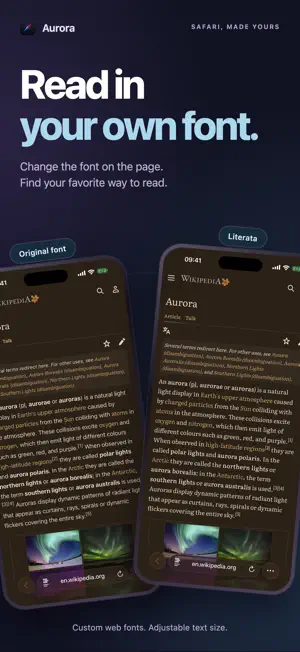
NEW IN 26 — EASY REPORT Unreadable text, wrong colors, or a page that looks too dark? Open Aurora in Safari and tap “Report a problem.” Choose what looks wrong, add an optional note, and review or remove the screenshot before sending. No account needed. Help us see which pages need attention. YOU REPORT IT. WE WORK ON IT. We review reports daily, track reported issues, and investigate what went wrong. Your reports help us prioritize bug fixes for future Aurora updates. Tired of blinding screens at night? Wish you could browse in total comfort, with a style that's uniquely yours? Aurora is the only Safari dark mode built for iOS — with Focus Filter, Control Center, Live Activity, and Auto Schedule features no other dark mode app has. Unlike the dark mode in iOS Settings or Focus modes — which only darkens the Safari interface — Aurora darkens the website content itself, even on sites that have no dark mode of their own. MADE FOR iOS — FEATURES NO OTHER DARK MODE APP HAS • Read in Your Own Font — the new Font tab brings 14 typefaces, from Literata and Inter to OpenDyslexic and Atkinson Hyperlegible, plus four text sizes. Per-site control, and it works with dark mode on or off. • Focus Filter — Aurora automatically toggles dark mode when you enter Sleep, Reading, Work, or any iOS Focus mode. Built right into iOS. • Control Center Widget — Toggle dark mode from anywhere on iOS 18+, even outside Safari, with one tap. • Live Activity — See dark mode status on your Lock Screen and Dynamic Island. • Auto Schedule — Automatic on/off at custom times. Different schedules per day of the week. Let Aurora adapt to your routine. • Siri & Shortcuts — "Hey Siri, turn on dark mode." Automate Aurora with the Shortcuts app. One tap, total control. • iOS Appearance Sync — "Sunset to sunrise." Aurora automatically toggles on and off based on your iOS system theme. Perfect harmony. BUILT FOR iOS 18+ Aurora is updated for the latest iOS and works reliably where other dark mode extensions fail. Site-specific optimizations for YouTube, Google, Twitter, Reddit, Amazon, Wikipedia, Medium, and many more for the best possible experience. BEYOND DARK MODE — A COMPLETE EYE COMFORT TOOLKIT • Unleash Your Creativity — Don't settle for black and white. Our powerful Theme Creator lets you design and save unlimited unique themes. Your web, your colors. • Protect Your Eyes & Sleep Better — Our Blue Light Filter reduces harmful blue light from screens, helping to reduce eye strain and improve your sleep quality. • Reduce Annoying Glare — Tame overly bright images, ads, and banners with the Image Filter. Enjoy a perfectly balanced and comfortable view in any lighting condition. • Fine-Tune Your Experience — Adjust brightness (10–190%) and contrast (10–290%) to match your perfect reading comfort level. • You Are In Control — Use the powerful Whitelist/Blacklist feature to decide exactly which websites Aurora should run on. WHY AURORA PRO? • Unlock every feature — Theme Creator, Focus Filter, Auto Schedule, unlimited themes and fonts, and more. • Pay once, keep it forever — the Lifetime unlock never renews. No subscription needed. • 3-day free trial — no credit card, no auto-charge. • One purchase covers iPhone, iPad and Mac. • Free lifetime updates and priority support. Download Aurora today and rediscover the joy of browsing at night!
Ratings & reviews
5.0
32 ratings
What’s new
Version 4.0 · Updated October 12, 2026
FIXED FROM YOUR REPORTS • Post rows no longer turn white with unreadable text after you tap them (reported on torrentmac.net). • The current page number in page lists keeps its highlight color on torrentmac.net. • Article cards no longer show a dark band behind the title when highlighted, on torrentmac.net and similar blog sites. Something still looks wrong on a site? Tap “Report a problem” in Aurora’s Safari popup. We review reports daily.
App privacy
The developer, Dat Nguyen Nam Thanh, reported these privacy practices to Apple.
Data Not Linked to You
The following data, which may be collected but is not linked to your identity, may be used for the following purposes:
- Purchases: Purchase History
- Usage Data: Product Interaction, Other Usage Data
Used for: Analytics, App Functionality
Alternatives to Aurora: Dark Mode for Safari
Looking for apps like Aurora: Dark Mode for Safari? Here are 6 similar apps on the App Store. The highest rated is Noxri: Dark Mode for Safari (4.6/5), and all 6 are free to download.
-
 Darkify for Safari
3.5
Darkify for Safari
3.5
-
 Dark Mode for Safari - EyeRest
1.0
Dark Mode for Safari - EyeRest
1.0
-
 Noxri: Dark Mode for Safari
4.6
Noxri: Dark Mode for Safari
4.6
-
 Dark Reader Mode for Safari
4.3
Dark Reader Mode for Safari
4.3
-
 Dark Mode - Dark Reader
4.3
Dark Mode - Dark Reader
4.3
-
 Ultra Dark Mode Extension
4.3
Ultra Dark Mode Extension
4.3
| App | Rating | Price | Last updated | Compare |
|---|---|---|---|---|
| Aurora: Dark Mode for Safari | 5.0 / 5 (32 ratings) | Free | October 12, 2026 | |
| Darkify for Safari | 3.5 / 5 (11) | Free | Sep 3, 2026 | Compare |
| Dark Mode for Safari - EyeRest | 1.0 / 5 (1) | Free | Nov 7, 2025 | Compare |
| Noxri: Dark Mode for Safari | 4.6 / 5 (10) | Free | Sep 30, 2026 | Compare |
| Dark Reader Mode for Safari | 4.3 / 5 (7) | Free | Jul 30, 2026 | Compare |
| Dark Mode - Dark Reader | 4.3 / 5 (3) | Free | Oct 13, 2026 | Compare |
| Ultra Dark Mode Extension | 4.3 / 5 (6) | Free | Aug 14, 2026 | Compare |