

PDF to Text Converter.
Asad Ahsan Productivity iPhoneiPadiPod touchMac
PDF to Text Converter. is a free Productivity app for iPhone and iPad by Asad Ahsan. Rated 4.2/5 from 5 ratings. Requires iOS 15.0. Updated August 6, 2026.
- Rating
- 4.2
- 5 ratings
- Price
- Free
- on the App Store
- Size
- 34 MB
- Age 4+
- Updated
- Aug 6
- 2026 · v1.0.7
Screenshots


About PDF to Text Converter.
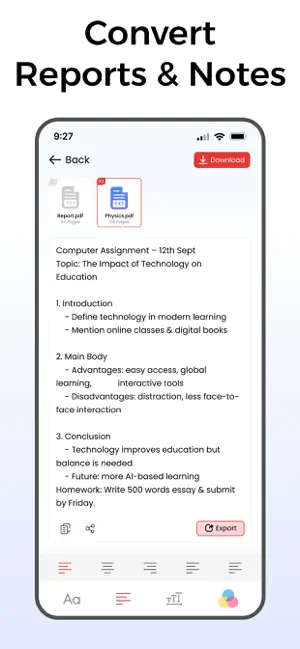
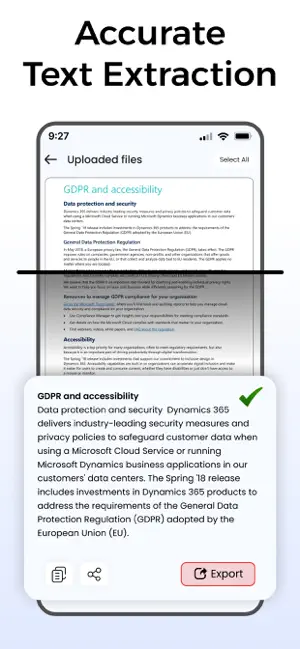
PDF to Text Converter – The Easiest Way to Get Editable Text! Looking for a fast, reliable, and lightweight PDF to Text Converter? With this powerful PDF to Text app, you can easily extract clean text from your PDF files and save them as editable TXT documents. Whether you need to copy lecture notes, edit reports, prepare contracts, or share content, this smart text extractor from PDF makes everything quick and simple. With just one tap, this PDF to Text Converter transforms your PDFs into clean, editable text. You can convert single or multiple files at once with the batch conversion feature, making it perfect for handling large documents. The app is lightweight, works completely offline, and ensures your documents stay private. Key Features: • Fast & Accurate Extraction – Convert any PDF into clean, editable text in seconds. • Batch Conversion – Load and convert multiple PDF files together. • Smart Page Selection – Preview all PDF pages and extract only the ones you need. • Easy File Import – Add files from camera, gallery, or cloud drive instantly. • Edit extracted text – add new words or lines, or remove unwanted text easily. • Offline & Private – Works without internet, keeping your files secure. • Export Options – Save as TXT or export multiple files as ZIP. • Quick Sharing – Instantly share extracted text from pdf with others. • Recents & File Management – Rename, delete, or replace files anytime. Work with Multiple Files Smoothly: Managing big documents? No problem. Select multiple PDFs at once, preview their pages, and choose only the content you want to convert. You can edit, replace, or delete files before saving the final version. Even if you load the wrong file, removing it takes just a tap. Batch processing makes handling large collections and customized conversions effortless. How PDF to Text converter Works: • Import one or more PDF files from your device, gallery, camera, or cloud. •Preview pages and select what you want to extract. •Tap “Convert” to get editable text instantly. • Edit Text – add, edit, or remove text with ease • Export as TXT or save multiple files as a ZIP. • Access your recent conversions anytime and share them with others. Access recent conversions anytime and share with others. This smooth process saves time, avoids errors, and makes handling PDFs easier than ever before. Why Choose This PDF to Text Converter? • Lightweight, fast, and user-friendly design. • Works offline for privacy and convenience. • Advanced text extractor ensures accuracy and clean formatting. • Flexible tools: batch processing, editing, and file management. • Perfect for both quick conversions and professional use. Perfect For: • Students who need editable notes from PDFs. • Professionals extracting text from contracts, reports, and presentations. • Writers, researchers, and readers working with reference material. • Anyone searching for a free, fast, and accurate PDF to TXT reader. Whether you call it a PDF to Text Converter, PDF to TXT tool, or a Text Extractor from PDF, this all-in-one solution is designed to make your life easier. Extract, edit, save, and share your text—all within seconds. Download now and enjoy the fastest, most accurate, and hassle-free PDF to Text Converter – free, offline, and made for everyone! Disclaimer: Our app is unique and independently developed. We respect your privacy and never share your data with third parties. Privacy Policy https://www.cardscanner.co/privacy Terms of Service https://www.cardscanner.co/terms Support Email: [email protected]
Ratings & reviews
4.2
5 ratings
What’s new
Version 1.0.7 · Updated August 6, 2026
- Support for new devices - User friendly Interface - Performance Enhancement - Bug Fixed
App privacy
The developer, Asad Ahsan, reported these privacy practices to Apple.
Data Not Collected
The developer does not collect any data from this app.
Alternatives to PDF to Text Converter.
Looking for apps like PDF to Text Converter.? Here are 6 similar apps on the App Store. The highest rated is PDF to Text Extractor (5.0/5), and all 6 are free to download.
-
 PDF to Text Extractor
5.0
PDF to Text Extractor
5.0
-
 Text to PDF Converter - TXT
4.3
Text to PDF Converter - TXT
4.3
-
 Text Scanner・Image to Text
4.7
Text Scanner・Image to Text
4.7
-
 Text to PDF Converter - Text2P
4.7
Text to PDF Converter - Text2P
4.7
-
 PDF Converter PDF to Word docx
4.6
PDF Converter PDF to Word docx
4.6
-
 Text to Speech PDF Reader
4.5
Text to Speech PDF Reader
4.5
| App | Rating | Price | Last updated | Compare |
|---|---|---|---|---|
| PDF to Text Converter. | 4.2 / 5 (5 ratings) | Free | August 6, 2026 | |
| PDF to Text Extractor | 5.0 / 5 (2) | Free | Aug 18, 2025 | Compare |
| Text to PDF Converter - TXT | 4.3 / 5 (89) | Free | Aug 27, 2026 | Compare |
| Text Scanner・Image to Text | 4.7 / 5 (16) | Free | Oct 23, 2026 | Compare |
| Text to PDF Converter - Text2P | 4.7 / 5 (22) | Free | Oct 22, 2026 | Compare |
| PDF Converter PDF to Word docx | 4.6 / 5 (36) | Free | Jun 3, 2025 | Compare |
| Text to Speech PDF Reader | 4.5 / 5 (561) | Free | Jul 19, 2026 | Compare |