

Tally Counter: Click Counter
Kostiantyn Krizhanovskyi Utilities iPhoneiPadiPod touch
Tally Counter: Click Counter is a free Utilities app for iPhone and iPad by Kostiantyn Krizhanovskyi. Requires iOS 18.0. Updated October 4, 2026.
- Price
- Free
- on the App Store
- Size
- 24 MB
- Age 4+
- Updated
- Oct 4
- 2026 · v2.0.0
Screenshots



About Tally Counter: Click Counter
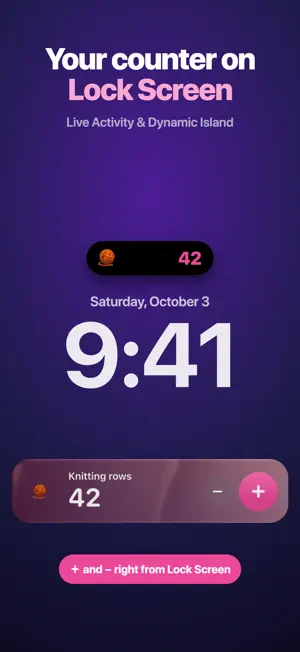
The fastest way to count anything — from the Home Screen, Lock Screen or Dynamic Island. Tally Counter is a simple, beautiful clicker for reps, laps, rows, people, scores, habits and inventory. Tap +, see the number, done. When you need more, there are goals, streaks, charts and widgets that actually stay in sync. COUNT WITHOUT OPENING THE APP • Interactive Home Screen widgets with + and − buttons (small, medium, large, extra large) • Lock Screen widgets: circular gauge, rectangular and inline • Live Activity on the Lock Screen and Dynamic Island with + and − • Control Center button and Action Button • Siri & Shortcuts: increase, decrease, reset, set or read any counter COUNT HANDS-FREE • Use the volume buttons as a clicker • Tap anywhere on screen in focus mode • Keep the screen awake while counting • Haptic feedback and click sounds GOALS & HABITS • Set a goal and watch the progress ring fill up • Auto-reset daily, weekly, monthly or yearly • Streaks and daily charts show your progress over time • Full history of every tap with undo ORGANIZED YOUR WAY • Unlimited counters with Pro (3 free) • Custom step values, negative values, notes and lock • 14 colors, SF Symbols or emoji icons • Groups to keep counters together • 12 ready-made templates: push-ups, water, coffee, laps, pages read, knitting rows, dhikr / tasbih, people count, inventory, score and more SYNC & EXPORT • iCloud sync across iPhone and iPad • Export history to CSV PERFECT FOR • Workouts — reps, sets, push-ups and laps • Knitting and crochet — row and stitch counter • Dhikr and tasbih prayer counting • Events — people, attendance and crowd counting • Board games and sports — score keeper • Inventory, traffic and bird counts • Habits — water, coffee, cigarettes, pages read TALLY COUNTER PRO Unlimited counters, charts and full history, CSV export, iCloud sync, groups and Live Activities. Subscriptions renew automatically unless cancelled at least 24 hours before the end of the current period. Manage them in your App Store account settings. Privacy Policy: https://telegra.ph/Privacy-Notice-09-02 Terms of Use: https://telegra.ph/Terms-and-Conditions-09-02-6
What’s new
Version 2.0.0 · Updated October 4, 2026
Tally Counter 2.0 is a complete rebuild: • Interactive widgets for Home Screen and Lock Screen — count without opening the app • Live Activity with +/− on the Lock Screen and Dynamic Island • Control Center button, Siri, Shortcuts and Action Button support • Count with the volume buttons or tap anywhere on screen • Goals, daily/weekly/monthly auto-reset and streaks • Charts and full history, CSV export • Groups, 12 ready-made templates, iCloud sync • iPad support • 3 counters free
App privacy
The developer, Kostiantyn Krizhanovskyi, reported these privacy practices to Apple.
Data Not Linked to You
The following data, which may be collected but is not linked to your identity, may be used for the following purposes:
- Identifiers: User ID, Device ID
- Usage Data: Product Interaction
Used for: Analytics
Alternatives to Tally Counter: Click Counter
Looking for apps like Tally Counter: Click Counter? Here are 6 similar apps on the App Store. The highest rated is Counter App Countapp (5.0/5), and all 6 are free to download.
-
 Tally Counter: Clicker Counter
-
 Click Counter: Tally Count
-
 Counter App Countapp
5.0
-
 Tapok: Tally & Clicker Counter
-
 Ripple Counter
-
 Tally - Smart Counter
| App | Rating | Price | Last updated | Compare |
|---|---|---|---|---|
| Tally Counter: Click Counter | – | Free | October 4, 2026 | |
| Tally Counter: Clicker Counter | – | Free | Sep 21, 2025 | Compare |
| Click Counter: Tally Count | – | Free | Jul 20, 2025 | Compare |
| Counter App Countapp | 5.0 / 5 (7) | Free | Jan 5, 2026 | Compare |
| Tapok: Tally & Clicker Counter | – | Free | Jun 19, 2026 | Compare |
| Ripple Counter | – | Free | Oct 18, 2026 | Compare |
| Tally - Smart Counter | – | Free | Sep 26, 2026 | Compare |