

Photo Collage - Create & Share
PixelWave LLC Photo & Video iPhoneiPadiPod touch
Photo Collage - Create & Share is a free Photo & Video app for iPhone and iPad by PixelWave LLC. Rated 5.0/5 from 1 ratings. Requires iOS 17.0.
- Rating
- 5.0
- 1 ratings
- Price
- Free
- on the App Store
- Size
- 14 MB
- Age 4+
- Updated
- Jun 30
- 2026 · v1.8.1
Screenshots

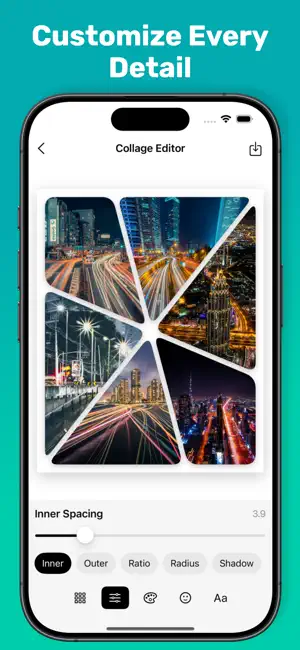
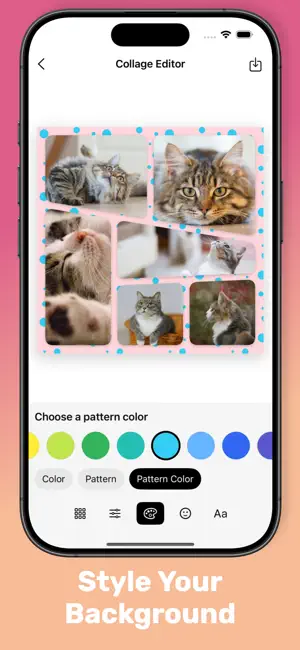

About Photo Collage - Create & Share
Transform your photos into beautiful collages with PhotoCollage - the ultimate photo editing and collage creation app! 140+ Stunning Templates Choose from a variety of professionally designed layouts that work perfectly with 1-9 photos. From simple grids to creative geometric shapes, find the perfect template for any occasion. Powerful Editing Tools • Layout Editor: Switch between templates instantly • Custom Spacing: Adjust inner and outer padding • Aspect Ratios: Perfect for social media or print • Corner Radius: Add rounded corners to your photos • Shadow Effects: Create depth with customizable shadows Creative Features • Text Overlays: Add custom text with multiple fonts and colors • Stickers: Decorate with fun emoji-style stickers • Background Patterns: 25+ beautiful patterns including geometric, nature, and abstract designs • Color Backgrounds: Choose from a wide palette of colors User-Friendly Design • Intuitive drag-and-drop interface • Real-time preview of your changes • Easy photo selection from your library • High-resolution export and share Perfect For • Social media posts and stories • Memory books and scrapbooks • Event announcements and invitations • Creative projects and art • Sharing special moments with friends and family Save & Share Export your creations in high quality and save directly to your photo library. Share your beautiful collages on any platform! Download Photo Collage today and start creating amazing photo collages that will impress everyone! Terms of Use: https://pixelwaveapp.com/apps/photo-collage/terms Privacy Policy: https://pixelwaveapp.com/apps/photo-collage/privacy
What’s new
Version 1.8.1 · Updated June 30, 2026
Bug fixes and performance improvements.
App privacy
The developer, PixelWave LLC, reported these privacy practices to Apple.
Data Used to Track You
The following data may be used to track you across apps and websites owned by other companies:
- Identifiers: User ID, Device ID
- Usage Data: Product Interaction, Advertising Data
Data Linked to You
The following data, which may be collected and linked to your identity, may be used for the following purposes:
- Identifiers: User ID, Device ID
- Usage Data: Product Interaction, Advertising Data
- Diagnostics: Crash Data, Performance Data
Used for: Third-Party Advertising, Analytics, App Functionality
Alternatives to Photo Collage - Create & Share
Looking for apps like Photo Collage - Create & Share? Here are 6 similar apps on the App Store. The highest rated is CollageVibe Easy Photo Collage (5.0/5), and all 6 are free to download.
-
 CollageVibe Easy Photo Collage
5.0
CollageVibe Easy Photo Collage
5.0
-
 Photo Grid: Collage Maker
4.9
Photo Grid: Collage Maker
4.9
-
 Easy Photo Grid
5.0
Easy Photo Grid
5.0
-
 PhotoSwift: Pic Editor&Collage
4.9
PhotoSwift: Pic Editor&Collage
4.9
-
 Collage Maker ▫
4.6
Collage Maker ▫
4.6
-
 PicCollage:photo Collage Maker
4.5
PicCollage:photo Collage Maker
4.5
| App | Rating | Price | Last updated | Compare |
|---|---|---|---|---|
| Photo Collage - Create & Share | 5.0 / 5 (1 rating) | Free | June 30, 2026 | |
| CollageVibe Easy Photo Collage | 5.0 / 5 (3) | Free | Sep 4, 2026 | Compare |
| Photo Grid: Collage Maker | 4.9 / 5 (8) | Free | Jul 30, 2026 | Compare |
| Easy Photo Grid | 5.0 / 5 (1) | Free | Jun 26, 2025 | Compare |
| PhotoSwift: Pic Editor&Collage | 4.9 / 5 (72) | Free | May 31, 2026 | Compare |
| Collage Maker ▫ | 4.6 / 5 (5,256) | Free | Jan 5, 2026 | Compare |
| PicCollage:photo Collage Maker | 4.5 / 5 (21) | Free | Oct 13, 2026 | Compare |