

PDF Reader: Scanner & OCR Scan
SUPERNOVA MEDIA JOINT STOCK COMPANY Utilities iPhoneiPadiPod touch
PDF Reader: Scanner & OCR Scan is a free Utilities app for iPhone and iPad by SUPERNOVA MEDIA JOINT STOCK COMPANY. Rated 4.3/5 from 66 ratings.
- Rating
- 4.3
- 66 ratings
- Price
- Free
- on the App Store
- Size
- 69 MB
- Age 4+
- Updated
- Sep 11
- 2026 · v4.1
Screenshots


About PDF Reader: Scanner & OCR Scan
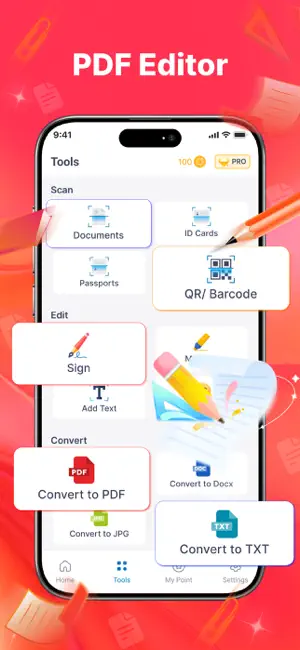
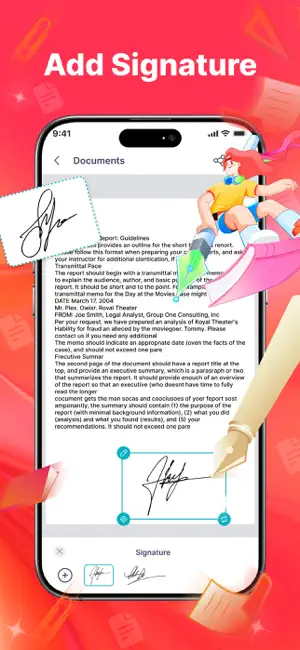
PDF Reader brings everything you need to work with documents into one simple app. Easily read and edit your PDFs, then scan documents and extract text with OCR. You can also convert files between different formats. It also lets you scan passports and ID cards, add signatures, and even scan your sketches and convert them to a document. MAIN FEATURES: - PDF Reader: Open and view your PDF files smoothly - PDF Scanner: Quickly scan documents, receipts, notes, and photos into high quality PDF files. - Add Signature: Sign PDF directly on your device. - PDF Editor: add text, mark up your document. - HWP Reader: Easily open and read HWP files on your phone - Converter Tool: Easily convert documents to PDF, TXT, PPT, DOCX, or Excel. - Smart Document Scanner: Scan all documents, QR codes, and live text using your camera. - Import from Photos: Use existing images from your gallery and turn them into scannable documents. - OCR Text Scanner: Extract and recognize text from images accurately. - ID Card & Passport Scanner: Scan ID cards, passports, and important papers. - Sketch & Scan: Scan drawings and turn them into digital files. WHY SHOULD YOU USE PDF READER APP? - All-in-One Tool: You can use Document scanner, PDF editor & converter - Fast result: Auto-enhance scans for clear, high-quality results ready for business, school, or legal use. - Time-Saving: Replace desktop scanners, printers, or multiple apps. - Secure & Private: No cloud upload unless you choose; you remain in full control of your documents. - Useful for students, freelancers, and anyone who works with documents. SUBSCRIPTION INFO Enjoy a 3-day free trial to experience all premium features: Weekly: $5.99 Yearly: $99.99 Your subscription will automatically renew unless auto-renew is turned off at least 24 hours before the current period ends. Payment will be charged to your Apple ID account at the time of purchase. You can manage or cancel your subscription anytime in Settings → Apple ID → Subscriptions after purchase. Any unused portion of a free trial period will be forfeited once you purchase a subscription. Download PDF Reader: Scanner & OCR Scan app now to easily manage and edit all PDF documents! Policy: https://sites.google.com/view/xpdf-pro-privacy TnC: https://sites.google.com/view/xpdf-pro-term-condition
Ratings & reviews
4.3
66 ratings
What’s new
Version 4.1 · Updated September 11, 2026
Improved PDF viewing performance, enhanced document rendering, and overall app stability.
App privacy
The developer, SUPERNOVA MEDIA JOINT STOCK COMPANY, reported these privacy practices to Apple.
Data Used to Track You
The following data may be used to track you across apps and websites owned by other companies:
- Usage Data: Advertising Data
Data Not Linked to You
The following data, which may be collected but is not linked to your identity, may be used for the following purposes:
- Usage Data: Advertising Data
Used for: Third-Party Advertising
Alternatives to PDF Reader: Scanner & OCR Scan
Looking for apps like PDF Reader: Scanner & OCR Scan? Here are 6 similar apps on the App Store. The highest rated is ScanDoc Pro: Scan All Document (4.5/5), and all 6 are free to download.
-
 ScanDoc Pro: Scan All Document
4.5
ScanDoc Pro: Scan All Document
4.5
-
 iQR Scanner Pro
4.4
iQR Scanner Pro
4.4
-
 Phone cleaner + Photo cleaner
4.1
Phone cleaner + Photo cleaner
4.1
-
 PDF Reader - EZ Read PDF
3.7
PDF Reader - EZ Read PDF
3.7
-
 DocScan App: PDF Scanner, Edit
1.0
DocScan App: PDF Scanner, Edit
1.0
-
 PDF Reader Pro: Scan & Convert
4.5
PDF Reader Pro: Scan & Convert
4.5
| App | Rating | Price | Last updated | Compare |
|---|---|---|---|---|
| PDF Reader: Scanner & OCR Scan | 4.3 / 5 (66 ratings) | Free | September 11, 2026 | |
| ScanDoc Pro: Scan All Document | 4.5 / 5 (52) | Free | Sep 9, 2026 | Compare |
| iQR Scanner Pro | 4.4 / 5 (35) | Free | Aug 1, 2026 | Compare |
| Phone cleaner + Photo cleaner | 4.1 / 5 (524) | Free | Feb 12, 2026 | Compare |
| PDF Reader - EZ Read PDF | 3.7 / 5 (15) | Free | Dec 2, 2025 | Compare |
| DocScan App: PDF Scanner, Edit | 1.0 / 5 (1) | Free | Mar 18, 2026 | Compare |
| PDF Reader Pro: Scan & Convert | 4.5 / 5 (1,392) | Free | Sep 23, 2026 | Compare |