
Navidog for MySQL
冰冰 邓 Developer Tools iPhoneiPadiPod touchMac
Navidog for MySQL is a free Developer Tools app for iPhone and iPad by 冰冰 邓. Requires iOS 17.0. Updated October 2, 2026.
- Price
- Free
- on the App Store
- Size
- 28 MB
- Age 4+
- Updated
- Oct 2
- 2026 · v1.2
Screenshots

About Navidog for MySQL
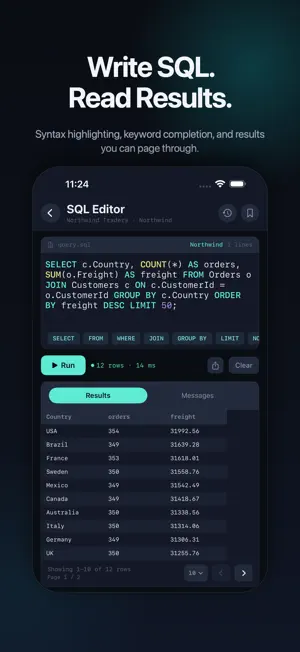
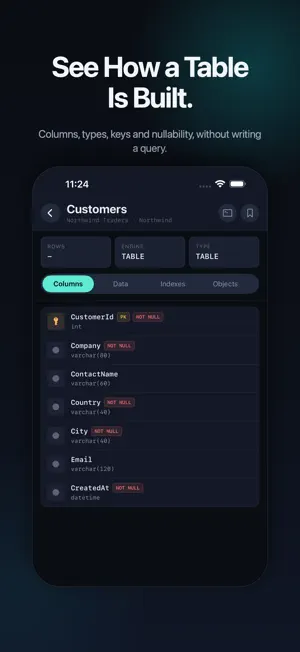
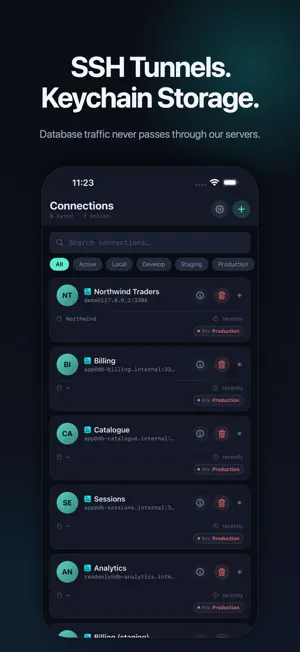
Connect to MySQL and MariaDB from your iPhone and iPad. Run SQL, read your results and browse your schema — your device connects to your server directly, with no Navidog account and no servers of ours in the path. QUERY • A SQL editor with syntax highlighting and MySQL keyword completion • Results in a table you can scroll and search • Query history, per connection • Share query results as CSV (Pro) BROWSE • Databases, tables and views in a searchable list • Page through table data • Column types, keys, defaults and nullability at a glance • Indexes, and the CREATE statement behind any table, view or stored routine CONNECT • MySQL 5.7 and 8.x, MariaDB, and managed database services • TLS, with the certificate handling managed hosts expect • SSH tunnels for servers you reach through a jump host • Paste a mysql:// URI or a connection string and the form fills itself in • Passwords are kept in the system Keychain, and saved connections never hold them in plain text MYSQL REFERENCE A searchable cheat sheet of MySQL syntax — joins, indexes, data types, common statements — for when you are away from your desk. FREE AND PRO The free version includes two saved connections. Pro removes the limit and adds CSV sharing for query results, plus the light theme and the accent colors. Monthly, yearly, or a one-time purchase — and Pro applies to the Mac app too, on the same Apple Account. PRIVACY Database traffic does not pass through our servers. There is no Navidog account to create, no analytics SDK and no crash reporter. SIX LANGUAGES English, Japanese, Simplified Chinese, Korean, German and French — switched inside the app, no restart. Browsing on iPhone and iPad is read-only for table data; the Mac app adds in-place row editing. Anything you write yourself in the SQL editor runs as you typed it. Terms of Use: https://navidog.app/terms Privacy Policy: https://navidog.app/privacy
What’s new
Version 1.2 · Updated October 2, 2026
Navidog for MySQL is the new name for LiteMySQL. Same app, same purchases — it joins the rest of the Navidog family of database clients, and wears its own colour now instead of the blue it had inherited. You can still pick another under Settings › Accent. • Properly translated at last. The table list, the table details, the SQL editor and the query history stayed in English whichever language you had chosen. They don't any more. • German, French, Korean and Japanese each gained around 150 phrases that were missing elsewhere in the app. • The App Store page is now in six languages, and support has moved to navidog.app/support.
App privacy
The developer, 冰冰 邓, reported these privacy practices to Apple.
Data Not Collected
The developer does not collect any data from this app.
Alternatives to Navidog for MySQL
Looking for apps like Navidog for MySQL? Here are 6 similar apps on the App Store. The highest rated is MagicSQL - SQL Client & Editor (5.0/5), and all 6 are free to download.
-
 MySQL Helper - DB Client
-
 Master SQL - Database Manager
-
 MagicSQL - SQL Client & Editor
5.0
-
 BalauDeck
5.0
-
 Octo
-
 D1Explorer - Database Manager
| App | Rating | Price | Last updated | Compare |
|---|---|---|---|---|
| Navidog for MySQL | – | Free | October 2, 2026 | |
| MySQL Helper - DB Client | – | Free | Jul 29, 2026 | Compare |
| Master SQL - Database Manager | – | Free | Oct 16, 2026 | Compare |
| MagicSQL - SQL Client & Editor | 5.0 / 5 (1) | Free | Jun 25, 2026 | Compare |
| BalauDeck | 5.0 / 5 (1) | Free | Oct 20, 2026 | Compare |
| Octo | – | Free | May 2, 2026 | Compare |
| D1Explorer - Database Manager | – | Free | Sep 28, 2026 | Compare |
Compare Navidog for MySQL with the top alternatives: ratings, updates, ASO score and keyword gaps →