

ReadAloud+ Scan Text to Speech
Educated Wish Education iPhoneiPadiPod touch
ReadAloud+ Scan Text to Speech is a free Education app for iPhone and iPad by Educated Wish. Rated 5.0/5 from 3 ratings. Requires iOS 18.5.
- Rating
- 5.0
- 3 ratings
- Price
- Free
- on the App Store
- Size
- 25 MB
- Age 4+
- Updated
- Sep 13
- 2026 · v2.2
Screenshots


About ReadAloud+ Scan Text to Speech
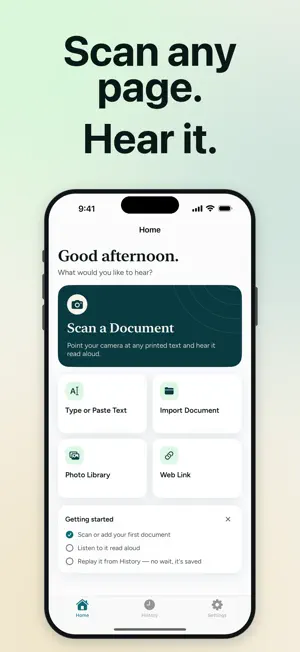
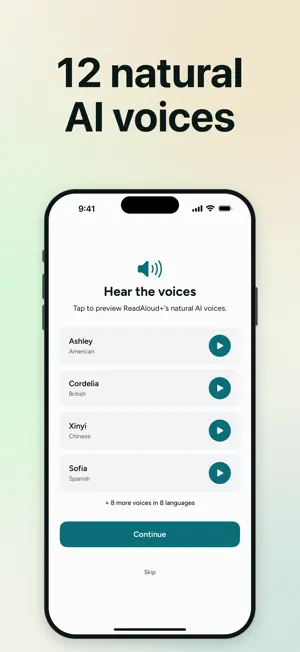
ReadAloud+ turns any document into spoken audio in seconds. Point your camera, scan, and listen — it's that simple. Built low-vision-first: for readers with low vision or dyslexia, students reviewing notes, professionals digesting reports, and anyone who'd rather listen than scroll. HOW IT WORKS - Scan documents with your camera or import from Photos - AI text recognition extracts the text — handles complex layouts, multi-column pages, and curved book pages - Choose a natural voice, hit play, listen at your own pace - Summary mode: get the gist of any long document, read aloud - Adjust playback speed from 0.5x to 2x - Smart cleanup removes headers, footers, and page artifacts - Recent scans stay in History so you can re-listen anytime 12 NATURAL AI VOICES IN 8 LANGUAGES Premium voices that sound real — expressive, distinct, never robotic. Available in English (American and British), Spanish, French, Italian, Portuguese, Hindi, Japanese, and Mandarin. Preview every voice before you choose. Save your favorite per language so switching between documents is seamless. DESIGNED FOR LISTENERS Read by ear, not by eye. Whether you depend on audio for accessibility, multitask while learning, or simply prefer the sound of words, ReadAloud+ is the listening tool that actually keeps up. VoiceOver-friendly throughout, with Dynamic Type and high-contrast support across the app. OFFLINE? STILL WORKS Lost your connection? ReadAloud+ falls back to on-device text recognition and Apple's built-in voices automatically. You can keep scanning and listening even with no signal. 3-DAY FREE TRIAL Try every feature for 3 days at no cost. Then $9.99/month or $79.99/year — no ads, no upsells, no surprises. No voice credits. No per-voice purchases. Cancel anytime in iOS Settings. PRIVACY Documents are ephemeral: we extract the text, generate the audio, and store nothing on our servers. Text recognition is powered by Google Gemini and voices by Inworld; both may retain request data briefly (up to about 90 days) under their policies — the same disclosure shown in the app. We don't sell data, run third-party ad SDKs, or track you across apps. Full policy: https://educatedwishllc.com/privacy Subscriptions auto-renew. Manage in iOS Settings → Apple ID → Subscriptions. Terms of Use (EULA): https://educatedwishllc.com/terms Privacy Policy: https://educatedwishllc.com/privacy
What’s new
Version 2.2 · Updated September 13, 2026
Reader colors and line spacing. Tap Display while reading to choose from eight color options, including Black on Yellow, Yellow on Blue, and Green on Black, and Single, Double, or Triple spacing. Each option previews itself. Search your History. Receipts and lists get a short pause between lines instead of running together, all the way through long bills. Scans made offline now skip letterheads, barcodes, and page numbers, as online scans already did. These scans show a "Read offline" note at the top, and a number that comes out garbled is read as "unclear" instead of as the wrong number. Imported scanned PDFs fall back to offline reading the same way. Documents in a language with no matching voice now play correctly on the first try. VoiceOver: the reading voice now waits until VoiceOver has finished speaking before it starts, and Play keeps focus instead of jumping to Back. Reading speed is spoken at both speed controls, History rows and the reader's sheets announce properly, and onboarding and sign-in no longer cut off text at the largest sizes. The mini player on Home and History now offers only the document you listened to last, can be dismissed, and goes away once you finish it. On a shared device, signing in with a different account now clears the previous account's documents first. The voice picker describes each voice's style, and Apple's free voices are labeled in plain words.
App privacy
The developer, Educated Wish, reported these privacy practices to Apple.
Data Linked to You
The following data, which may be collected and linked to your identity, may be used for the following purposes:
- Purchases: Purchase History
- Contact Info: Email Address, Name
- Identifiers: User ID
- Usage Data: Product Interaction, Other Usage Data
- Diagnostics: Crash Data, Performance Data
- User Content: Photos or Videos, Other User Content
Used for: Analytics, App Functionality
Alternatives to ReadAloud+ Scan Text to Speech
Looking for apps like ReadAloud+ Scan Text to Speech? Here are 6 similar apps on the App Store. The highest rated is Fahan: Somali Translator (4.6/5), and all 6 are free to download.
-
 Refa: Islamic Mood Tracker
-
 Audio Book Reader: ReadBeam
-
 Sensory Reader
-
 ReadLens: AI Text Analyzer
-
 Fahan: Somali Translator
4.6
Fahan: Somali Translator
4.6
-
 Real UK Roads: DriveSim UK
| App | Rating | Price | Last updated | Compare |
|---|---|---|---|---|
| ReadAloud+ Scan Text to Speech | 5.0 / 5 (3 ratings) | Free | September 13, 2026 | |
| Refa: Islamic Mood Tracker | – | Free | Aug 19, 2026 | Compare |
| Audio Book Reader: ReadBeam | – | Free | Oct 13, 2026 | Compare |
| Sensory Reader | – | Free | Feb 18, 2026 | Compare |
| ReadLens: AI Text Analyzer | – | Free | Oct 18, 2026 | Compare |
| Fahan: Somali Translator | 4.6 / 5 (10) | Free | Sep 6, 2026 | Compare |
| Real UK Roads: DriveSim UK | – | Free | Aug 2, 2026 | Compare |