

Penelope Ai
BXT srl Finance iPhoneiPadiPod touch
Penelope Ai is a free Finance app for iPhone and iPad by BXT srl. Requires iOS 15.6. Updated October 5, 2026.
- Price
- Free
- on the App Store
- Size
- 37 MB
- Age 17+
- Updated
- Oct 5
- 2026 · v1.2.1
Screenshots

About Penelope Ai
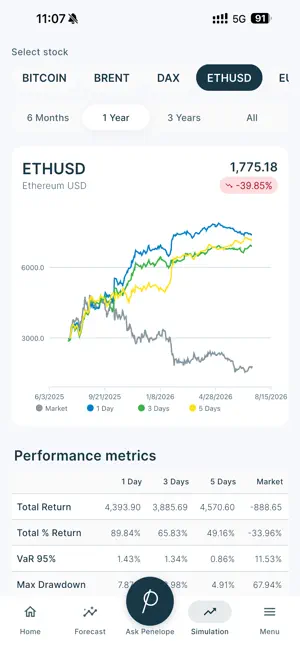
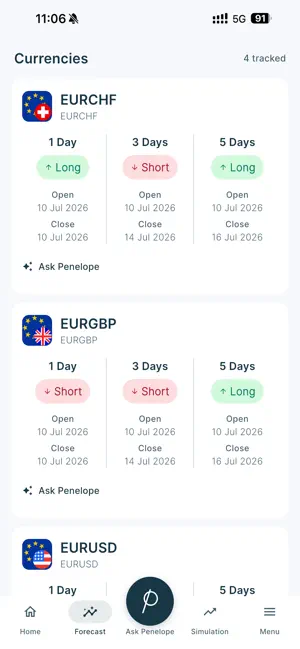
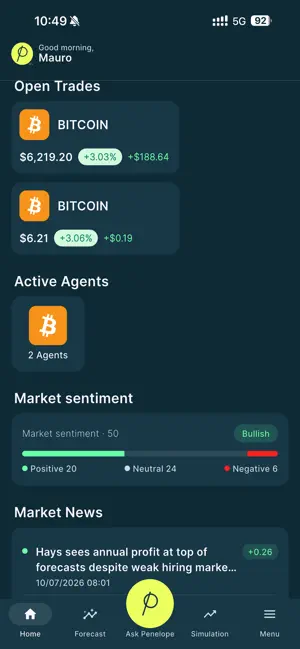
Penelope is the mobile companion to the Penelope AI platform — a clear, native view of your strategy, wherever you are. Monitor your portfolio and positions in real time. Follow AI-generated market forecasts across indices, FX, commodities and crypto. Explore strategy simulations to see how Penelope's models performed against the market over time. Ask Penelope for native, conversational analysis of instruments and fundamentals. And keep your automated agents at hand — pause or resume them in a tap. Built for method and discipline, Penelope puts structure, transparency and risk awareness at the center of how you follow the markets. Highlights • Real-time portfolio and position monitoring • Favourites: choose the instruments you follow — they feed the Home ticker • Penelope signals on those favourites, with optional push notifications • AI market forecasts across indices, FX, commodities and crypto • Strategy simulations — model performance vs the market over time • Ask Penelope: conversational analysis of instruments and fundamentals • One-tap pause and resume for your active agents • Optional Face ID app lock Placing trades and setting up agents is done on the Penelope platform. This app is for monitoring and insight — it does not place trades and cannot create or configure agents. A Penelope Capital account is required. Try before you sign in: tap "Explore the demo" to see the app on sample data. *** Disclaimer *** Signals and analysis are for informational purposes only and are not investment advice. The content and data presented in this app are provided for illustrative and informational purposes only and do not represent real investment performance. Any results shown are based on simulated trading strategies generated by AI models, and should not be interpreted as actual or future performance, nor as a guarantee of results. These simulations do not account for trading fees, slippage, taxes, or behavioral factors, and are subject to model assumptions and historical data limitations. The information provided does not constitute financial advice, investment recommendation, solicitation, or an offer to buy or sell any financial instrument. BXT, the company operating Penelope, is not a regulated investment firm and does not provide personalized investment services under Directive 2014/65/EU (MiFID II). BXT disclaims all responsibility for any decisions made based on this information, whether arising from AI-generated configurations or manual actions. Users are strongly advised to consult a qualified financial advisor before making any investment decisions.
What’s new
Version 1.2.1 · Updated October 5, 2026
Favourites: you decide which instruments to follow. Search by name or ticker — Milan, New York, Frankfurt, Tokyo and other exchanges — and find them grouped by market, in the Home quote ticker. Penelope signals: on the instruments you picked, the Home screen shows what the market did — level breakouts, moving-average crossovers, Fibonacci retracements, RSI and more. Open any signal and it explains what happened in full, with the figures that triggered it and the reference price. Notifications: if you want them, signals on your favourites reach you even with the app closed. Turn them on at the end of setup, and off again whenever you like, from the Menu. Ask Penelope: the answer takes shape as it is written, instead of leaving you in front of a still screen. Ask about a single instrument and its card comes too: how the price has moved, how analysts see it, how solid the accounts are. Demo and Live: on this device, choose whether to look at demonstration accounts or real ones. It applies here only, and your settings on the website stay as they are. Return statistics: a new page, with historical returns for every window side by side — from 30 days to 3 years, annualised or over the period. Simulation: the return distribution, with a percentile summary and a density curve. On iPad: News, Open positions, Active agents and Return statistics, from the sidebar. Privacy: the statement can be read in full inside the app, under Menu, with a summary next to the consent block in Profile. Dark theme refined, and many fixes.
App privacy
The developer, BXT srl, reported these privacy practices to Apple.
Data Linked to You
The following data, which may be collected and linked to your identity, may be used for the following purposes:
- Contact Info: Email Address, Name, Other User Contact Info
Used for: Developer’s Advertising or Marketing, Product Personalization, App Functionality
Data Not Linked to You
The following data, which may be collected but is not linked to your identity, may be used for the following purposes:
- Contact Info: Name
Used for: App Functionality
Alternatives to Penelope Ai
Looking for apps like Penelope Ai? Here are 6 similar apps on the App Store. The highest rated is Edgar Finance (5.0/5), and all 6 are free to download.
-
 Edgar Finance
5.0
-
 Trading AI: Any Chart Analysis
3.0
-
 Rame
-
 Sella Trader
-
 Danelfin: AI Stock Analysis
4.9
-
 Trading AI: AI Chart Analyzer
4.6
| App | Rating | Price | Last updated | Compare |
|---|---|---|---|---|
| Penelope Ai | – | Free | October 5, 2026 | |
| Edgar Finance | 5.0 / 5 (1) | Free | Nov 2, 2026 | Compare |
| Trading AI: Any Chart Analysis | 3.0 / 5 (2) | Free | Oct 31, 2026 | Compare |
| Rame | – | Free | Sep 22, 2026 | Compare |
| Sella Trader | – | Free | Jul 9, 2026 | Compare |
| Danelfin: AI Stock Analysis | 4.9 / 5 (14) | Free | Nov 5, 2026 | Compare |
| Trading AI: AI Chart Analyzer | 4.6 / 5 (41) | Free | Jul 27, 2026 | Compare |
Compare Penelope Ai with the top alternatives: ratings, updates, ASO score and keyword gaps →