

Focussimo: Focus & App Blocker
Anton Borries Productivity iPhoneiPadiPod touch
Focussimo: Focus & App Blocker is a free Productivity app for iPhone and iPad by Anton Borries. Requires iOS 26.0. Updated October 6, 2026.
- Price
- Free
- on the App Store
- Size
- 21 MB
- Age 4+
- Updated
- Oct 6
- 2026 · v1.1
Screenshots


About Focussimo: Focus & App Blocker
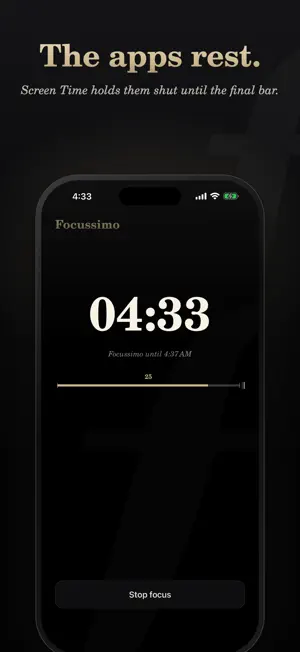
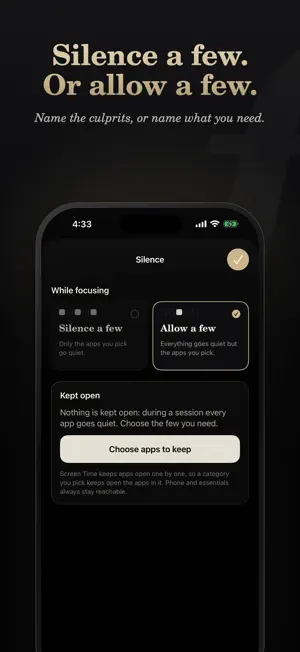
From fortissimo to pianissimo. Focussimo silences the apps that pull at you, so you can finish what you started. Pick a length, tap Start focus, and your distracting apps go quiet through Screen Time until the final bar. Open one anyway and a calm piano-black screen reminds you: Tacet. SILENCE A FEW, OR ALLOW A FEW • Silence a few: only the apps you pick go quiet. • Allow a few: everything goes quiet except the apps you need. Phone and essentials always stay reachable. FOCUS IN MOVEMENTS • Sessions of 15, 25, 45, 60 or 90 minutes, or open-ended. • Intermissions: Pomodoro-style breaks between rounds. Your apps are back for the break, then da capo. • "Bravo." when you hold a session to the end. • An alarm at the end and at each Intermission if you want one, with or without sound. FOCUSSIMO PRO Focus is free, always. Pro weaves it into the rest of your iPhone: • Home and Lock Screen widgets with live focus time and one-tap start • A Control Center, Lock Screen and Action button toggle • A countdown in the Dynamic Island and on the Lock Screen • Shortcuts and Siri, and Focus filters: silence apps whenever your Work Focus is on • History: your week and month of focus, streaks and completion rate Pro is available monthly, yearly or as a one-time Lifetime purchase. Subscriptions renew automatically until cancelled in your App Store settings. PRIVATE BY DESIGN No account, no ads, no tracking. Your app selections never leave your iPhone; Screen Time keeps them private even from Focussimo. Anonymous usage statistics are hosted in the EU. Privacy: https://focussimo.app/privacy Terms: https://www.apple.com/legal/internet-services/itunes/dev/stdeula/
What’s new
Version 1.1 · Updated October 6, 2026
Alarms now work better. • Focussimo can mark the end of a session and each change between focus and Intermission with an alarm, with or without sound. • Turn on Intermissions and the alarm is offered right there. • Onboarding asks for one permission at a time and says what each one is for.
App privacy
The developer, Anton Borries, reported these privacy practices to Apple.
Data Linked to You
The following data, which may be collected and linked to your identity, may be used for the following purposes:
- Purchases: Purchase History
- Identifiers: Device ID
- Usage Data: Product Interaction
- Diagnostics: Crash Data
Used for: Analytics, App Functionality
Alternatives to Focussimo: Focus & App Blocker
Looking for apps like Focussimo: Focus & App Blocker? Here are 6 similar apps on the App Store.
-
 ScrollNinja: Screen Time Game
-
 Nod: Phone Pickup Tracker
-
 Focusoro
-
 GRUVA
GRUVA
-
 nextappcon
-
 Oodrive Authenticator
| App | Rating | Price | Last updated | Compare |
|---|---|---|---|---|
| Focussimo: Focus & App Blocker | – | Free | October 6, 2026 | |
| ScrollNinja: Screen Time Game | – | Free | Oct 11, 2026 | Compare |
| Nod: Phone Pickup Tracker | – | Free | Jun 12, 2026 | Compare |
| Focusoro | – | Free | Oct 22, 2026 | Compare |
| GRUVA | – | Free | Sep 3, 2025 | Compare |
| nextappcon | – | Free | Oct 2, 2026 | Compare |
| Oodrive Authenticator | – | Free | May 28, 2025 | Compare |