

Win 10 Minutes: Focus Timer
LUIZ FELLIPE ALMEIDA Productivity iPhoneiPadiPod touch
Win 10 Minutes: Focus Timer is a free Productivity app for iPhone and iPad by LUIZ FELLIPE ALMEIDA. Rated 5.0/5 from 1 ratings. Requires iOS 18.5.
- Rating
- 5.0
- 1 ratings
- Price
- Free
- on the App Store
- Size
- 73 MB
- Age 4+
- Updated
- Jul 5
- 2026 · v3.2.7
Screenshots

About Win 10 Minutes: Focus Timer
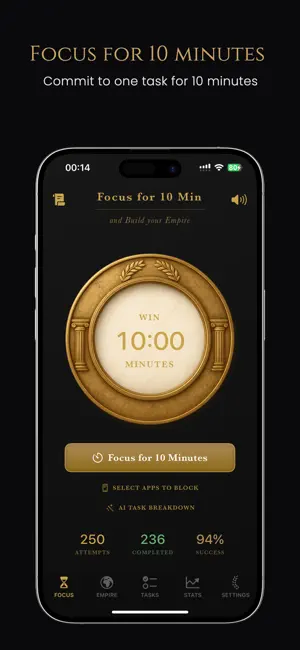
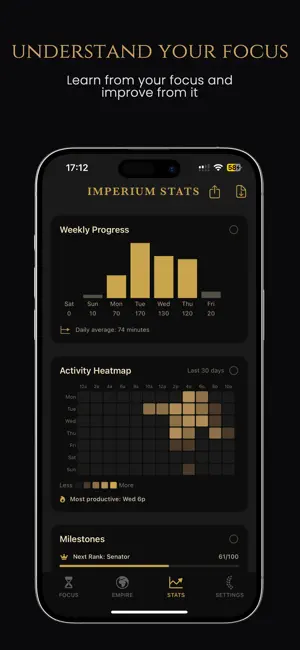
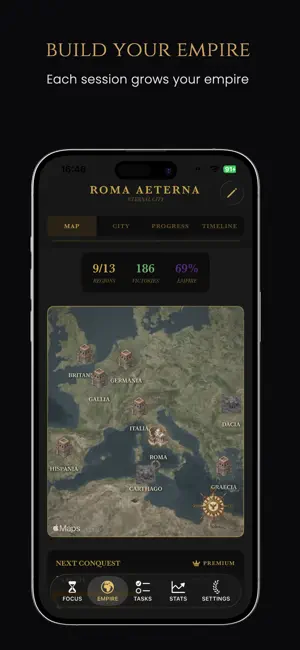
Win 10 Min combines powerful focus tools with addictive city-building gameplay. Block distracting apps, complete tasks, and watch your virtual Roman Empire grow with every victory. Perfect for ADHD, students, professionals, and anyone who wants to turn work into an adventure. Build your Roman Empire one victory at a time! HOW IT WORKS • Start a focus session (10 minutes by default) • Your phone blocks distracting apps automatically • Stay focused to earn coins (denarii) • Build Roman structures and conquer territories • Track your progress and watch your empire expand KEY FEATURES • Smart App Blocking: Stay focused by blocking distractions during sessions • AI Task Breakdown: Break big goals into bite-sized 10-minute tasks with AI • Saved Tasks: Save tasks and start sessions instantly • Roman City Builder: Construct forums, aqueducts, temples, and more • Empire Conquest: Unlock 7 territories from Roma to Germania • Progress Tracking: View streaks, completion rates, and statistics • Auto-Continue: Seamlessly chain focus sessions with smart breaks PREMIUM CITIZENSHIP Upgrade to unlock the full empire experience: • AI Task Saving: Save up to 100 AI-generated tasks for later • Focus Music: Background music during focus sessions • Custom Durations: Choose 5, 10, or 15-minute sessions • Custom App Blocking: Select exactly which apps to block • 13 Empire Territories: Conquer Greece, Dacia, Persia, and more premium regions • Advanced Analytics: Detailed charts, trends, and insights • Premium Buildings: Unlock legendary structures like the Colosseum • Personalization: Customize your @handle and city name • CSV Export: Download your complete focus history BUILD YOUR LEGACY Every completed session adds buildings to your city and coins to your treasury. Use denarii to conquer new territories across the ancient world. Rise from Plebeian to Caesar through your achievements. Whether you're studying for exams, working on projects, or building new habits—Win 10min turns focus into a rewarding game. Your empire awaits. Start building today! Terms: https://win10minutes.app/terms
What’s new
Version 3.2.7 · Updated July 5, 2026
- Quick-Start Templates Save any task or Super Focus Session as a reusable template, then tap once to start it instantly. No more rebuilding the same session every time. - A Peek at Your Stats Free users now get a glimpse of their real focus stats. - Polish & Fixes
App privacy
The developer, LUIZ FELLIPE ALMEIDA, reported these privacy practices to Apple.
Data Linked to You
The following data, which may be collected and linked to your identity, may be used for the following purposes:
- User Content: Photos or Videos
- Identifiers: User ID, Device ID
Used for: App Functionality
Data Not Linked to You
The following data, which may be collected but is not linked to your identity, may be used for the following purposes:
- Usage Data: Product Interaction
- User Content: Other User Content
Used for: Analytics, App Functionality
Alternatives to Win 10 Minutes: Focus Timer
Looking for apps like Win 10 Minutes: Focus Timer? Here are 6 similar apps on the App Store. The highest rated is Focus Timer Game - Time Miner (5.0/5), and all 6 are free to download.
-
 Focus Timer Game - Time Miner
5.0
Focus Timer Game - Time Miner
5.0
-
 Catnap Focus
-
 Gamified Goal Tracker
-
 Deep focus timer - Pomo
-
 ScruMe
-
 Do Focus: Pomodoro Timer
| App | Rating | Price | Last updated | Compare |
|---|---|---|---|---|
| Win 10 Minutes: Focus Timer | 5.0 / 5 (1 rating) | Free | July 5, 2026 | |
| Focus Timer Game - Time Miner | 5.0 / 5 (2) | Free | Sep 14, 2026 | Compare |
| Catnap Focus | – | Free | Sep 30, 2026 | Compare |
| Gamified Goal Tracker | – | Free | Aug 11, 2026 | Compare |
| Deep focus timer - Pomo | – | Free | Mar 17, 2026 | Compare |
| ScruMe | – | Free | Jan 20, 2026 | Compare |
| Do Focus: Pomodoro Timer | – | Free | Sep 12, 2026 | Compare |