

Aurea – Golden Hour & Sunset
Santiago Gomez Photo & Video iPhoneiPadiPod touch
Aurea – Golden Hour & Sunset is a free Photo & Video app for iPhone and iPad by Santiago Gomez. Rated 5.0/5 from 2 ratings. Requires iOS 26.0.
- Rating
- 5.0
- 2 ratings
- Price
- Free
- on the App Store
- Size
- 7 MB
- Age 4+
- Updated
- Oct 21
- 2026 · v4.8
Screenshots


About Aurea – Golden Hour & Sunset
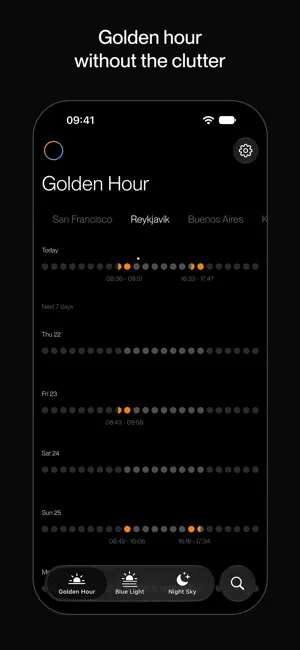
Aurea — The Right Light, Every Day Aurea shows you exactly when the light will be good — and skips the noise when it won't be. Most light-tracking apps give you a sunrise and sunset time and leave the rest to you. Aurea goes further: it checks the forecast — clouds, visibility, rain — and only lights up the hours actually worth showing up for. No more standing on a rooftop at "golden hour" under a flat grey sky. Three lights, one calendar Switch between Golden hour, Blue hour, and Night with a tap. Same 16-day view, same clean timeline — just a different window into the sky each time. A dot for every hour Each day is a simple row of dots. Grey means ordinary daylight or night. Lit dots mean the light — and the weather — line up. Glance down the week and see which days are worth planning around. Know when the sky goes dark Night mode marks the hours worth setting an alarm for: truly dark, clear, and moonless. The moon sits right in the row, at its real phase, so you can see why a night is short — or why a full moon week goes quiet. Track every place that matters Add your city, your next trip, the coast you're shooting next weekend. Switch between saved locations instantly, each with its own forecast and its own golden, blue, and dark-sky windows. Built for looking, not tapping No settings to dig through, no ads, no account. Open it, glance at the dots, go. Terms of Use: https://www.apple.com/legal/internet-services/itunes/dev/stdeula/ Privacy Policy: https://aurea.photos/privacy
What’s new
Version 4.8 · Updated October 21, 2026
A true black background and neutral greys throughout, so the light you’re chasing stands out more.
App privacy
The developer, Santiago Gomez, reported these privacy practices to Apple.
Data Not Collected
The developer does not collect any data from this app.