

Oneword – AI Speed Reader
James Burrus Education iPhoneiPadiPod touch
Oneword – AI Speed Reader is a free Education app for iPhone and iPad by James Burrus. Rated 5.0/5 from 1 ratings. Requires iOS 15.1. Updated August 9, 2026.
- Rating
- 5.0
- 1 ratings
- Price
- Free
- on the App Store
- Size
- 61 MB
- Age 4+
- Updated
- Aug 9
- 2026 · v2.1.0
Screenshots
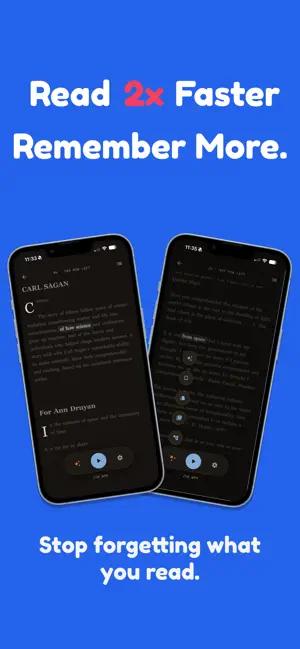
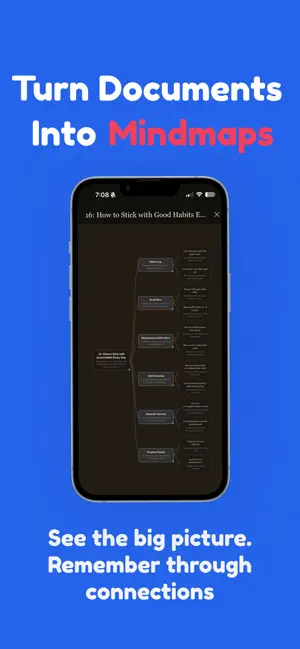

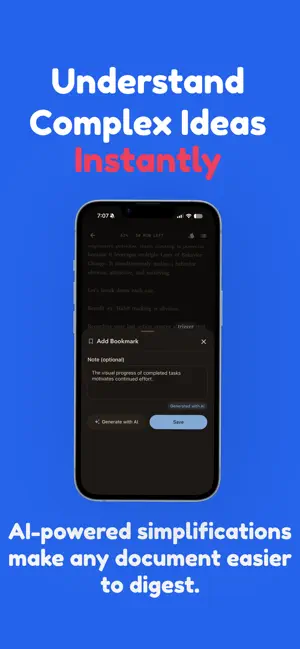
About Oneword – AI Speed Reader
Read faster. Learn deeper. Remember more. Oneword is the AI-powered speed reading app designed to help you focus, retain knowledge, and get through your reading list without the overwhelm. WHY ONEWORD? Most reading apps stop at simple highlighting. Oneword goes further - combining customizable speed reading tools, AI text simplifications, automatic flashcard generation, and interactive mindmaps to transform the way you consume and remember information. Whether you’re a student, professional, or lifelong learner, Oneword adapts to your pace and gives you the power to learn smarter, not harder. KEY FEATURES Speed Reading, Your Way • Customize highlight length, reading speed, and word flashing • Stay in flow with adjustable pacing that matches your focus level • Read more in less time without sacrificing comprehension AI-Powered Simplifications • Break down complex sentences into clear, simple ideas • Instantly get easier-to-understand versions of difficult passages • Great for learning new subjects or tackling dense reading Mindmaps for Memory • Automatically generate AI-driven mindmaps from your documents • Visualize key concepts, themes, and relationships • Click on any node in the mindmap to go directly to that concept in the document • Reinforce memory with structured overviews you can revisit anytime Flashcards for Spaced Repetition • Instantly generate AI-powered flashcards directly from your documents • Tap “Go to Source” to jump back to the exact spot in the text • Track progress with “Got It / Don’t Know” to build stronger memory Focused Reading Experience • Clean, distraction-free interface optimized for focus • Designed for both quick study sessions and deep reading • Works across academic papers, work documents, books, and notes WHO IT’S FOR Students who want to learn faster and retain more for exams Professionals keeping up with reports, research, or industry news Lifelong learners looking to absorb more articles, or knowledge Anyone who wants to upgrade their reading efficiency WHY IT WORKS Oneword combines proven speed reading techniques with the latest in AI learning science: Speed reading customization keeps you engaged at your own pace Simplification removes friction from difficult content Mindmaps create mental anchors that improve retention The result? Reading that’s not just faster, but smarter. GET STARTED TODAY Download Oneword for free and experience reading reimagined. Unlock your potential with speed, clarity, and memory - all in one app. FREE TIER (per month) • 5 documents • 50,000 character limit • 100 simplifications SUBSCRIBERS • Unlimited documents • Unlimited Simplifications • Unlimited Mindmaps • Priority Support Oneword Support: [email protected] Privacy Policy: https://www.oneword.so/privacy Oneword Terms of Use: https://www.oneword.so/terms TERMS OF USE: https://www.apple.com/legal/internet-services/itunes/dev/stdeula/
What’s new
Version 2.1.0 · Updated August 9, 2026
- Write in your margins. On iPad, Apple Pencil now works the way it should: annotate right in the margins while you read, and your ink follows the text — through font changes, reflow, even Focus mode. No Pencil? Draw with your finger. - Share anything. Send PDFs and EPUBs straight from Mail, Files, or Safari — look for Oneword in the share sheet. Sharing an article from Safari now brings the whole page with it. - A more beautiful read. Literata, a typeface designed for long-form reading, now sets your books and titles. Plus a new app icon. - And the usual round of fixes — including smarter handling of paywalled articles and smoother navigation after imports.
App privacy
The developer, James Burrus, reported these privacy practices to Apple.
Data Linked to You
The following data, which may be collected and linked to your identity, may be used for the following purposes:
- Purchases: Purchase History
- Identifiers: User ID, Device ID
- Contact Info: Email Address
- User Content: Audio Data
Used for: Analytics, App Functionality
Data Not Linked to You
The following data, which may be collected but is not linked to your identity, may be used for the following purposes:
- Diagnostics: Crash Data, Performance Data
Used for: Analytics, App Functionality
Alternatives to Oneword – AI Speed Reader
Looking for apps like Oneword – AI Speed Reader? Here are 6 similar apps on the App Store. The highest rated is Wildfire Spiritual Exercises (5.0/5), and 5 of the 6 are free to download.
-
 ReadFlow: Speed Reading
-
 PixBible: Bible Verse Memory
-
 3D Global Temperature Map
-
 ReadSpeed Monitor
-
 Wildfire Spiritual Exercises
5.0
Wildfire Spiritual Exercises
5.0
-
 Read Boost
5.0
Read Boost
5.0
| App | Rating | Price | Last updated | Compare |
|---|---|---|---|---|
| Oneword – AI Speed Reader | 5.0 / 5 (1 rating) | Free | August 9, 2026 | |
| ReadFlow: Speed Reading | – | Free | Oct 14, 2026 | Compare |
| PixBible: Bible Verse Memory | – | Free | Sep 12, 2026 | Compare |
| 3D Global Temperature Map | – | 1.99 USD | Aug 19, 2025 | Compare |
| ReadSpeed Monitor | – | Free | Jan 16, 2025 | Compare |
| Wildfire Spiritual Exercises | 5.0 / 5 (1) | Free | Feb 22, 2024 | Compare |
| Read Boost | 5.0 / 5 (3) | Free | Dec 11, 2025 | Compare |