

QOVO: Used Car Inspection
Luxsteel OU Utilities iPhoneiPadiPod touch
QOVO: Used Car Inspection is a free Utilities app for iPhone and iPad by Luxsteel OU. Requires iOS 16.0. Updated October 22, 2026.
- Price
- Free
- on the App Store
- Size
- 196 MB
- Age 4+
- Updated
- Oct 22
- 2026 · v2.4.2
Screenshots

About QOVO: Used Car Inspection
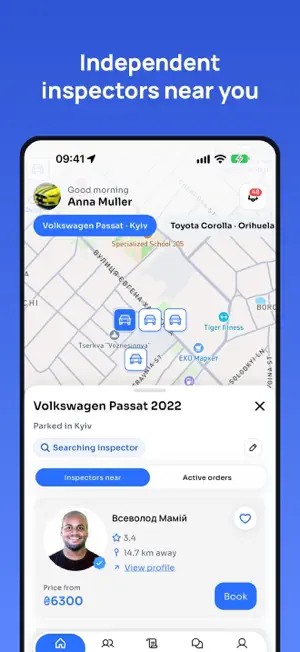
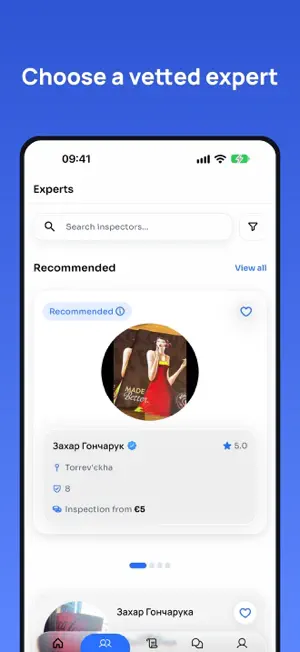
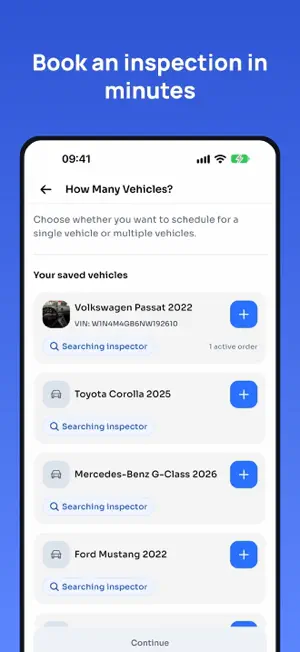
Qovo connects car owners with verified professional vehicle inspectors. Whether you need a pre-purchase check, routine evaluation, or damage assessment — Qovo makes it simple, transparent, and secure. FOR CAR OWNERS Create an inspection request in minutes. Browse verified inspectors, book a convenient time, and pay securely by card. Receive a comprehensive report with photos and notes covering exterior, interior, engine, tires, test drive, and documents. Track inspection progress in real time and chat directly with your inspector. FOR PROFESSIONAL INSPECTORS Accept orders, manage your calendar, and conduct structured inspections using our guided workflow. Capture photos per category, add detailed notes, and submit reports instantly. Track earnings, manage payouts, and grow your reputation through client reviews. KEY FEATURES • Biometric login (Touch ID / Face ID) • Real-time order status and push notifications • Detailed photo-backed inspection reports • Secure payment processing • In-app chat between clients and inspectors • Multi-language: English, German, Spanish, Polish, Russian, Ukrainian • Location-based inspector discovery • Document verification during signup • Payment history and invoices • Self-inspection tool for inspectors Download Qovo and experience hassle-free vehicle inspections.
What’s new
Version 2.4.2 · Updated October 22, 2026
Dozens of fixes for inspectors and clients. Inspectors see every order, photos survive when Android closes the camera, and order, payment and profile screens behave as expected. Fixed: • Inspector orders — My Orders loads every order, not only the first page; the "too far" warning shows once per order. • Camera — a photo is kept when Android closes the app while the camera is open; a clear message when no camera is available. • Orders — the order card shows the date without a stray 00:00; tapping a notification no longer opens the same order twice; the self-inspection header shows the right car. • Inspection — inspecting several vehicles no longer carries over the previous vehicle; leaving a report returns to its order. • Payments — card tiles are readable in dark theme; a declined card shows the reason in your language; "Contact support" works on a rejected withdrawal. • Profile — saved description and slogan show at once; the country code switches the flag when editing a phone number; the verified banner shows once. • Offers and documents — the offer sheet names the vehicle; cancelling a document resubmission no longer shows an error. Changed: • Upgrade screen — redesigned. • Notifications — show the client's photo. • Order details — show when an order is being negotiated. Added: • Privacy — a consent prompt before marketing analytics in the EEA, UK and Switzerland.
App privacy
The developer, Luxsteel OU, reported these privacy practices to Apple.
Data Used to Track You
The following data may be used to track you across apps and websites owned by other companies:
- Identifiers: Device ID
- Usage Data: Advertising Data
Data Linked to You
The following data, which may be collected and linked to your identity, may be used for the following purposes:
- Identifiers: Device ID
- Usage Data: Advertising Data
Used for: Third-Party Advertising, Developer’s Advertising or Marketing, Analytics