

Voxia Transcribe Audio to Text
Maksim Tishchenko Productivity iPhoneiPadiPod touch
Voxia Transcribe Audio to Text is a free Productivity app for iPhone and iPad by Maksim Tishchenko. Requires iOS 17.0. Updated October 29, 2026.
- Price
- Free
- on the App Store
- Size
- 30 MB
- Age 4+
- Updated
- Oct 29
- 2026 · v2.0.1
Screenshots


About Voxia Transcribe Audio to Text
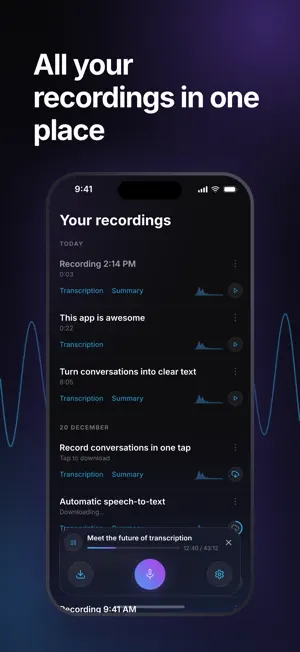
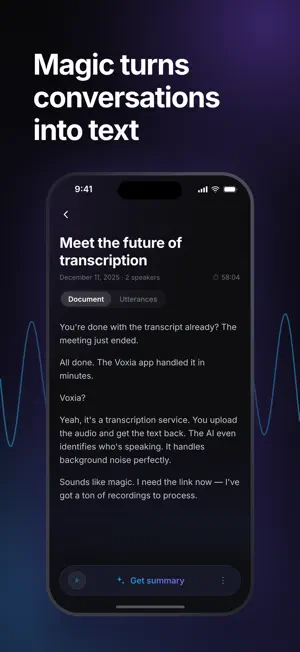
Voxia turns your recordings into organized, professional documents - automatically. Whether it's a business meeting, a university lecture, a podcast, or a professional interview, Voxia delivers accurate speech to text transcription for audio files up to 4 hours long. No more rewinding. No more messy notes. Just clear, structured text ready to use. ACCURATE AI TRANSCRIPTION Record directly in the app or import any audio file. Voxia's AI engine converts speech to text with high accuracy, even in noisy environments. Support for long recordings means you can capture entire meetings, conferences, or study sessions without worrying about time limits. AUTOMATIC SPEAKER IDENTIFICATION Multiple people in the conversation? Voxia uses advanced speaker diarization to identify and label different voices. Each speaker gets their own label, making it easy to follow who said what - perfect for interviews, panel discussions, and team meetings. SMART FORMATTING & STRUCTURE Forget messy walls of text. Voxia automatically organizes your transcripts with clear headings, logical paragraphs, and a table of contents. The result looks like a professionally formatted document, not a raw text dump. AI-POWERED SUMMARIES Don't have time to read the full transcript? Voxia's AI analyzes the entire recording and generates a concise summary highlighting key points, decisions, and action items. Review a 2-hour meeting in 30 seconds. PROFESSIONAL EXPORT Share your work instantly. Export formatted transcripts and AI summaries to Word (.docx) or PDF with a single tap. Send them to colleagues, attach to emails, or save to your cloud storage. BUILT FOR: • Professionals - Capture meeting notes, action items, and decisions automatically • Students - Turn lectures into study-ready notes with summaries • Journalists - Transcribe interviews with accurate speaker labels • Researchers - Convert hours of field recordings into searchable text • Content Creators - Get transcripts of podcasts and videos for repurposing Try Voxia today and never take manual notes again. Terms of Use (EULA): https://voxia.pro/terms Privacy Policy: https://voxia.pro/privacy
What’s new
Version 2.0.1 · Updated October 29, 2026
Bug fixes and performance improvements.
App privacy
The developer, Maksim Tishchenko, reported these privacy practices to Apple.
Data Not Linked to You
The following data, which may be collected but is not linked to your identity, may be used for the following purposes:
- Identifiers: User ID
- Diagnostics: Crash Data
Used for: Analytics
Alternatives to Voxia Transcribe Audio to Text
Looking for apps like Voxia Transcribe Audio to Text? Here are 6 similar apps on the App Store. The highest rated is Voice to Text - SotiTalk (5.0/5), and 5 of the 6 are free to download.
-
 Voice to Text - SotiTalk
5.0
Voice to Text - SotiTalk
5.0
-
 Transcribe audio to text - AI
4.2
Transcribe audio to text - AI
4.2
-
 iLinkbox
3.0
iLinkbox
3.0
-
 Remarkable AI
4.9
Remarkable AI
4.9
-
 Pumli: Your Private Agent
4.7
Pumli: Your Private Agent
4.7
-
 Speech to Text - Sono
4.4
Speech to Text - Sono
4.4
| App | Rating | Price | Last updated | Compare |
|---|---|---|---|---|
| Voxia Transcribe Audio to Text | – | Free | October 29, 2026 | |
| Voice to Text - SotiTalk | 5.0 / 5 (2) | Free | Oct 23, 2026 | Compare |
| Transcribe audio to text - AI | 4.2 / 5 (5) | Free | Sep 29, 2026 | Compare |
| iLinkbox | 3.0 / 5 (1) | Free | Oct 3, 2026 | Compare |
| Remarkable AI | 4.9 / 5 (15) | Free | Oct 24, 2026 | Compare |
| Pumli: Your Private Agent | 4.7 / 5 (21) | 9.99 USD | Oct 29, 2026 | Compare |
| Speech to Text - Sono | 4.4 / 5 (32) | Free | Jul 9, 2026 | Compare |