

Neon Swipe Photo
Rasmus Lantz Utilities iPhoneiPadiPod touch
Neon Swipe Photo is a free Utilities app for iPhone and iPad by Rasmus Lantz. Requires iOS 13.0. Updated September 17, 2025.
- Price
- Free
- on the App Store
- Size
- 29 MB
- Age 4+
- Updated
- Sep 17
- 2025 · v1.0.2
Screenshots

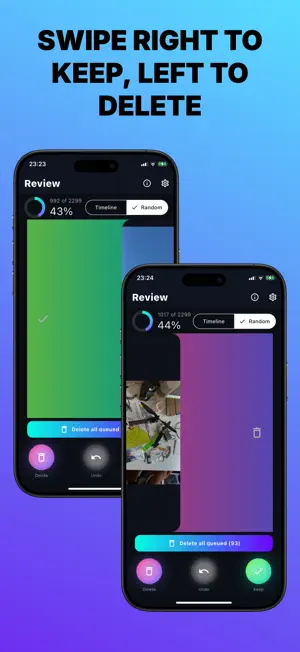


About Neon Swipe Photo
Neon Swipe makes cleaning your camera roll fast, fun, and safe. Swipe right to keep, left to delete—no clutter, no stress, just more space for what matters. WHY YOU’LL LOVE IT • Lightning-fast swiping to keep or delete • Clear, full-screen review so every decision is easy • Simple progress stats to see how much you’ve tidied • Optional review step before removal for peace of mind • Looks great in dark environments with crisp neon accents HOW IT WORKS Open Neon Swipe and grant photo access. Swipe photo-by-photo to keep or delete. Confirm your selections when you’re ready. That’s it. SAFE BY DESIGN • Removed photos go to the “Recently Deleted” album in Photos for up to 30 days. • To reclaim storage immediately, empty “Recently Deleted” in the Photos app after a cleanup session. PERFECT FOR • Making space before a trip or a big iOS update • Clearing old screenshots and missed shots • Keeping only your best memories Neon Swipe turns cleanup into a quick daily habit—so your gallery stays fresh and your device stays speedy. SUBSCRIPTION TERMS • Payment is charged to your Apple ID at confirmation of purchase. • Subscription renews automatically unless canceled at least 24 hours before the end of the current period. • Your account will be charged for renewal within 24 hours before the end of the current period. • You can manage or cancel your subscription in your App Store account settings after purchase. • Any unused portion of a free trial is forfeited when you purchase a subscription. Terms of Use (EULA): https://www.apple.com/legal/internet-services/itunes/dev/stdeula/ Privacy Policy: https://neonswipe-photos.pages.dev/privacy/
What’s new
Version 1.0.2 · Updated September 17, 2025
UPDATE FOR 1.0.2: - Ads every 20 (skippable) - Guide page for first time use - Added more to info section - Re-organized settings
App privacy
The developer, Rasmus Lantz, reported these privacy practices to Apple.
Data Used to Track You
The following data may be used to track you across apps and websites owned by other companies:
- Usage Data: Advertising Data
Data Linked to You
The following data, which may be collected and linked to your identity, may be used for the following purposes:
- Usage Data: Advertising Data
Used for: Third-Party Advertising
Alternatives to Neon Swipe Photo
Looking for apps like Neon Swipe Photo? Here are 6 similar apps on the App Store. The highest rated is Digital Japanese Clock (2.0/5), and all 6 are free to download.



| App | Rating | Price | Last updated | Compare |
|---|---|---|---|---|
| Neon Swipe Photo | – | Free | September 17, 2025 | |
| nameLibre | – | Free | Oct 17, 2026 | Compare |
| Berrly Scan | – | Free | Sep 15, 2026 | Compare |
| gethookd | – | Free | Jul 1, 2025 | Compare |
| Proandre Scent | – | Free | Jan 9, 2025 | Compare |
| ExpiryMeter | – | Free | Nov 3, 2023 | Compare |
| Digital Japanese Clock | 2.0 / 5 (1) | Free | Jul 28, 2026 | Compare |
Compare Neon Swipe Photo with the top alternatives: ratings, updates, ASO score and keyword gaps →