

Subvia Subscription Tracker
Muzaffer Kuran Finance iPhoneiPadiPod touch
Subvia Subscription Tracker is a free Finance app for iPhone and iPad by Muzaffer Kuran. Rated 4.5/5 from 2 ratings. Requires iOS 15.0.
- Rating
- 4.5
- 2 ratings
- Price
- Free
- on the App Store
- Size
- 60 MB
- Age 4+
- Updated
- Oct 10
- 2026 · v1.3.5
Screenshots


About Subvia Subscription Tracker
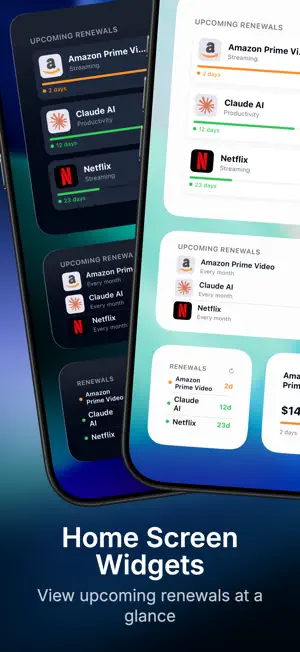
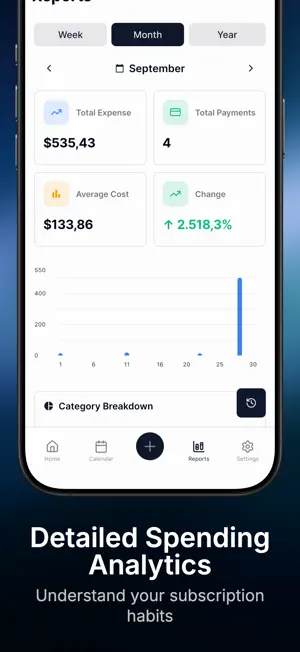
TRACK RECURRING PAYMENTS WITH CLARITY Subvia helps you track subscriptions and recurring payments in one organized place. Add subscriptions, set billing cycles, choose categories, accounts, payment methods and currencies, then review upcoming renewals from a clear dashboard. START FREE, GROW WITH PREMIUM Track up to 3 subscriptions in one account for free, with reminders, widgets, reports and local backups. Premium unlocks unlimited subscription records, multiple accounts and optional iCloud sync with a one-time lifetime purchase. No recurring Premium subscription. HOME SCREEN WIDGETS Keep upcoming payments visible with home widgets. See monthly totals, next renewals and important alerts without opening the app. SMART REMINDERS AND MULTI-NOTIFICATION PLANS Create more than one reminder for the same subscription, such as an early planning alert and a final renewal alert. Flexible scheduling helps you review services before payment dates arrive. ADVANCED REPORTS AND TRANSACTION HISTORY Use detailed reports to understand monthly and yearly costs, category distribution, account-level spending and payment method usage. Transaction history stays searchable, filterable and easy to review. ORGANIZATION FOR DAILY USE - iCloud sync across your Apple devices - Local backup for additional data protection - Lifetime, paid and free subscription records - Custom categories and subscription services - Payment method tracking - Multi-account management - Advanced filters by service, date, category, account and currency - Dark theme for comfortable viewing - App Store service search support - Automatic and customizable currency conversion PRIVATE BY DESIGN Subvia is designed to keep your subscription records organized on your devices and in your iCloud account. Use it to plan recurring payments, compare spending across accounts and keep your subscription list under control. Terms of Use: https://helvorxy.com/apps/subvia/terms/ Apple Standard EULA: https://www.apple.com/legal/internet-services/itunes/dev/stdeula/
What’s new
Version 1.3.5 · Updated October 10, 2026
A few improvements to make Subvia clearer and easier to use: • iCloud sync status now updates more accurately. • The Premium screen is clearer and easier to understand. • In-app messages now better match your selected language.
App privacy
The developer, Muzaffer Kuran, reported these privacy practices to Apple.
Data Linked to You
The following data, which may be collected and linked to your identity, may be used for the following purposes:
- Purchases: Purchase History
Used for: Analytics, App Functionality
Alternatives to Subvia Subscription Tracker
Looking for apps like Subvia Subscription Tracker? Here are 6 similar apps on the App Store. The highest rated is Fineyo: Expense Tracker (5.0/5), and all 6 are free to download.
-
 Subscription Manager & Cancel
4.0
-
 Moneko AI: Track & Budget
4.7
-
 Tally AI Expense Tracker & Log
4.9
-
 Fineyo: Expense Tracker
5.0
-
 PacketPlanner
1.0
-
 WaitWise - Fight Consumerism
5.0
| App | Rating | Price | Last updated | Compare |
|---|---|---|---|---|
| Subvia Subscription Tracker | 4.5 / 5 (2 ratings) | Free | October 10, 2026 | |
| Subscription Manager & Cancel | 4.0 / 5 (8) | Free | Jan 28, 2026 | Compare |
| Moneko AI: Track & Budget | 4.7 / 5 (26) | Free | Oct 19, 2026 | Compare |
| Tally AI Expense Tracker & Log | 4.9 / 5 (14) | Free | Oct 7, 2026 | Compare |
| Fineyo: Expense Tracker | 5.0 / 5 (12) | Free | Oct 7, 2026 | Compare |
| PacketPlanner | 1.0 / 5 (1) | Free | Sep 24, 2026 | Compare |
| WaitWise - Fight Consumerism | 5.0 / 5 (4) | Free | Aug 11, 2026 | Compare |