

ChopChop - Splitting bills
Adam Koutny Finance iPhoneiPadiPod touch
ChopChop - Splitting bills is a free Finance app for iPhone and iPad by Adam Koutny. Requires iOS 18.0. Updated September 24, 2026.
- Price
- Free
- on the App Store
- Size
- 12 MB
- Age 4+
- Updated
- Sep 24
- 2026 · v1.4
Screenshots



About ChopChop - Splitting bills
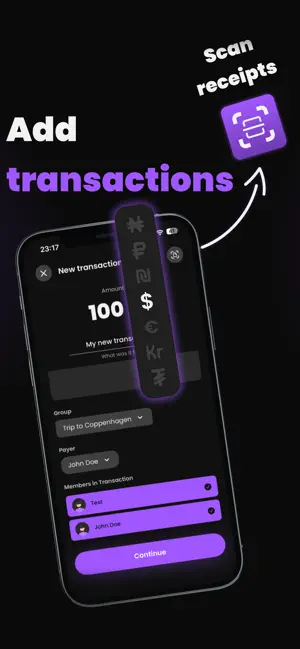
ChopChop makes splitting bills simple and fair. Whether you're on a trip, sharing rent, or just grabbing dinner — ChopChop handles the math so you don't have to. Split Any Way You Want Equal split, custom amounts, or lock specific shares and auto-distribute the rest. Multi-currency support with automatic conversion. Groups & One-Time Splits Create groups for trips, roommates, or events. Or split a single bill instantly without creating a group — even without an account. Smart Debt Settlement ChopChop works out the shortest set of payments that clears the group, so nobody pays twice or transfers more than they need to. Settling Up That Sticks A settle-up stays open until the money actually moves. Confirm each payment as it lands, close the app and pick up where you left off, and reopen a payment code any time from Activity. QR Payment Codes Generate ready-to-scan QR codes for instant bank transfers. No more copying IBANs. Add a Payment Without Opening the App After an Apple Pay purchase, ChopChop can offer to file it as a transaction — pick the group up front and one tap is enough. Optional, off by default, and set up in a few taps from Settings. Receipt Scanner Snap a photo of your receipt and let AI extract the items and amounts automatically. Guest Mode Try ChopChop without creating an account. Split bills, track history, and see balances — no sign-up required. Real-Time Updates Everyone in the group sees changes instantly. No refreshing, no waiting. More Features • Virtual members for people without the app • Home screen widgets • Profile with stats and IBAN management • Dark mode and larger text supported throughout • Available in English and Czech
What’s new
Version 1.4 · Updated September 24, 2026
Splitting a receipt down the middle never was fair — you had the steak, they had a soup. So now you can divide one line by line: drag each item onto whoever had it, and everybody's share adds up as you go. Tap a line instead if you'd rather pick from a list, and rename anything the scan misread. Whatever the items don't cover — service, rounding, a line we couldn't read — gets shared evenly, so the split always matches what actually left your account. You can also add photos to any expense now, so the receipt stays with the money it paid for. And signing in works the same everywhere: e-mail, Apple or Google, on the phone and on the web.
App privacy
The developer, Adam Koutny, reported these privacy practices to Apple.
Data Linked to You
The following data, which may be collected and linked to your identity, may be used for the following purposes:
- Financial Info: Other Financial Info
- Contact Info: Email Address, Name
- User Content: Photos or Videos, Customer Support
- Identifiers: User ID
- Usage Data: Product Interaction
Used for: App Functionality
Alternatives to ChopChop - Splitting bills
Looking for apps like ChopChop - Splitting bills? Here are 6 similar apps on the App Store. The highest rated is Claimio (5.0/5), and all 6 are free to download.
-
 Claimio
5.0
Claimio
5.0
-
 Scan&Split: AI Bill Splitter
5.0
Scan&Split: AI Bill Splitter
5.0
-
 Splitr: Split Bills in Seconds
5.0
Splitr: Split Bills in Seconds
5.0
-
 Divvy - Split Expenses
-
 Splitt: Split Expenses & Bills
-
 All Cashback: Credit Cards
| App | Rating | Price | Last updated | Compare |
|---|---|---|---|---|
| ChopChop - Splitting bills | – | Free | September 24, 2026 | |
| Claimio | 5.0 / 5 (1) | Free | Aug 14, 2026 | Compare |
| Scan&Split: AI Bill Splitter | 5.0 / 5 (1) | Free | Sep 10, 2025 | Compare |
| Splitr: Split Bills in Seconds | 5.0 / 5 (1) | Free | May 31, 2026 | Compare |
| Divvy - Split Expenses | – | Free | Sep 2, 2026 | Compare |
| Splitt: Split Expenses & Bills | – | Free | Oct 7, 2026 | Compare |
| All Cashback: Credit Cards | – | Free | Sep 25, 2026 | Compare |