

Calorie Counter: AI Photo Log
Evgenii Evsiukov Health & Fitness iPhoneiPadiPod touchApple Watch
Calorie Counter: AI Photo Log is a free Health & Fitness app for iPhone and iPad by Evgenii Evsiukov. Rated 4.5/5 from 6 ratings. Requires iOS 16.4.
- Rating
- 4.5
- 6 ratings
- Price
- Free
- on the App Store
- Size
- 84 MB
- Age 4+
- Updated
- Oct 28
- 2026 · v2.8.2
Screenshots


About Calorie Counter: AI Photo Log
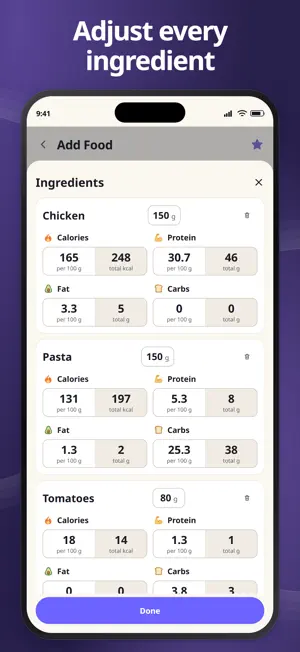
Track calories and macros with an AI calorie counter that turns meal photos into editable food entries. Review estimated calories, protein, carbs and fat before saving them to your food diary. Set daily targets for weight loss, weight maintenance or muscle gain, and see how each meal fits your day. Log meals with a photo or barcode Take a photo or choose one from your gallery. AI estimates the foods, portions and nutrition, so you can start with an entry to review instead of entering every detail yourself. Estimates are approximate: adjust the dish name, total weight, ingredient names and weights, or calorie and macro values before saving. Add or remove ingredients and totals recalculate. Use the barcode scanner to look up packaged foods when product data is available, or add food manually. Save individual foods to Favorites and search them when you want to log the same food again. Keep calories and macros in view Use the macro tracker to follow protein, carbs and fat alongside your calorie intake. Get daily targets based on your profile, activity and goal, or set your own. See what you have consumed and what remains, whether you are working toward a calorie deficit or keeping track of protein for muscle gain. Check your daily calorie ring, follow your logging streak in the calendar, and review weekly, monthly and yearly charts. Your food diary brings meals and progress together so you can spot patterns in your routine. Track water and weight Set a water goal, log your water intake and schedule water or meal reminders. Record body weight to follow changes over time alongside your nutrition records. Home Screen widgets show calories, macros and water at a glance. Quick Scan opens the camera for your next meal photo. On iOS 17 or later, add water directly from the water widget; earlier versions open the entry form. More ways to log and learn with Premium - Describe a meal by text or voice and get an AI estimate to review. - Save meals containing several foods and log them together next time. - Explore fiber, sugars, sodium, vitamins and minerals with detailed nutrient charts when data is available. - With enough records, get a weekly AI review of food, water and weight patterns, progress against your goals and practical suggestions based on your diary. Manual food entry, water and weight tracking, and widgets are part of the basic app. Daily food-entry limits depend on your access and include manual entries and foods added from Favorites. Check current limits in the app. Connect with Apple Health With your permission, import recorded calories burned, export logged nutrition and sync weight in both directions. Compare food intake with recorded energy expenditure while choosing which health data to connect. Keep and share your food diary Share a diary entry as an image or text. Export and import backups with food photos, water and weight records. Choose metric or imperial units and light or dark mode. Start with your next meal and build a clearer picture of your daily nutrition. AI results are estimates, and the app does not provide medical advice. Terms of Use: https://evsi.store/en/app/calorie-counter-ai/terms Privacy Policy: https://evsi.store/en/app/calorie-counter-ai/privacy
Ratings & reviews
4.5
6 ratings
What’s new
Version 2.8.2 · Updated October 28, 2026
• Improved saving of food, water and weight from your phone and watches. • The diary updates correctly after saving. • Fixed adding favorite foods and saved meals.
App privacy
The developer, Evgenii Evsiukov, reported these privacy practices to Apple.
Data Not Linked to You
The following data, which may be collected but is not linked to your identity, may be used for the following purposes:
- Identifiers: Device ID
- Usage Data: Product Interaction
- Health & Fitness: Health
- User Content: Photos or Videos, Audio Data
Used for: Analytics, App Functionality
Alternatives to Calorie Counter: AI Photo Log
Looking for apps like Calorie Counter: AI Photo Log? Here are 6 similar apps on the App Store. The highest rated is KalorieScan: Calorie Tracker (5.0/5), and all 6 are free to download.
-
 CalPix: Count & Track Calories
4.2
CalPix: Count & Track Calories
4.2
-
 KalorieScan: Calorie Tracker
5.0
KalorieScan: Calorie Tracker
5.0
-
 Calories from photos cpfc.pro
5.0
Calories from photos cpfc.pro
5.0
-
 AI Calorie Counter with Photo
4.0
AI Calorie Counter with Photo
4.0
-
 Calorie Tracker AI Food Track
1.0
Calorie Tracker AI Food Track
1.0
-
 Calorie Balance: Food Scaner
5.0
Calorie Balance: Food Scaner
5.0
| App | Rating | Price | Last updated | Compare |
|---|---|---|---|---|
| Calorie Counter: AI Photo Log | 4.5 / 5 (6 ratings) | Free | October 28, 2026 | |
| CalPix: Count & Track Calories | 4.2 / 5 (5) | Free | Sep 22, 2025 | Compare |
| KalorieScan: Calorie Tracker | 5.0 / 5 (3) | Free | Oct 31, 2026 | Compare |
| Calories from photos cpfc.pro | 5.0 / 5 (1) | Free | Oct 26, 2026 | Compare |
| AI Calorie Counter with Photo | 4.0 / 5 (4) | Free | Sep 3, 2026 | Compare |
| Calorie Tracker AI Food Track | 1.0 / 5 (2) | Free | May 25, 2026 | Compare |
| Calorie Balance: Food Scaner | 5.0 / 5 (3) | Free | Oct 30, 2025 | Compare |