

PDF Converter & Sign: PDFero
Mikayil Feyzili Utilities iPhoneiPadiPod touch
PDF Converter & Sign: PDFero is a free Utilities app for iPhone and iPad by Mikayil Feyzili. Rated 4.8/5 from 4 ratings. Requires iOS 15.1.
- Rating
- 4.8
- 4 ratings
- Price
- Free
- on the App Store
- Size
- 45 MB
- Age 4+
- Updated
- Aug 14
- 2026 · v1.2.1
Screenshots


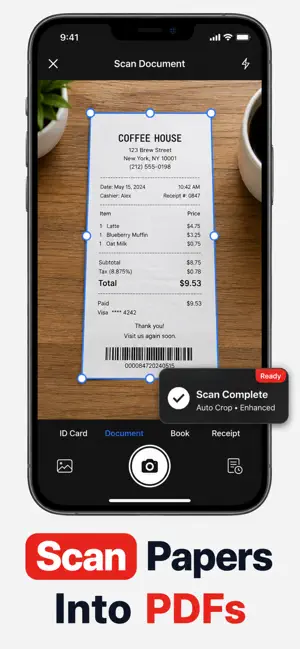
About PDF Converter & Sign: PDFero
Convert, merge, scan, and sign PDFs in one simple app. PDFero turns photos, Word, Excel, PowerPoint, text, URLs, and other files into professional PDFs—then lets you combine documents, add your signature, organize files, print, or share them directly from your iPhone. Whether you need to turn a jpg, jpeg, png, word, excel, powerpoint, url, text, picture, photo, or scan into a PDF, PDFero makes it fast and easy. Key Features Photo & Image to PDF: Convert any pic, picture, or photo into a PDF file. File to PDF: Transform Word (docx), text, and other files into PDFs for easy sharing. Camera Scanner: Use your iPhone as a scanner and create PDFs instantly. Export & Print: Share, email, or print your PDFs with a single tap. Organize Files: Rename, save, and manage your PDF library with ease. Why PDFero? Simple yet powerful PDF creator & maker. Designed for speed, privacy, and convenience. Perfect for students, professionals, and everyday use. Disclaimer Your privacy is our top priority: Local Conversions: Most file types (images, text, url → pdf, etc.) are processed locally on your device and never leave it. Secure Server Conversions: For Word, Excel, PPT, and Audio conversions, files are processed via our API on secure servers. All requests are encrypted via HTTPS (SSL). Files are not stored, shared, or sold. Transparency: No hidden data collection or unauthorized third-party access. PRICING AND TERMS We offer 3 subscription types: Auto-renewal of yearly, monthly, and weekly subscriptions. Your subscription will automatically renew at the end of each term, and you will be charged through your iTunes account. You can turn off auto-renew from your iTunes account settings, but refunds will not be provided for any unused portion of the term. Terms of use: https://www.apple.com/legal/internet-services/itunes/dev/stdeula/ Privacy policy: https://owlly.cc/privacy Download PDFero today and create secure, professional PDFs from your photos, images, and documents!
What’s new
Version 1.2.1 · Updated August 14, 2026
Password-protected PDFs are now supported. Open encrypted PDF documents securely by entering their password, then continue working with them in PDFero. This update makes it easier to access and manage protected documents while keeping your PDF workflow in one place.
App privacy
The developer, Mikayil Feyzili, reported these privacy practices to Apple.
Data Used to Track You
The following data may be used to track you across apps and websites owned by other companies:
- Usage Data: Advertising Data
Data Linked to You
The following data, which may be collected and linked to your identity, may be used for the following purposes:
- User Content: Audio Data
- Purchases: Purchase History
- Identifiers: User ID, Device ID
Used for: Developer’s Advertising or Marketing, Analytics, Product Personalization, App Functionality
Data Not Linked to You
The following data, which may be collected but is not linked to your identity, may be used for the following purposes:
- Search History: Search History
- Browsing History: Browsing History
- Usage Data: Product Interaction, Advertising Data, Other Usage Data
- Diagnostics: Crash Data, Performance Data, Other Diagnostic Data
Used for: Developer’s Advertising or Marketing, Analytics, App Functionality
Alternatives to PDF Converter & Sign: PDFero
Looking for apps like PDF Converter & Sign: PDFero? Here are 6 similar apps on the App Store. The highest rated is PDF converter: Image to PDF (5.0/5), and all 6 are free to download.
-
 Convert Picture to PDF +
-
 PDF converter: Image to PDF
5.0
PDF converter: Image to PDF
5.0
-
 PDFConverter.app
3.9
PDFConverter.app
3.9
-
 PDF Converter,Convert to PDF
1.0
PDF Converter,Convert to PDF
1.0
-
 Merge Pdf Combine Pdf
5.0
Merge Pdf Combine Pdf
5.0
-
 PDF Converter – Photo to PDF
4.6
PDF Converter – Photo to PDF
4.6
| App | Rating | Price | Last updated | Compare |
|---|---|---|---|---|
| PDF Converter & Sign: PDFero | 4.8 / 5 (4 ratings) | Free | August 14, 2026 | |
| Convert Picture to PDF + | – | Free | Aug 21, 2026 | Compare |
| PDF converter: Image to PDF | 5.0 / 5 (4) | Free | Jul 8, 2026 | Compare |
| PDFConverter.app | 3.9 / 5 (28) | Free | Feb 13, 2026 | Compare |
| PDF Converter,Convert to PDF | 1.0 / 5 (1) | Free | Feb 28, 2026 | Compare |
| Merge Pdf Combine Pdf | 5.0 / 5 (2) | Free | Oct 23, 2024 | Compare |
| PDF Converter – Photo to PDF | 4.6 / 5 (108) | Free | Oct 17, 2026 | Compare |