

MonoBudget: Fixed Costs
Michael Guggenberger Finance iPhoneiPadiPod touch
MonoBudget: Fixed Costs is a free Finance app for iPhone and iPad by Michael Guggenberger. Requires iOS 16.4. Updated September 27, 2026.
- Price
- Free
- on the App Store
- Size
- 36 MB
- Age 4+
- Updated
- Sep 27
- 2026 · v2.3.0
Screenshots


About MonoBudget: Fixed Costs
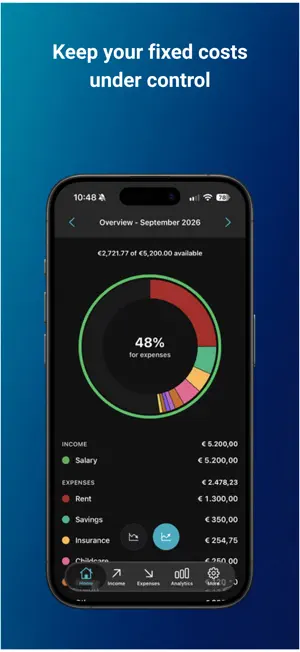
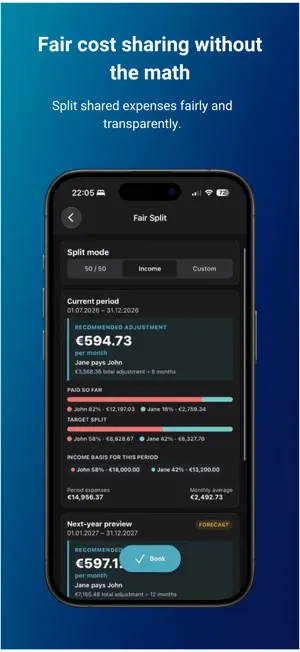
Finally know what's actually left at the end of the month. MonoBudget is a household budget planner built around your fixed costs. Enter your income and your recurring bills, and within minutes you'll see how much money is genuinely free to spend each month. No bank connection, no account, no ads. SET UP IN 5 MINUTES Add your salary, add your fixed costs, done. No lengthy onboarding, no category spreadsheets to fill in first. → Enter your income: salary, side job, benefits → Add your fixed costs: rent, insurance, utilities, subscriptions → MonoBudget immediately shows you what's left Once a cost is set up, MonoBudget keeps creating its monthly entries for you. There's nothing to maintain. NOT AN EXPENSE TRACKER You don't log every coffee here. This is about your fixed, predictable costs — so you know what's genuinely available to spend, and where to start if you want to save. YOUR DATA STAYS WITH YOU No account, no sign-up, no MonoBudget server, no tracking. Your financial data lives locally on your iPhone. Back up only if you want to. Encryption happens on the device with a passphrase only you know, and you decide whether a backup stays on your iPhone or goes to your iCloud Drive. You can also export plain JSON at any time and take your data with you. FREE FEATURES - Unlimited income sources and fixed costs - Repeats monthly, quarterly, semi-annually, yearly, or on your own interval in days, weeks, months, or years - Yearly bills counted either in the month they're due or spread evenly across the year - A clear chart of where your money goes - Your own categories and colors - Sort and filter by person, category, and interval - A reminder before bigger payments like insurance or an annual subscription - App lock via Face ID, Touch ID, or your passcode - 14 color themes, light and dark - Move between months — past and future - Export and import your data: open JSON or passphrase-encrypted - English and German MONOBUDGET PRO - Analytics: key figures, expenses and income in one chart with past and forecast kept apart, and breakdowns by category and person - Scenarios: work out what a new job, a move or a bigger purchase would do to your budget, without changing your real data. Compare a scenario against your real figures or against another scenario - Fair Split: divide fixed costs fairly between two people — 50/50, proportional to income, or your own percentage. Includes a preview for next year and a monthly settlement the app books for you - Add a second person, ideal for couples and shared households - Automatic encrypted backups, created daily in the background - 2 additional premium themes Pro is a one-time purchase. No subscription, no recurring cost. WHAT IF? (PRO) A new job, a move, a loan paid off? The question is always what would be left each month. Copy your real figures into a scenario, adjust what the change would cost or bring in, and compare the result against today. Your real budget stays untouched. Pro is a one-time purchase. No subscription, no recurring cost. WHO IS MONOBUDGET FOR? → You want to know how much is left once every fixed cost is paid → Your fixed costs are high: rent, car, childcare, insurance → Other budget apps feel too complicated → You share costs with a partner or flatmates → Privacy matters to you Made in Austria. No ads, no tricks.
What’s new
Version 2.3.0 · Updated September 27, 2026
NEW: Scenarios (Pro) • Work out what a change would do to your budget, without touching your real data. • Start a scenario from today's figures, from scratch, or as a copy of one you already have. • Switch individual sources off, override amounts, or add items that exist only in the scenario. • Compare a scenario against your real figures, or against another scenario. • Scenarios travel with your exports, imports and backups. IMPROVED: Home • Above the chart, Home now says directly how much of your income is still available. • The centre of the chart shows how much of your income your fixed costs take up. • The legend shows your five largest categories and groups the rest under "Other". IMPROVED: Analytics • The expense chart now starts at zero, so bar lengths match the amounts. • Your income sits in the same chart as a second line. • What has already happened is clearly separated from what is still ahead. • Tap a month to see its expenses, income and the difference. • A second chart shows how far a month sits from a typical one. Outliers that vanish in the absolute chart stand out there. • The full-screen view lists every month with both values. STABILITY • Figures in Analytics stay on screen while they refresh instead of briefly disappearing. • Concurrent database access now waits instead of failing. • A restored backup keeps deleted single entries deleted. • While a backup is being restored, the app is locked so nothing gets in the way. • Renamed or recolored categories take effect everywhere right away. ALSO • More now links to the MonoBudget website and lists the open-source licenses. NOTE • MonoBudget now requires iOS 16.4 or later.
App privacy
The developer, Michael Guggenberger, reported these privacy practices to Apple.
Data Not Collected
The developer does not collect any data from this app.
Alternatives to MonoBudget: Fixed Costs
Looking for apps like MonoBudget: Fixed Costs? Here are 6 similar apps on the App Store.
-
 fixo – Fixkosten Tracker
-
 Fixo - Fixed Expenses Tracker
-
 BudgetFox: Budget Planner App
-
 Gidero
-
 Abo Manager & Tracker: Prism
-
 X Finance App
| App | Rating | Price | Last updated | Compare |
|---|---|---|---|---|
| MonoBudget: Fixed Costs | – | Free | September 27, 2026 | |
| fixo – Fixkosten Tracker | – | Free | Oct 19, 2026 | Compare |
| Fixo - Fixed Expenses Tracker | – | Free | May 3, 2026 | Compare |
| BudgetFox: Budget Planner App | – | Free | Oct 12, 2026 | Compare |
| Gidero | – | Free | Jun 28, 2026 | Compare |
| Abo Manager & Tracker: Prism | – | Free | Sep 7, 2026 | Compare |
| X Finance App | – | Free | Oct 2, 2026 | Compare |