

Smart Alerts Pro
Hibin Maheendran Productivity iPhoneiPadiPod touch
Smart Alerts Pro is a free Productivity app for iPhone and iPad by Hibin Maheendran. Requires iOS 15.0. Updated October 22, 2026.
- Price
- Free
- on the App Store
- Size
- 72 MB
- Age 4+
- Updated
- Oct 22
- 2026 · v2.1.0
Screenshots


About Smart Alerts Pro
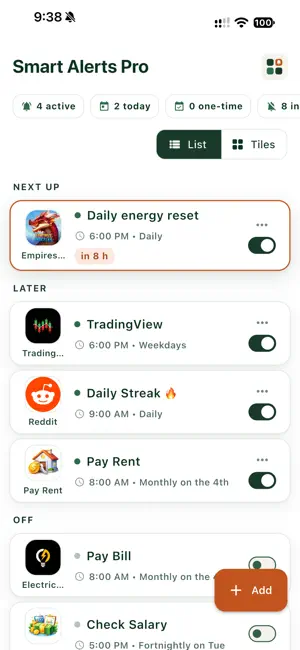
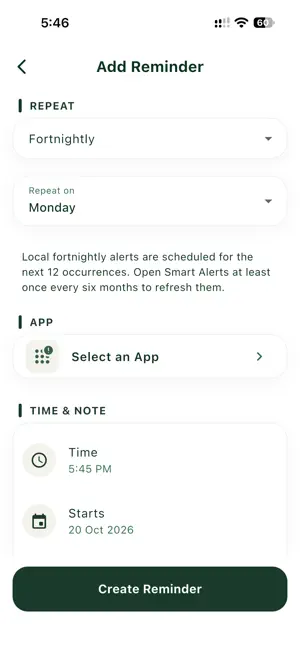
Never lose a streak again. Smart Alerts Pro reminds you at exactly the right time, and one tap opens the app you need, so a busy day never costs you a 300-day streak. Set reminders tied to any app on your phone: language lessons, meditation, fitness, journaling, study or games. FEATURES • App-aware reminders: tap the notification to open your app • Next up on Home shows your soonest reminder with a live countdown • Back up and sync your reminders to your account, so they come back on a new phone or after reinstalling (free on every plan) • Flexible schedules: one-time, daily, custom days, weekly, fortnightly and monthly • See the next alert before you save, and pick a start date for fortnightly reminders • Ready-made templates, including bills and paydays • Snooze right from the notification • Time Sensitive reminders can break through Focus (you control this in Settings) • Turn off every alert in one tap, then turn back on just the ones you need • Reminders that are off sit in their own section at the bottom • Reminders follow you correctly when you travel across time zones • List or tile view; long-press to move reminders • Directory of popular apps with icons, or add any app with your own emoji icon • 6 notification sounds • Light by default, with a true-black dark mode • Sign in with Apple or Google; hide your email on My Account • Delete your account and data at any time PLANS • Basic (free): 2 reminders, one-time and daily • Plus: 5 reminders, adds weekly and custom days • Pro: unlimited reminders and every schedule Whether you're learning a language, building a workout habit or keeping a game streak alive, Smart Alerts Pro keeps you on track. Terms of Use: https://sap.synvoya.com/terms Privacy Policy: https://sap.synvoya.com/privacy
What’s new
Version 2.1.0 · Updated October 22, 2026
What's new in Smart Alerts 2.1: • Reminders that are off now sit in their own Off section at the bottom, in both list and tile view. Turn one back on and it returns to its place. • Turn off all alerts from the menu switches every reminder off. Turn any one back on and it rings again straight away. • Turn on all alerts brings back the reminders you had on. • Turning alerts off on this phone only (Settings) now greys the switches, so it is clear nothing will ring. • A fresh launch screen with the new icon.
App privacy
The developer, Hibin Maheendran, reported these privacy practices to Apple.
Data Linked to You
The following data, which may be collected and linked to your identity, may be used for the following purposes:
- Purchases: Purchase History
- Contact Info: Email Address
- User Content: Other User Content
- Identifiers: User ID
Used for: App Functionality
Data Not Linked to You
The following data, which may be collected but is not linked to your identity, may be used for the following purposes:
- Diagnostics: Crash Data, Performance Data
Used for: App Functionality