

Transcript & AI Video Editing
Driftwave Labs LLC Utilities iPhoneiPadiPod touch
Transcript & AI Video Editing is a free Utilities app for iPhone and iPad by Driftwave Labs LLC. Rated 4.4/5 from 96 ratings. Requires iOS 15.1.
- Rating
- 4.4
- 96 ratings
- Price
- Free
- on the App Store
- Size
- 51 MB
- Age 12+
- Updated
- Oct 14
- 2025 · v1.0.5
Screenshots


About Transcript & AI Video Editing
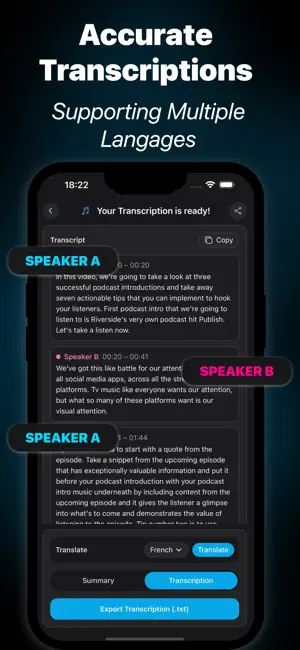
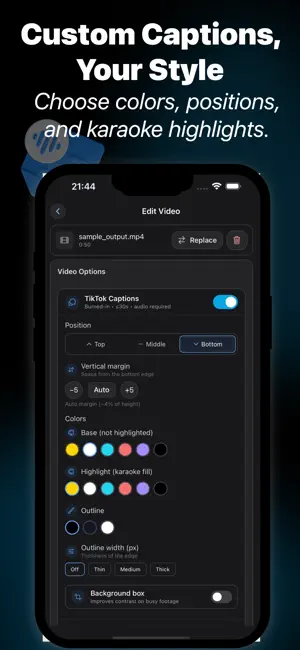
Turn any audio or video into polished content. you can transcribe, clean voices, add captions, and edit video — all in one easy app Key Features : • Video Editing Made Simple – Upload any video, edit the audio, add captions, and export ready-to-share clips. • AI Transcription – Convert audio & video into accurate text with speaker labels and multiple languages. • Auto-Captions for Creators – Instantly generate styled captions for TikTok, Reels & Shorts with colors, positions, and karaoke highlights. • Noise Removal & Voice Cleaning – Eliminate background noise, clicks, pops, and boost clarity for studio-quality sound. • Smart Audio Enhancements – Match loudness, fix silences, and polish podcasts, interviews, or lectures. • Summaries & Notes – Get automatic highlights, action items, and structured notes. • Export & Share – Save to Photos, share to social media, or download clean transcripts instantly. Perfect For : • Students taking lecture notes • Podcasters & journalists recording interviews • Businesses capturing meeting minutes • YouTubers & content creators making Shorts/Reels • Anyone who wants clear, professional sound without expensive tools Why Choose Transcript & AI Video Editing? Unlike basic editors, Transcript & AI Video Editing brings transcription + video captions + audio cleanup + editing tools into one seamless workflow. Just upload your file, let AI do the work, and share content that looks and sounds professional. Subscriptions • Weekly Plan – Unlock all features ($4.99 / week) • Monthly Plan – Unlock all features ($14.99 / month) Terms & Privacy By using Transcript & AI Video Editing, you agree to our Terms of Use and Privacy Policy. • Terms of Use: https://www.transcript.club/terms/ • Privacy Policy : https://www.transcript.club/privacy/ Contact Us Questions or feedback? We’d love to hear from you. https://www.transcript.club/contact/ Download Transcript & AI Video Editing today — transcribe, edit, and share content like a pro.
Ratings & reviews
4.4
96 ratings
What’s new
Version 1.0.5 · Updated October 14, 2025
Bug fixes
App privacy
The developer, Driftwave Labs LLC, reported these privacy practices to Apple.
Data Used to Track You
The following data may be used to track you across apps and websites owned by other companies:
- Identifiers: Device ID
Data Not Linked to You
The following data, which may be collected but is not linked to your identity, may be used for the following purposes:
- Identifiers: Device ID
Used for: Developer’s Advertising or Marketing, Analytics
Alternatives to Transcript & AI Video Editing
Looking for apps like Transcript & AI Video Editing? Here are 6 similar apps on the App Store. The highest rated is Boost Audio Voice Reduce Noise (4.6/5), and all 6 are free to download.
-
 Editune - Audio Editor
3.4
Editune - Audio Editor
3.4
-
 Boost Audio Voice Reduce Noise
4.6
Boost Audio Voice Reduce Noise
4.6
-
 Podcast Cleaner AI Denoise Fix
4.5
Podcast Cleaner AI Denoise Fix
4.5
-
 Smooth Talker - Remove Silence
3.1
Smooth Talker - Remove Silence
3.1
-
 Video Transcriber: VidNotes
4.6
Video Transcriber: VidNotes
4.6
-
 Denoise Audio: Noise Reducer
4.3
Denoise Audio: Noise Reducer
4.3
| App | Rating | Price | Last updated | Compare |
|---|---|---|---|---|
| Transcript & AI Video Editing | 4.4 / 5 (96 ratings) | Free | October 14, 2025 | |
| Editune - Audio Editor | 3.4 / 5 (97) | Free | Jul 20, 2026 | Compare |
| Boost Audio Voice Reduce Noise | 4.6 / 5 (144) | Free | Oct 19, 2026 | Compare |
| Podcast Cleaner AI Denoise Fix | 4.5 / 5 (169) | Free | Sep 25, 2026 | Compare |
| Smooth Talker - Remove Silence | 3.1 / 5 (29) | Free | Jun 11, 2024 | Compare |
| Video Transcriber: VidNotes | 4.6 / 5 (34) | Free | Oct 18, 2026 | Compare |
| Denoise Audio: Noise Reducer | 4.3 / 5 (30) | Free | Jul 14, 2025 | Compare |