

NipaPlay
荣广 梁 Entertainment iPhoneiPadiPod touch
NipaPlay is a free Entertainment app for iPhone and iPad by 荣广 梁. Rated 4.4/5 from 7 ratings. Requires iOS 13.0. Updated October 2, 2026.
- Rating
- 4.4
- 7 ratings
- Price
- Free
- on the App Store
- Size
- 188 MB
- Age 4+
- Updated
- Oct 2
- 2026 · v1.11.9
Screenshots
About NipaPlay
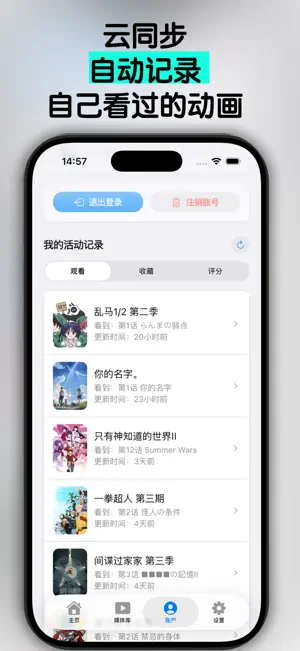
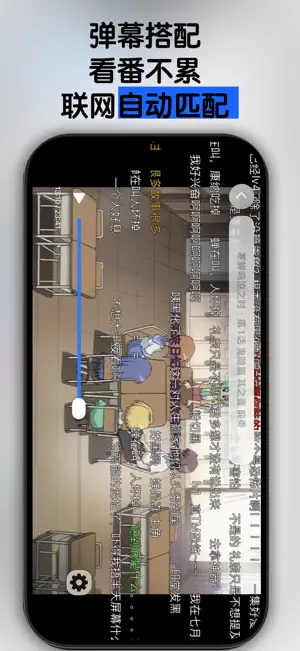
NipaPlay is a modern, open-source video player built for your local media collection. Enjoy an immersive and flexible viewing experience, whether you're watching offline files or connecting to your personal media server. Key Features: Your Media, Your Way: Flawlessly play your local video files with support for multiple subtitle (ASS, SRT) and audio tracks. Emby & Jellyfin Integration: Connect directly to your media server to browse and watch your entire library. Made for Anime Fans: Full support for Danmaku (bullet comments) brings an interactive viewing experience. Clean & Modern UI: A beautiful, easy-to-use interface that stays out of your way. Truly Cross-Platform: Designed with Flutter for a seamless experience on all your devices.
Ratings & reviews
4.4
7 ratings
What’s new
Version 1.11.9 · Updated October 2, 2026
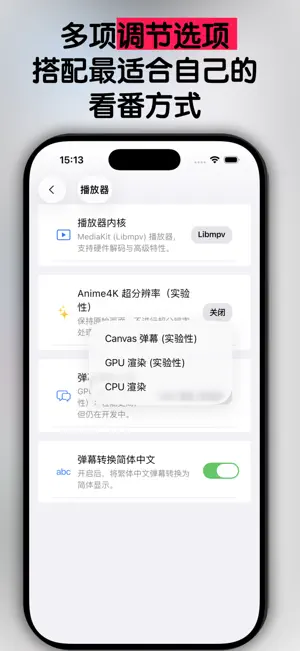
What's New in NipaPlay New Features You can now load multiple external subtitles simultaneously, each with its own independent timeline. Long-press subtitle text to open an edit panel and drag to adjust the global position offset. VobSub (.sub + .idx) image-based subtitles are fully supported, with automatic preference for Simplified Chinese or Japanese tracks and correct filename restoration after a cold start. A new Player Menu Quick Controls toggle in Settings > Player lets you adjust playback speed and volume boost directly from the player menu. A new Library NEW Badge toggle in Settings > Appearance lets you hide the NEW corner badge on library cards without affecting new-content tracking. A limited-time New Anime Recap section has been added to the home screen and can be disabled in Settings. The media info page now supports binding multiple video file versions to the same episode, with a version picker appearing before playback. Episode auto-scrolling and improved mouse-wheel speed in episode lists are also included. Jellyfin gains an Episode Date Added sort option, and a crash caused by missing legacy sort fields in Emby/Jellyfin archives has been fixed. Improvements Skip Intro and Skip Outro buttons now display as icon-and-text with a drop shadow for better readability over video. The GIF export Copy to Clipboard option on desktop now writes the actual image to the system clipboard for direct pasting into other apps. iOS DFM+ danmaku rendering is now driven by the native display clock, eliminating duplicate frames, skipped frames, and position jitter. Danmaku engines now pause and resume with video buffering to stay in sync, and a progress bar tooltip flickering issue has been fixed. The downloader shows tasks immediately after adding them and handles pause, resume, save, and library import more reliably. The plugin marketplace now shows Delete and Update options for installed non-built-in plugins, with confirmation before deletion. Bug Fixes Fixed a UI freeze caused by a deadlock when switching playback engines during playback. Fixed the aspect-ratio menu overflowing off the right edge of the screen. Fixed player controls, titles, lock button, skip button, and progress bar overlapping the notch or Dynamic Island during iPhone landscape playback. Fixed the library settings button on iOS having a misaligned tap target, now a proper 44x44 pt touch area. Fixed videos opened from the iOS Files app via Open with NipaPlay not playing. Fixed library cover images going permanently blank after backgrounding the app. Fixed the iOS bottom tab bar icons overlapping their labels. Fixed the iPadOS library search field losing focus after search results updated. Fixed Chinese characters on Windows rendering with Japanese glyph variants instead of Simplified Chinese forms. Fixed incorrect video duration display and a Continue Watching button incorrectly pointing to the last episode when no watch history exists. Fixed DFM/DFM+ supersampling preference and danmaku visibility toggle being reset after a restart. Fixed a macOS crash at launch in sandboxed builds caused by an inaccessible lock file path. Fixed a macOS crash when switching audio output devices such as plugging in headphones or changing Bluetooth devices.
App privacy
The developer, 荣广 梁, reported these privacy practices to Apple.
Data Linked to You
The following data, which may be collected and linked to your identity, may be used for the following purposes:
- Contact Info: Email Address
- User Content: Other User Content
- Identifiers: User ID
- Usage Data: Product Interaction
Used for: App Functionality
Alternatives to NipaPlay
Looking for apps like NipaPlay? Here are 6 similar apps on the App Store. The highest rated is Lenna - Video Library Player (4.9/5), and all 6 are free to download.
-
 Video Player - EplayerX
3.8
-
 DeePlayer -Create home theater
2.3
-
 CapyPlayer: Video Player
4.4
-
 iPlay: Watch Anywhere
3.6
-
 BeeJoy
4.3
-
 Lenna - Video Library Player
4.9
| App | Rating | Price | Last updated | Compare |
|---|---|---|---|---|
| NipaPlay | 4.4 / 5 (7 ratings) | Free | October 2, 2026 | |
| Video Player - EplayerX | 3.8 / 5 (32) | Free | Sep 27, 2026 | Compare |
| DeePlayer -Create home theater | 2.3 / 5 (3) | Free | Sep 23, 2025 | Compare |
| CapyPlayer: Video Player | 4.4 / 5 (7) | Free | Jul 25, 2026 | Compare |
| iPlay: Watch Anywhere | 3.6 / 5 (5) | Free | Jun 20, 2026 | Compare |
| BeeJoy | 4.3 / 5 (14) | Free | Oct 10, 2026 | Compare |
| Lenna - Video Library Player | 4.9 / 5 (118) | Free | Jun 18, 2026 | Compare |
Compare NipaPlay with the top alternatives: ratings, updates, ASO score and keyword gaps →