

Blood Pressure Time
Mutsumi Suzuki Health & Fitness iPhoneiPadiPod touch
Blood Pressure Time is a free Health & Fitness app for iPhone and iPad by Mutsumi Suzuki. Requires iOS 26.0. Updated October 12, 2026.
- Price
- Free
- on the App Store
- Size
- 66 MB
- Age 17+
- Updated
- Oct 12
- 2026 · v1.3.0
Screenshots



About Blood Pressure Time
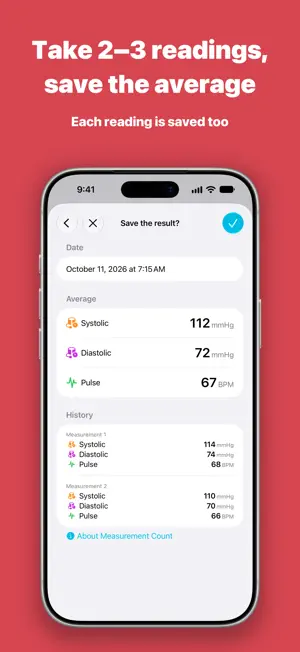
Point your camera at your blood pressure monitor, and the app reads and records the numbers on its display. It also averages 2 or 3 readings taken in a row, and shows morning and evening averages by week and month. Tired of typing in readings and averaging them with a calculator every day? Blood Pressure Time makes it easy to log readings right after you measure. With Premium, you can also make a PDF of your records to show your doctor. No more paper logbooks. Daily record keeping becomes much easier. ■ Perfect if you: • Measure your blood pressure at home every day • Want to switch from a paper log to an app • Take 2 or 3 readings in a row and average them with a calculator • Want to see morning and evening averages by week or month • Want to log readings right after you measure • Want to show your records to your doctor • Use more than one iPhone or iPad ■ Key Features (Free) • Scan Your Monitor with the Camera Point your camera at your monitor, and systolic, diastolic, and pulse are entered for you. Check and correct them before saving. Works with typical home monitors that show the three numbers stacked top to bottom. The first 50 uses are free (2 or 3 readings in one session count as one use). Try it with your own monitor. If a scan doesn't work, or after 50 uses, you can type the numbers in. • Average 2 or 3 Readings in a Row For home monitoring, guidelines generally recommend taking 2 readings in a row each morning and evening, and using their average. Choose 1 to 3 readings per session. With 2 or 3, the app saves the average as one record and keeps each reading. No calculator needed. With 1, the reading is saved as is. • Morning and Evening Averages Reports show the average, high, and low of blood pressure and pulse, split into morning and evening. Choose a week, a month, 6 months, or a year. Graphs show trends in your morning and evening averages by day, week, or month. • Quick Input and Quick Scan (NEW) Quick Input opens the input screen, and Quick Scan opens the scan screen. Open them from Lock Screen widgets, Control Center, Siri, or by touching and holding the app icon. Quick Scan counts toward the 50 free uses. • Simple to Use Follow the on-screen guide to enter systolic, diastolic, and pulse. Easy for anyone to follow. • Record with Siri Say "Record in BP Time" to Siri, then answer when Siri asks for your systolic and diastolic values. No need to open the app. (BP Time is the app's Home Screen name.) • Calendar Record temperature, mood, medication, and notes with your blood pressure, and review any day on the calendar. • Morning and Evening Periods Set the morning and evening periods to fit your routine. Reports split your readings by these periods. • iCloud Sync See your records on any iPhone or iPad signed in to the same Apple Account. • Apple Health Save blood pressure and pulse to Apple Health, and import past readings from it. • Reminders Get notified at your chosen morning and evening times, so you don't forget to measure. ■ Premium (One-Time Purchase) The basic features are free. Buy Premium once to unlock the features below permanently. • PDF Export Choose a period (up to 365 days) and make a PDF of your morning and evening blood pressure and pulse. Save, share, or print it. It includes a graph, readings, medication, temperature, mood, and notes. Useful for doctor's appointments. • Unlimited Camera Scanning Keep scanning after the 50 free uses. • Home Screen Widgets (NEW) Open Quick Input or Quick Scan from your Home Screen. • Quick Launch (NEW) The app opens directly to the input or scan screen. Turn this on in Settings. • No Ads No subscription or auto-renewal. With Family Sharing, your family can use Premium at no extra cost. This app does not measure blood pressure. It is a tool for recording blood pressure and pulse. It does not provide medical diagnosis, treatment, or advice. Always consult a doctor or healthcare professional about health decisions or treatment.
What’s new
Version 1.3.0 · Updated October 12, 2026
Open the input screen or the camera scanner right away. • Quick Input and Quick Scan: open them directly by touching and holding the app icon, or from Lock Screen widgets, Control Center, or Siri With Premium, you also get: • Home Screen Widgets: access Quick Input or Quick Scan from your Home Screen • Quick Launch: open the input or scan screen directly when you open the app Also includes minor improvements.
App privacy
The developer, Mutsumi Suzuki, reported these privacy practices to Apple.
Data Used to Track You
The following data may be used to track you across apps and websites owned by other companies:
- Location: Coarse Location
- Identifiers: Device ID
- Usage Data: Product Interaction, Advertising Data, Other Usage Data
- Diagnostics: Crash Data, Performance Data
Data Linked to You
The following data, which may be collected and linked to your identity, may be used for the following purposes:
- Location: Coarse Location
- Identifiers: Device ID
- Usage Data: Product Interaction, Advertising Data, Other Usage Data
- Diagnostics: Crash Data, Performance Data
Used for: Third-Party Advertising
Alternatives to Blood Pressure Time
Looking for apps like Blood Pressure Time? Here are 6 similar apps on the App Store. The highest rated is BP Pulse Health Log - PocketBP (5.0/5), and all 6 are free to download.


| App | Rating | Price | Last updated | Compare |
|---|---|---|---|---|
| Blood Pressure Time | – | Free | October 12, 2026 | |
| HealthPort - ヘルスケアデータ出力・血圧手帳 | – | Free | Sep 15, 2026 | Compare |
| BP Memo | – | Free | Oct 13, 2025 | Compare |
| Today's BP | – | Free | Aug 8, 2026 | Compare |
| Just BP | – | Free | Mar 22, 2026 | Compare |
| うちの血圧記録 | – | Free | Sep 10, 2026 | Compare |
| BP Pulse Health Log - PocketBP | 5.0 / 5 (1) | Free | Oct 13, 2026 | Compare |