

Bible Path : Read & Listen
Chris Wakefield Reference iPhoneiPadiPod touch
Bible Path : Read & Listen is a free Reference app for iPhone and iPad by Chris Wakefield. Requires iOS 18.1. Updated August 21, 2025.
- Price
- Free
- on the App Store
- Size
- 8 MB
- Age 4+
- Updated
- Aug 21
- 2025 · v1.0
Screenshots


About Bible Path : Read & Listen
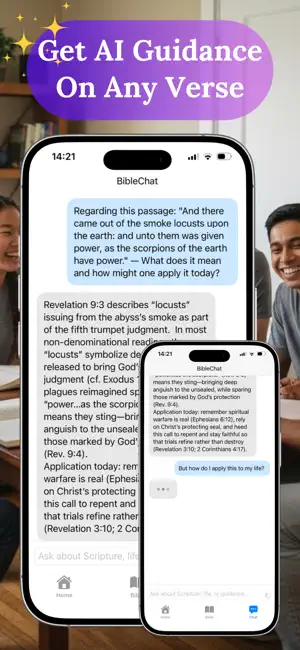
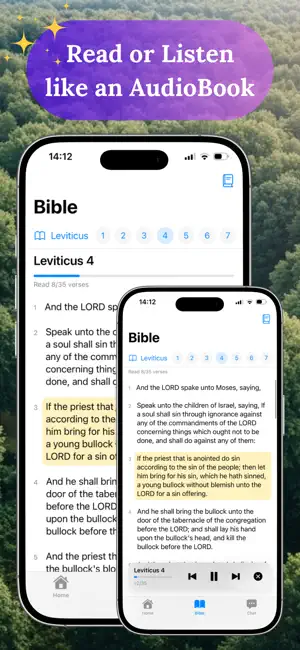
Bible Path makes Scripture feel close, clear, and practical. Read beautifully typeset text, listen hands‑free with natural audio, ask Bible‑anchored questions, and even turn verses into shareable images. Whether you’re starting a new reading rhythm or going deeper in study, Bible Path gently guides your daily walk. Bible Path blends a clean, calming reading experience with tools that reduce friction, not add it. Choose your preferred English translation, pick up right where you left off, and flow between reading, listening, and reflection without losing your place. When you’re curious, Bible Path’s Bible‑grounded chat points you back to Scripture with concise answers and references. Enjoy crisp typography and smooth navigation through books, chapters, and verses. Switch translations at any time (including KJV, ASV, and WEB), and read offline after the first download. Bible Path remembers your last location and your progress so you can resume instantly. Turn chapters into an audiobook with a single tap. The mini player shows verse progress and lets you pause, resume, and move between verses with simple controls. Verse highlighting tracks the spoken text so reading and listening stay in sync. Chat with a respectful, Scripture‑first assistant that stays focused on the Bible, offers concise explanations, and references passages for further reading. Long‑press any verse to “Ask BibleChat” in context. Transform a verse into a tasteful, square image with readable overlay text and strong contrast, then save or share it with friends. It’s a simple way to keep truth in view and spark meaningful conversations. Bookmark meaningful passages, add personal notes, and see your saved items in one place. Bible Path highlights verses with notes and tracks your progress through every chapter. See the Verse of the Day on the Home screen and add the optional widget for quick inspiration. Open Bible Path from the widget to read the full passage, listen, or ask a question. Bible Path follows Apple’s design best practices to stay out of your way: clear typography, gentle colors, large touch targets, and accessible layouts that feel at home on iPhone and iPad. Why people love Bible Path It’s fast, offline‑friendly, and deliberately simple. You can read, listen, ask, visualize, save, and share—all in one place—without busy screens or distracting clutter. Bible Path makes it easier to build a daily habit and apply the Word to real life. An active subscription is required to use the above features in Bible Path. Apple EULA: https://www.apple.com/legal/internet-services/itunes/dev/stdeula/
App privacy
The developer, Chris Wakefield, reported these privacy practices to Apple.
Data Not Collected
The developer does not collect any data from this app.
Alternatives to Bible Path : Read & Listen
Looking for apps like Bible Path : Read & Listen? Here are 6 similar apps on the App Store. The highest rated is Bible Reading Plan & Worship (5.0/5), and all 6 are free to download.
-
 JustBible - Read & Learn
-
 Biblical Thoughts
-
 Bible Reading Plan & Worship
5.0
-
 Light My Path Bible Study
5.0
-
 La Biblia De Darby ·
4.8
-
 Heavenly Quiz: Win & Cash Out
5.0
| App | Rating | Price | Last updated | Compare |
|---|---|---|---|---|
| Bible Path : Read & Listen | – | Free | August 21, 2025 | |
| JustBible - Read & Learn | – | Free | Jun 24, 2026 | Compare |
| Biblical Thoughts | – | Free | Mar 2, 2025 | Compare |
| Bible Reading Plan & Worship | 5.0 / 5 (1) | Free | Jun 23, 2026 | Compare |
| Light My Path Bible Study | 5.0 / 5 (3) | Free | Apr 10, 2026 | Compare |
| La Biblia De Darby · | 4.8 / 5 (33) | Free | Jun 16, 2025 | Compare |
| Heavenly Quiz: Win & Cash Out | 5.0 / 5 (1) | Free | Sep 29, 2024 | Compare |