

Dayline: Tasks & Calendar
Workalisation Limited Productivity iPhoneiPadiPod touch
Dayline: Tasks & Calendar is a free Productivity app for iPhone and iPad by Workalisation Limited. Rated 5.0/5 from 3 ratings. Requires iOS 17.6.
- Rating
- 5.0
- 3 ratings
- Price
- Free
- on the App Store
- Size
- 37 MB
- Age 4+
- Updated
- Jan 15
- 2026 · v1.7.0
Screenshots

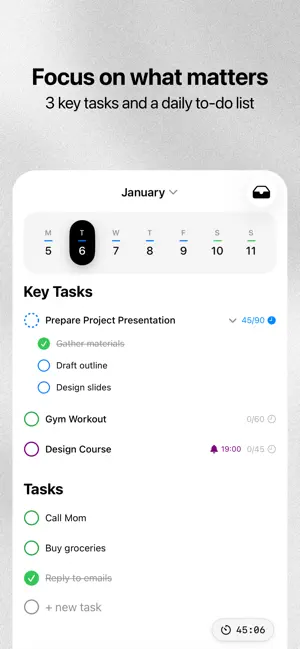


About Dayline: Tasks & Calendar
Dayline is designed for clarity. It’s a minimalist planner that guides you through your day without the noise. Plan in seconds, stay focused for hours. Prioritize - Key Tasks: Focus on your top 3 goals to avoid burnout. - To-Dos: A simple list for everything else. - Inbox: Quick capture for ideas and notes. Smart Calendar - Day Templates: Apply your "Work" or "Weekend" routine in one tap. - Active Hours: See only your scheduled time, not empty space. - Task Sync: Key tasks automatically appear in your calendar. Dayline Assist Manage your schedule with simple text or voice commands: - "Shift all events 2 hours forward." - "Break this task into subtasks." - "Move unfinished tasks to tomorrow." Deep Focus - Focus Tab: A unified timeline of your tasks and events. - Timers: Built-in Pomodoro and focus tracking. - Live Activities: Track progress via Dynamic Island and Lock Screen. Essentials - Google Calendar integration. - Seamless Dark and Light modes. - Interactive onboarding for quick setup. Privacy Policy: https://dayline.pro/privacy Terms of Use (EULA): https://dayline.pro/terms
What’s new
Version 1.7.0 · Updated January 15, 2026
- Compatibility Improvements: minor fixes for better performance and stability with the macOS version. - Data Security: enhanced the reliability and security of user data storage. - Icon Update: removed the holiday-themed icon and adapted the design to the Liquid Glass style.
App privacy
The developer, Workalisation Limited, reported these privacy practices to Apple.
Data Linked to You
The following data, which may be collected and linked to your identity, may be used for the following purposes:
- Contact Info: Email Address, Name
- User Content: Other User Content, Customer Support, Audio Data
- Identifiers: User ID
- Diagnostics: Crash Data, Performance Data
Used for: Third-Party Advertising, Developer’s Advertising or Marketing, Analytics, Product Personalization, Other Purposes
Data Not Linked to You
The following data, which may be collected but is not linked to your identity, may be used for the following purposes:
- Usage Data: Advertising Data, Other Usage Data, Product Interaction
- Identifiers: Device ID
- Diagnostics: Other Diagnostic Data
Used for: Third-Party Advertising, Developer’s Advertising or Marketing, Analytics
Alternatives to Dayline: Tasks & Calendar
Looking for apps like Dayline: Tasks & Calendar? Here are 6 similar apps on the App Store. The highest rated is Span (Did I?) – Task Tracker (5.0/5), and all 6 are free to download.
-
 Chart Maker - Build Graphs
3.0
Chart Maker - Build Graphs
3.0
-
 OmegaGPT - Offline AI Chat
3.3
OmegaGPT - Offline AI Chat
3.3
-
 Prehearsal - Speaking Coach
-
 Daynest
-
 Span (Did I?) – Task Tracker
5.0
Span (Did I?) – Task Tracker
5.0
-
 NotGPT: AI Detector & Humanize
4.2
NotGPT: AI Detector & Humanize
4.2
| App | Rating | Price | Last updated | Compare |
|---|---|---|---|---|
| Dayline: Tasks & Calendar | 5.0 / 5 (3 ratings) | Free | January 15, 2026 | |
| Chart Maker - Build Graphs | 3.0 / 5 (1) | Free | Aug 22, 2025 | Compare |
| OmegaGPT - Offline AI Chat | 3.3 / 5 (3) | Free | Oct 5, 2026 | Compare |
| Prehearsal - Speaking Coach | – | Free | Oct 15, 2026 | Compare |
| Daynest | – | Free | Oct 13, 2026 | Compare |
| Span (Did I?) – Task Tracker | 5.0 / 5 (4) | Free | Sep 18, 2026 | Compare |
| NotGPT: AI Detector & Humanize | 4.2 / 5 (23) | Free | Sep 28, 2026 | Compare |