

StegoSafe
NEXATECH AI EFFICIENCY SERVICES LTD. Utilities iPhoneiPadiPod touchMac
StegoSafe is a paid Utilities app for iPhone and iPad by NEXATECH AI EFFICIENCY SERVICES LTD. Requires iOS 14.0. Updated August 31, 2026.
- Price
- 49.99 USD
- on the App Store
- Size
- 2 MB
- Age 4+
- Updated
- Aug 31
- 2026 · v2.1.0
Screenshots


About StegoSafe
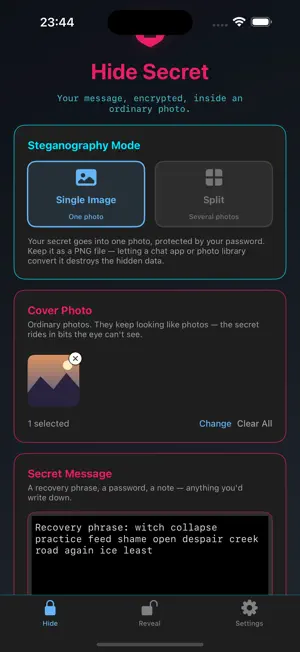
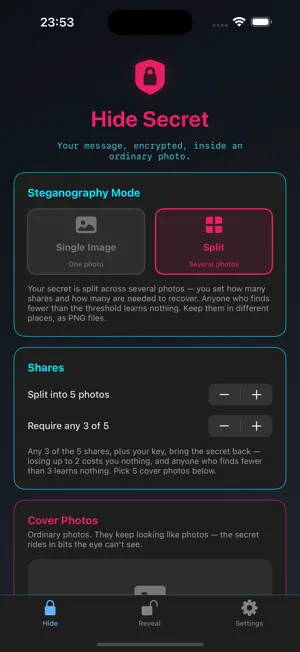
StegoSafe hides an encrypted secret inside an ordinary photo. The photo still looks like a photo — the secret rides in bits the eye can't see — so what you protect doesn't announce itself. Everything happens on your device. No account, no sign-in, no servers. Your secret and your password never leave your iPhone, iPad, or Mac. HOW IT WORKS • Type a secret — a recovery phrase, a password, a private note. • Pick a cover photo and choose how to protect it. • StegoSafe encrypts the secret and weaves it into the image. • Save the PNG, share it, or keep it. To read it back, open it in StegoSafe with your credentials. THREE WAYS TO PROTECT • Password — open it on any device, any time, as long as you know the password. • This device only — a key kept on this device behind Face ID / Touch ID. Nothing to phish out of you; nothing to recover if the device is lost. • Face ID / Touch ID + PIN — two factors. Opening needs both the device and a PIN you set. SPLIT ACROSS PHOTOS Break a secret into several share-images and set how many are needed to rebuild it — for example, any 3 of 5. No single photo reveals anything on its own. BUILT FOR PRIVACY • AES-256-GCM encryption, keys derived with PBKDF2-SHA256 (600,000 iterations). • Keep it as a PNG — re-compressing it (as chat apps do) is what destroys the hidden data, so StegoSafe helps you keep the real file. • Nothing is read from an image until you unlock it. A damaged or re-compressed image is reported as damaged — you're never handed a secret that's subtly wrong. IMPORTANT Only you can open your content. If you lose your password — or, for device-bound images, the device — it cannot be recovered, by you or by us. Write your password down somewhere safe. StegoSafe is for lawful, personal use.
What’s new
Version 2.1.0 · Updated August 31, 2026
StegoSafe 2.1.0 is a major update. • New protection modes: keep it recoverable with a password, lock it to this device behind Face ID / Touch ID, or combine the device with a PIN for two-factor protection. • Split a secret across several photos and choose how many are needed to rebuild it. • Rebuilt image format: saved photos carry no readable marker, and nothing is read from an image until you unlock it — you pick the method you used, then open. • Share a finished image straight to another app, or save it to Files or Photos. • Clearer wording throughout, with a redesigned Hide and Reveal flow. • Now on Mac, too — an image made on iPhone opens on your Mac, and vice versa. • Opens images made with older versions of StegoSafe. If you lose your password — or, for device-bound images, the device — it can't be recovered. Keep your password safe.
App privacy
The developer, NEXATECH AI EFFICIENCY SERVICES LTD., reported these privacy practices to Apple.
Data Not Collected
The developer does not collect any data from this app.
Alternatives to StegoSafe
Looking for apps like StegoSafe? Here are 6 similar apps on the App Store. The highest rated is Whois - Lookup & Availability (5.0/5), and 4 of the 6 are free to download.
-
 StegInsight
-
 BTWN – Hide Messages in Photos
-
 Whois - Lookup & Availability
5.0
Whois - Lookup & Availability
5.0
-
 Underlayer
-
 Advanced Pixels
-
 SecretPixel: Encrypted Photos
| App | Rating | Price | Last updated | Compare |
|---|---|---|---|---|
| StegoSafe | – | 49.99 USD | August 31, 2026 | |
| StegInsight | – | 2.99 USD | Oct 19, 2026 | Compare |
| BTWN – Hide Messages in Photos | – | Free | Feb 21, 2026 | Compare |
| Whois - Lookup & Availability | 5.0 / 5 (1) | 1.99 USD | Jul 7, 2026 | Compare |
| Underlayer | – | Free | Oct 19, 2026 | Compare |
| Advanced Pixels | – | Free | Dec 11, 2024 | Compare |
| SecretPixel: Encrypted Photos | – | Free | Jan 15, 2026 | Compare |
Compare StegoSafe with the top alternatives: ratings, updates, ASO score and keyword gaps →